No trade
-
Why, if I have a No Trade Block in place and when the condition is met, does it open 2 operations immediately?
Does this happen to anyone else?
I've looked everywhere and I don't know the reason.
This is a project I got from YouTube.
As always grateful for the community's help.link text
 image url)
 -
Which block is placing the extra trade? I would put a name in the comment section, so I can see which block has placed the trade.
-
@jstap gracias, estoy buscando en los comentarios para saber como hacer eso.
-
Only speak English
-
Sorry, the thing is that I used Google's WEB translator and when I responded I left that activated.
-
@Edtoloza Puedes evitar eso definiendo los grupos del trade. En el bloque "No trade", pon el grupo. Yo siempre pongo en variables, por ejemplo, BnS (buys and shorts) = 1. Este número se suma en el magic y le ayuda al EA a clasificar mejor los trades. Si el problema persiste, puedes agregar el bloque de trades count y le pones lower than 1 por arriba de los bloques de compra y venta
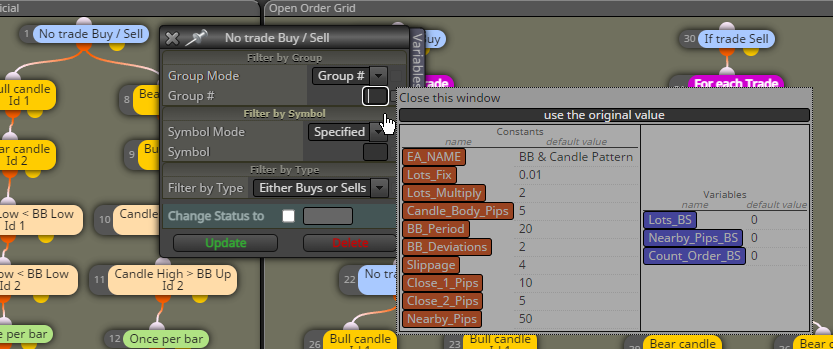
-
I think this is where the issue goes, but if so, then what purpose would the No Trade Block be? If he is giving me 2 operations instantly.
Thank you very much I will see about the Group -
No trade block will limit to 1 trade, but if at some point you want to add another, then you will probably find groups are needed.
-
@jstap What is happening (it may be a translator's problem) and I will use a simple example, is like you make an EA in which you say No Trade Buy using a cross of averages, and when the cross occurs what happens is that it opens 2 operations at the same time.
And it's the first time something like this happens to me, so I don't know what could be happening, and if so, then what is the use of the no trade block, if in the end you will have to start using other blocks and variables. -
Encontré 2 casos en el Foro, este es uno de ellos:
https://fxdreema.com/forum/topic/17781/opens-2-positions-simultaneously?_=1695852313843 -
As I said above, you need to work out which blocks are causing the extra trade, maybe tree 1 is placing the first, and tree 2 is placing the second?
-
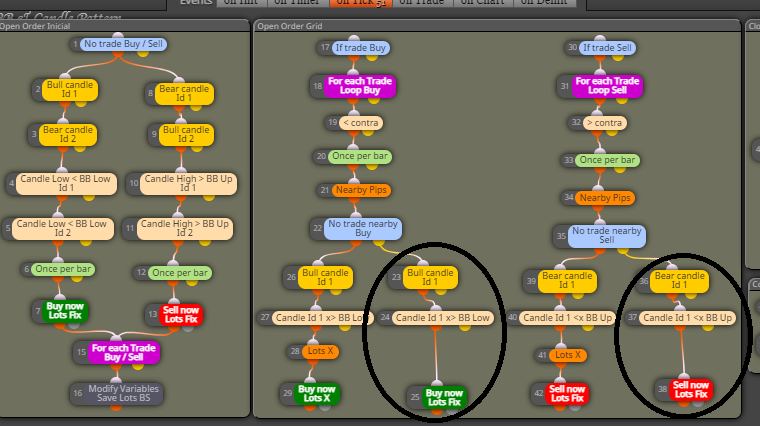
Thanks for the guidance, here was the problem.
So I'll have to change this setting.
Without the help I wouldn't have been able to see it.
Thank you very much, because every comment was helpful
