fxDreema

    • Register
    • Login
    • Search
    • Back to the main page
    • Categories
    • Recent
    • Tags
    • Popular
    • Search

    How do we get FXDreema to recognize buffers

    Questions & Answers
    3
    5
    307
    Loading More Posts
    • Oldest to Newest
    • Newest to Oldest
    • Most Votes
    Reply
    • Reply as topic
    Log in to reply
    This topic has been deleted. Only users with topic management privileges can see it.
    • C
      cmuphyfx last edited by

      I'm trying to use a custom indicator that has a few buffers but when I pull the MQ5 into FXDreema it only sees a single buffer. I look in the source code of the indicator and can see the different buffers that are used - my question is how do I alter the source code of the indicator to make the buffer visible? The source code is pretty simple - and I've been through a good amount of the MQL5 documentation and it's just not clear to me how to make this buffer available. Hoping someone has a bit of experience here.

      @roar

      https://www.mql5.com/en/code/22677

      roar 1 Reply Last reply Reply Quote 0
      • roar
        roar @cmuphyfx last edited by roar

        @cmuphyfx I dont know why fxdreema recognizes some buffers and some not, but you can always add more buffers manually from the "New" button. Color and name are irrelevant, only the buffer number (position in list) matters.
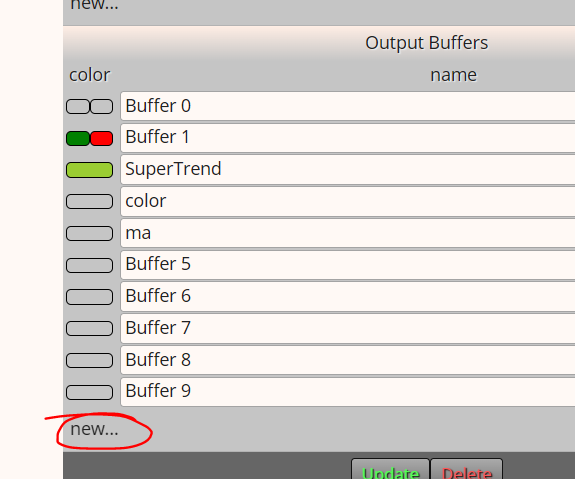
        5b1b4543-6eba-4e42-a211-50725ef61302-image.png

        Need small help? Tag me in your post
        Need big help? https://www.fiverr.com/big_algo/automate-your-winning-strategy-in-mql4-or-mql5

        1 Reply Last reply Reply Quote 0
        • C
          cmuphyfx last edited by

          And this will automatically connect to the buffers that the indicator has declared. If so, that's VERY helpful!

          Thank you

          1 Reply Last reply Reply Quote 1
          • jstap
            jstap last edited by

            If you have value in data window, you have usable buffers, if not only object on chart, but even they cannot be always used.

            Learn fxDreema Without the Wait!

            My comprehensive book, available on Amazon, is packed with examples and invaluable insights to help you fast-track your learning journey.

            The paperback and hardback editions include MT4 & MT5 QR codes for easy access to all prebuilt projects and robots, including my latest gold trading robot!

            Don’t miss out

            Click here➡️ https://mybook.to/fxDreema to get your copy today!

            Enjoy! 😊

            1 Reply Last reply Reply Quote 0
            • C
              cmuphyfx last edited by

              I added the additional buffers as shown above, and then in an ugly comment printed them out and it all appears to be working!

              1 Reply Last reply Reply Quote 1
              • 1 / 1
              • First post
                Last post

              Online Users

              J
              H
              E

              14
              Online

              146.7k
              Users

              22.4k
              Topics

              122.6k
              Posts

              Powered by NodeBB Forums | Contributors
