fxDreema

    • Register
    • Login
    • Search
    • Back to the main page
    • Categories
    • Recent
    • Tags
    • Popular
    • Search

    How to draw arrows for indicators not on chart?

    Questions & Answers
    3
    6
    434
    Loading More Posts
    • Oldest to Newest
    • Newest to Oldest
    • Most Votes
    Reply
    • Reply as topic
    Log in to reply
    This topic has been deleted. Only users with topic management privileges can see it.
    • F
      felix2828 last edited by felix2828

      Hi guys,

      currently testing EA with visual testing.

      What i've found for indicators on chart like e.g. Bollinger bands it works by just connecting to "draw arrow" block,

      but how can add visuals for indicators below chart like ADX for example?
      When +DI crosses -DI from below would like to get an arrow printed.

      Tested it this way but dont get correct arrow printed.

      https://fxdreema.com/shared/JEtXQelPb

      Also is it possible to get visual printing for both at current candle and the indicator itself, like dot printet at the lines for example?

      Thank you 🙂

      adx cross.png

      1 Reply Last reply Reply Quote 0
      • jstap
        jstap last edited by

        This looks like it should work, but being under a no position means it will only work when no trade is running

        Learn fxDreema Without the Wait!

        My comprehensive book, available on Amazon, is packed with examples and invaluable insights to help you fast-track your learning journey.

        The paperback and hardback editions include MT4 & MT5 QR codes for easy access to all prebuilt projects and robots, including my latest gold trading robot!

        Don’t miss out

        Click here➡️ https://mybook.to/fxDreema to get your copy today!

        Enjoy! 😊

        F 1 Reply Last reply Reply Quote 0
        • F
          felix2828 @jstap last edited by

          @jstap

          Hi,

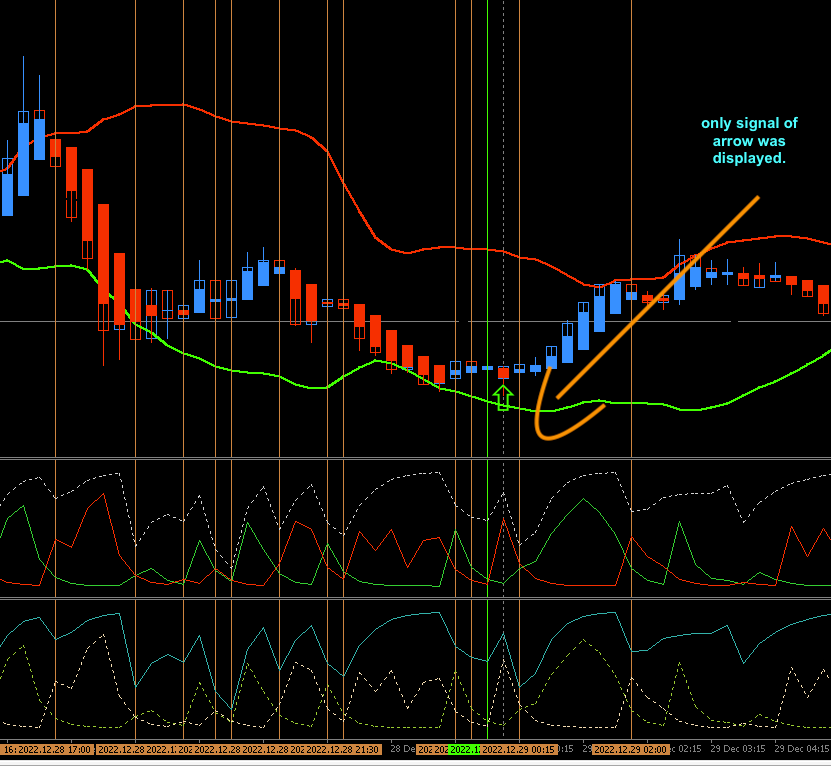
          tried but unfortunately either only vertical lines are shown but not arrows, and if using only arrows, and also got the case that if arrows is shown, it is plotted on the candle not under for buy/ above for sell, like absolute value.

          Also tried by following code to just look for the crossing for ADX Di and falling ADX as entry confirmation, but got the same results displayed.

          https://fxdreema.com/shared/rh8eUJsxb

          only lines.png only 1 arrow.png

          1 Reply Last reply Reply Quote 0
          • jstap
            jstap last edited by

            To draw objects do it in a separate tree.

            Learn fxDreema Without the Wait!

            My comprehensive book, available on Amazon, is packed with examples and invaluable insights to help you fast-track your learning journey.

            The paperback and hardback editions include MT4 & MT5 QR codes for easy access to all prebuilt projects and robots, including my latest gold trading robot!

            Don’t miss out

            Click here➡️ https://mybook.to/fxDreema to get your copy today!

            Enjoy! 😊

            F 1 Reply Last reply Reply Quote 0
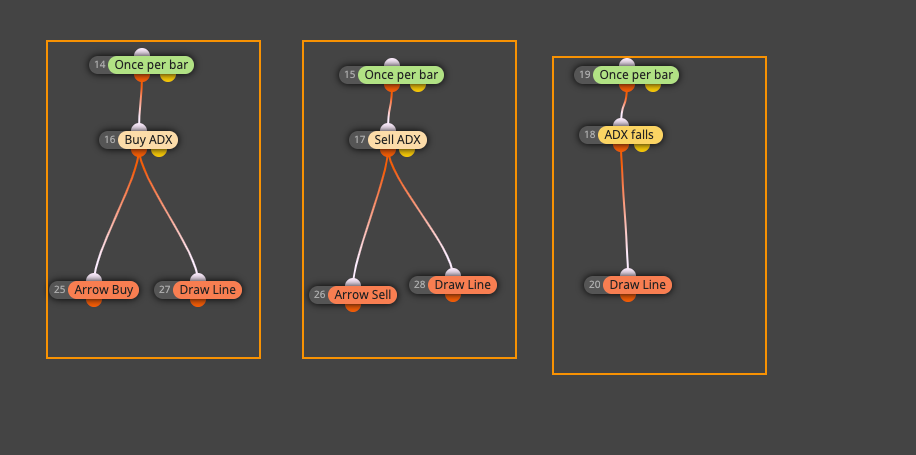
            • F
              felix2828 @jstap last edited by felix2828

              @jstap

              Hi,

              as i get it these are seperate trees or am i wrong?
              You mean like 1 vertical row per indication right?

              rows.png

              https://fxdreema.com/shared/rh8eUJsxb
              1 Reply Last reply Reply Quote 0
              • J
                Joseph mohlabafase last edited by

                how to get password for open my certificate

                1 Reply Last reply Reply Quote 0
                • 1 / 1
                • First post
                  Last post

                Online Users

                F
                R
                S
                D
                V
                O

                12
                Online

                146.7k
                Users

                22.4k
                Topics

                122.6k
                Posts

                Powered by NodeBB Forums | Contributors