Compilation errors when using indicators with Multi Time Frame.
-
Hello, lately I have been encountering compilation errors when I use indicators containing Multi Time Frame.
If any buffer is fed with MTF, this error is received:
'c' is not a class, struct or union. '........' - some operator expectedAnd this is getting really annoying.
-
Is that happening on MT5 projects, maybe? The admin is touching the code there very often.
-
Thank you for your interest @l'andorrà
When I use special Price Type, Time Frame and/or Moving Average within the indicator, we cannot use the standard ENUM_APPLIED_PRICE, ENUM_TIMEFRAMES or ENUM_MA_METHOD commands.
When I add it as custom indicator in Fxdreema, this problem occurs with variable definitions and it does not allow to create .ex5.
I can use it as Custom MQL, but in this case I'm stuck on the number of blocks.

It would be great if Mr. @fxDreema intervened in this situation. tsk.
-
@PhiLykia does the custom indicator have variable names such as "c" or "v"? Those may create the bug. You could try renaming the variables of your indicator.
I do agree these kinds of bugs should be fixed rather than finding such workarounds.
-
Hello, It is positive that updates are made to the application and that it continues to be developed. I am sure that the stable operation of the application is very important for all of us. It is undesirable for an EA that is currently working to not be working after development. We are ready to provide testing support in this regard, if necessary.
Among the indicators, Moving Avg, Price Type, Time Frames, etc. are included in the standard library. It is important that we also use the special parts we coded.
This is a problem for me if I am going to update the code that I have compiled in FxDreema on the IDE. I hope the developers resolve this quickly or suggest alternative solutions.
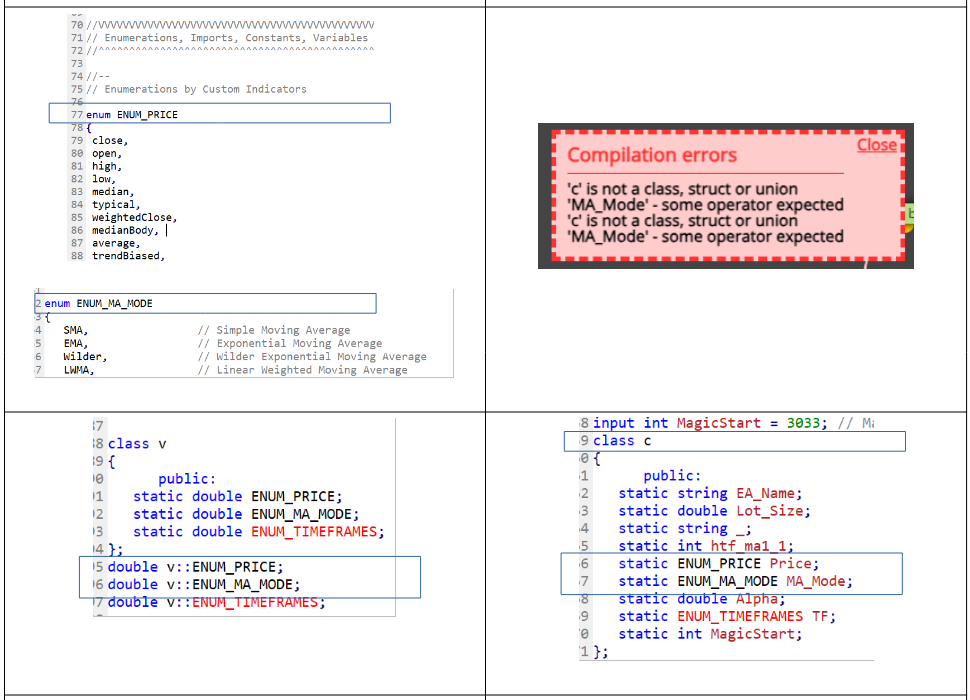
-
@fxDreema Problems continue, especially in compiling multi-time frame indicators. Can you provide an explanation or solution suggestion on this issue?
Example of the problem: In codes containing MTF, it is necessary to define this as a variable to call the data of the time frame. But since we cannot use this variable, we cannot work with these indicators.
#define _mtfCall iCustom(_Symbol,timeFrame,getIndicatorName(),0,inpx,inpy)
-
Some indicators will show errors, but most work depending on how they are added.
-
Hi @jstap,
Thanks for your interest. The problem is not being able to update or design a new one using the indicators we were actively working with before. In other words, we are no longer able to use the service we received.Although we provide support to identify the problem, it is sad that there is a lack of interest.
We need to work with time frame variables, especially in MTF indicators, you know. In this case, instead of using the ENUM_TIMEFRAMES structure, we need to give the variable a different name and switch to its standard structure (with the code block below) at the last stage.
ENUM_TIMEFRAMES timeFrameGet(int period)
{
int _shift=(period<0?MathAbs(period):0);
if(_shift>0 || period==PERIOD_CURRENT) period=_Period;
int i; for(i=0;i<ArraySize(X);i++) if(period==Y[i]) break;return(X[(int)MathMin(i+_shift,ArraySize(Y)-1)]);}
Again in the same example, at the beginning of the code;
_tf = inpTimeFrame;
ENUM_TIMEFRAMES timeframe;draw_begin = inpPeriod; // initial PLOT_DRAW_BEGIN value//---
timeframe=_Period;
if(_tf<=timeframe)_tf=timeframe;// if the TF is less than or is equal to the current one, set it to PERIOD_CURRENT
pf=(int)MathFloor(_tf/timeframe);// calculate coefficient forI can't do this part with "input ENUM_TIMEFRAMES = PERIOD_MX".
I'm not sure if I explained it.
You may ask, if you can do these things and compile them in the code editor, why use fxDreema?
For me, there is only one reason: time. I can do it much faster with fxDreema.
-
When it comes to indicators all you can do is insert the way it is in the inputs. show a picture of your inputs and one of how it is inserted on FX.


