Ascending lot sizes in grid pending orders
-
I need help on how to set ascending lot sizes in grid pending orders. say if I start with 0.01 with the first order and need to increase by 0.01 for every next order. thank you.
-
@mohammed66 You can do that here:

-
Thank you for the answer, but with this % we can't put 1,2,3,4,5, if 200% will get 1,2,4,8,16. I'm looking for how to add certain amount of increment (order lot size + X for the next one). is it possible ?
-
@mohammed66 Yes, but then you will ned a specific structure of variables storing the last lot size. Will the new lot sizes be random numbers or linear scalates?
-
Its simply to add a fixed amount (+ X lot) for every next gird line. say grid initial lot size 0.1 and we need the (X lot) = 0.2, then we'll have:
1st line = 0.1 ,
2nd line = 1st line + 0.2,
3rd line = (2nd line) +0.2,
4th line (3rd line ) + 0.2,, etc.
I think random (manually put the size) will serve better, but its ok with the easier in programming.
Appreciate your support. -
@mohammed66 This is clearly a case for a loop. Sadly, loops are not my field of expertise. Can mr roar take a look at this case, please?
-
Thank you for your time. How to contact mr roar please?
-
@mohammed66 hi.
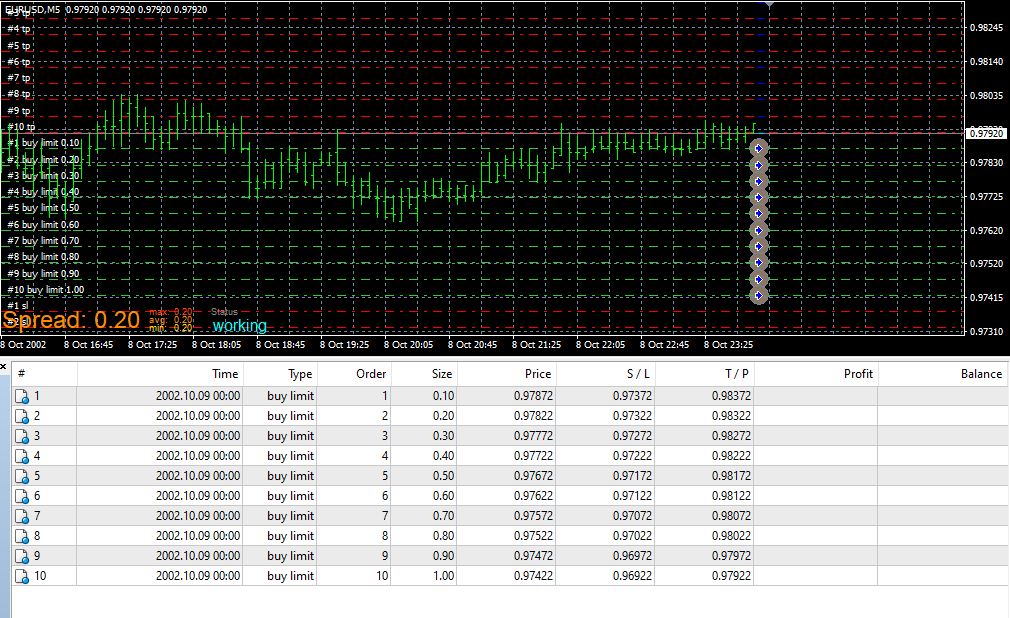
Since the grid block doesnt seem to support this, you have to create your own grid loop, like this:
https://fxdreema.com/shared/4iPmiGbLdI'm afraid this will give you more questions than answers lol
Need small help? Tag me in your post
Need big help? https://www.fiverr.com/big_algo/automate-your-winning-strategy-in-mql4-or-mql5 -
@roar Can you please explain this expression?
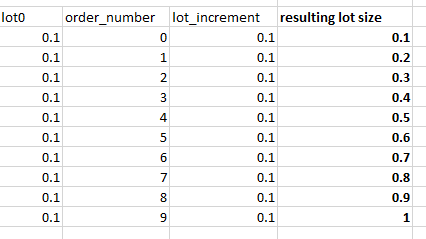
lot0 + order_number*lot_increment
Is the multiplication solved before or after the addition?
(English) I will try to help everyone in these fxDreema forums. But if you want to learn how to use the platform in depth or more quickly, I can help you with my introductory fxDreema course in English at https://www.theandorraninvestor.eu.
(Català) Miraré d’ajudar tothom en aquests fòrums d’fxDreema. Tanmateix, si vols aprendre a fer servir la plataforma amb més profunditat o més de pressa, t’hi puc ajudar amb el meu curs d’introducció a fxDeema en català a https://www.theandorraninvestor.eu/ca.
(Español) Intentaré ayudar a todo el mundo en estos foros de fxDreema. Sin embargo, si quieres aprender a usar la plataforma en profundidad o más deprisa, te puedo ayudar con mi curso de introducción a fxDreema en español en https://www.theandorraninvestor.eu/es.
-
@l-andorrà its solved EDIT:BEFORE. Here's a number example
Need small help? Tag me in your post
Need big help? https://www.fiverr.com/big_algo/automate-your-winning-strategy-in-mql4-or-mql5 -
@roar Interesting. How can I know the order when I use more than two elements (subtraction, division, addition, etc.)?
(English) I will try to help everyone in these fxDreema forums. But if you want to learn how to use the platform in depth or more quickly, I can help you with my introductory fxDreema course in English at https://www.theandorraninvestor.eu.
(Català) Miraré d’ajudar tothom en aquests fòrums d’fxDreema. Tanmateix, si vols aprendre a fer servir la plataforma amb més profunditat o més de pressa, t’hi puc ajudar amb el meu curs d’introducció a fxDeema en català a https://www.theandorraninvestor.eu/ca.
(Español) Intentaré ayudar a todo el mundo en estos foros de fxDreema. Sin embargo, si quieres aprender a usar la plataforma en profundidad o más deprisa, te puedo ayudar con mi curso de introducción a fxDreema en español en https://www.theandorraninvestor.eu/es.
-
@l-andorrà the universal practices in math - first comes multiplication and division, then comes subtraction and addition. When there are both multiplications and divisions, read from left to right.
Edit: Oh sorry, meant to say the multiplication is solved before addition, of course.
Need small help? Tag me in your post
Need big help? https://www.fiverr.com/big_algo/automate-your-winning-strategy-in-mql4-or-mql5 -
Thank you roar for your help. where can I put my loop variables?
Initial lot size
Increment size
No. of pending orders
Offset from price
Distance between orders.
Appreciate further explanation. thank you. -
@mohammed66 the constants/variables menu is on top of the block list.
Alternatively, just download the .mq4 from the shared link, and import it as a new project -> you get all the constants and variables automatically
-
@roar Ok. Thanks.
-
@roar I did that but receiving errors when I compile the file for checking !
is it possible to have it as a regular block in which variable windows are set as the gird block? https://fxdreema.com/shared/SVqtuJC6
the grid block with 3 pending as Buy stop and the required loop to generate 13 pending as Buy limit, with distance 20 pips space between lines, no TP/SL.
Variables are adjustable through Expert properties window in back testing tool. -
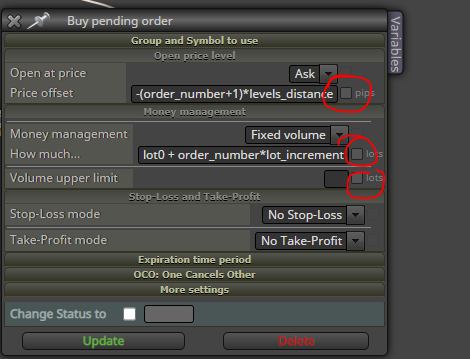
@mohammed66 just dont put tick marks in these boxes, then the EA will compile.
And remove the grid block, it will confuse the system.
-
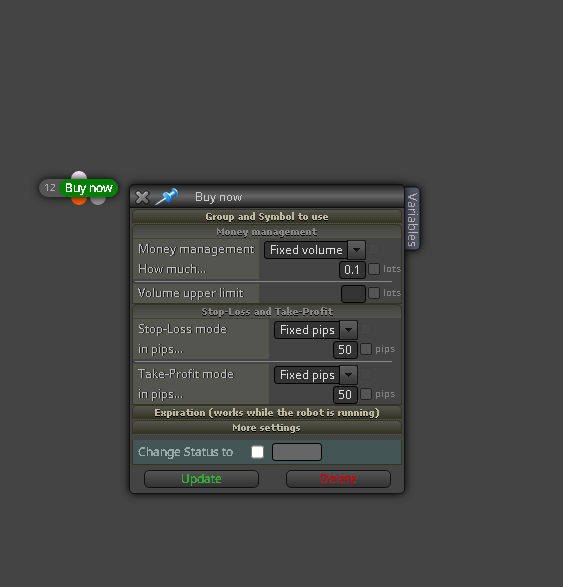
hi; as you show here how to adjust the lot size.
-
@mohammed66 Did you solve this question? Please teach me... if solved, thxxx


