fxDreema

    • Register
    • Login
    • Search
    • Back to the main page
    • Categories
    • Recent
    • Tags
    • Popular
    • Search

    Connect Button to the block area

    Questions & Answers
    2
    3
    332
    Loading More Posts
    • Oldest to Newest
    • Newest to Oldest
    • Most Votes
    Reply
    • Reply as topic
    Log in to reply
    This topic has been deleted. Only users with topic management privileges can see it.
    • Z
      zedeai2 last edited by

      Hello,

      I want to activate the trading once the button is pressed. An the logic are inside the block area (Area #13). I want to connect the button to the block area.. (not the block "no trade / order")

      So what should I do or type inside of the button?

      Thank you
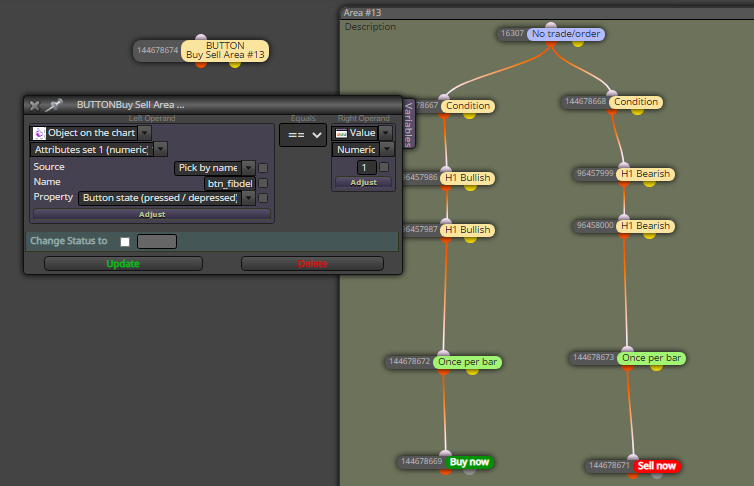
      0_1609823829088_be14cf87-cbd8-47d2-9ff0-d8ed7ce36d5e-image.png

      XYON126 1 Reply Last reply Reply Quote 0
      • XYON126
        XYON126 @zedeai2 last edited by

        @zedeai2 Here is an example of buttons, I hope it helps you or comments your doubts after trying it. As it has variables when you open it, you must save it as MQ4 and reopen it but from your PC where you have saved the MQ4.

        https://fxdreema.com/shared/HQiLTI6Jc

        Z 1 Reply Last reply Reply Quote 0
        • Z
          zedeai2 @XYON126 last edited by

          @xyon126 Hello,

          Interesting... Thank you! I will try it soon and will give any feedback.

          Regards

          1 Reply Last reply Reply Quote 0
          • 1 / 1
          • First post
            Last post

          Online Users

          N

          11
          Online

          146.7k
          Users

          22.4k
          Topics

          122.6k
          Posts

          Powered by NodeBB Forums | Contributors