how to move the orders
-
Hi, can anyone help me set my robot to move orders to to one when candle closes.
-
@siyanda Not sure what exactly your asking but, the pink for each order block with a pink slide order block underneath, will move your order to wherever you like.
-
@siyanda Do you mean pending orders? Otherwise you cannot do that.
-
@jstap Hi, thanx for your help. what I actually want is: the robot to place pending orders in every candle and if the other is not triggered it(the pending order) must be moved to the exact level of the new order when the new candle comes. for example, lets say three green candles (Bullish candles) candles have come and in each of the candles the candles a sell pending orders were placed. for candle 1 it was not triggered because it went further away from the pending order, so when the second candle comes, another sell pending other is placed. so I want the first order to move to the level of the new sell pending order. when the third bullish candle comes, I want the 2 sell pending orders to move to the third sell pending order. Can you help me figure that out?
-
@siyanda If you make a start, put it in a shared link then giving advice is a lot easier, I will say though, off the top of my head, you could slide the order and place a new on top, you could delete the pending place a new in double the size, quite possibly slide then add to size. What suites your particular plan is what will decide this, if at the same time as replacing a condition is true to delete then you probably want to delete>condition>replace/or not.
-
@jstap okay thank you am still processing your advice.
-
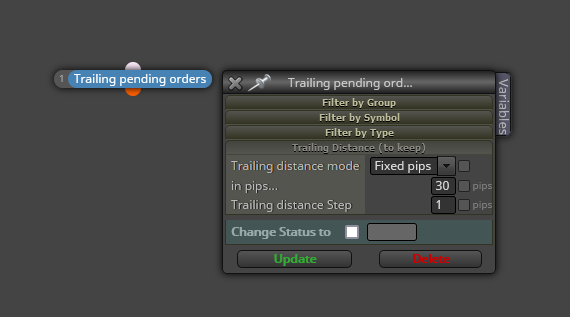
@siyanda You can also move pending orders with this block: