fxDreema

    • Register
    • Login
    • Search
    • Back to the main page
    • Categories
    • Recent
    • Tags
    • Popular
    • Search

    custom indicator appear

    Questions & Answers
    4
    19
    2226
    Loading More Posts
    • Oldest to Newest
    • Newest to Oldest
    • Most Votes
    Reply
    • Reply as topic
    Log in to reply
    This topic has been deleted. Only users with topic management privileges can see it.
    • P
      PipTheRipper last edited by PipTheRipper

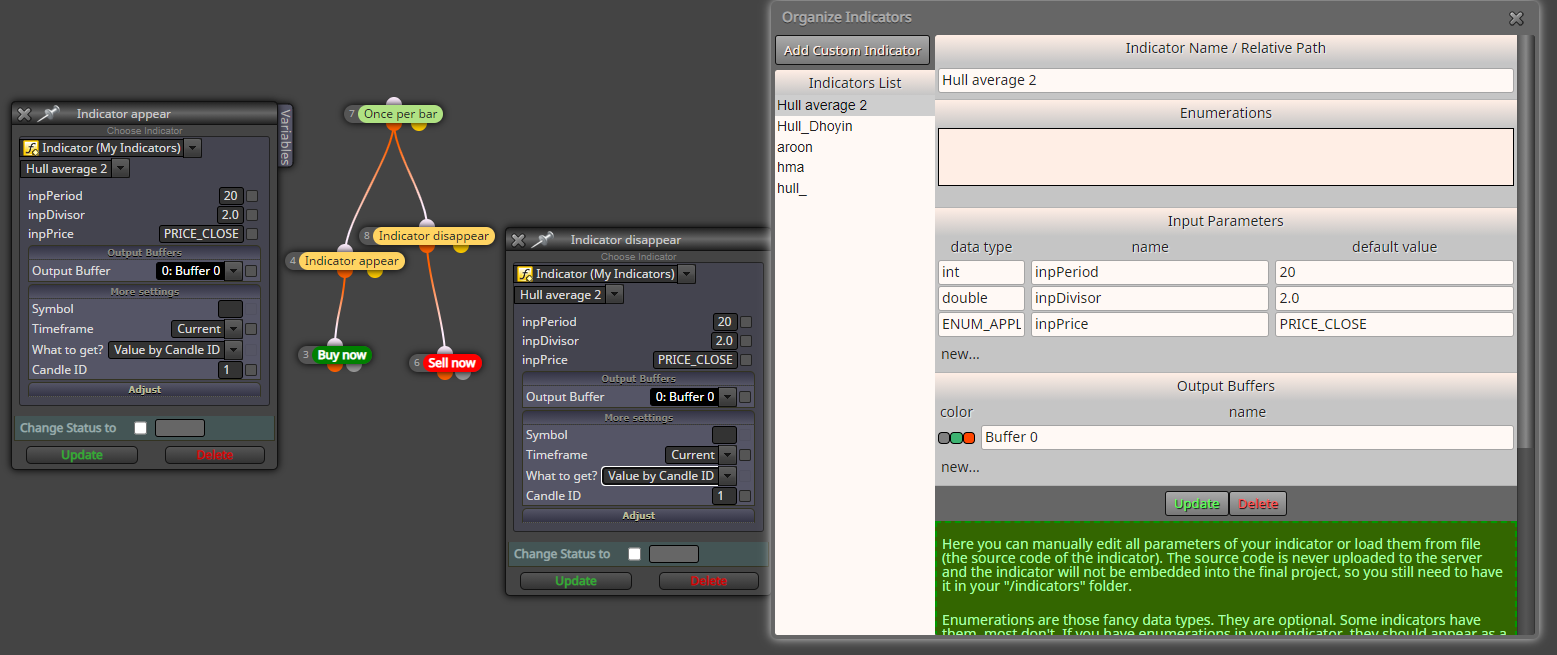
      Hi, i am trying for the first time to use a custom indicator - the Hull MA. I want to buy when color changes to green and sell when it changes to red. I use "indicator appear/disappear" but I cant get it to open any positions. I have tried with 4 different hull mql5 files, non of them work, so I believe I msut be doing something wrong in fxdreema. Does anyone know what is wrong here: https://fxdreema.com/shared/taKCneqyc
      0_1631345029980_hull.png

      OntradingX 1 Reply Last reply Reply Quote 0
      • P
        PipTheRipper last edited by

        And I should say that I do have the mql5 and ex5 files of the indicators in the indicators folder. So that is not what is wrong..

        jstap 1 Reply Last reply Reply Quote 0
        • jstap
          jstap @PipTheRipper last edited by

          @piptheripper Looking at your shared link the indicator has 2 buffers, I would place in a comment block, This will give you a visual number to watch, number should change when indicator changes, if not you will have to find another, the other thing you can do is open the data window to see what changes the indicator makes. If you want you can put the indicator here and I'll have a look.

          Learn fxDreema Without the Wait!

          My comprehensive book, available on Amazon, is packed with examples and invaluable insights to help you fast-track your learning journey.

          The paperback and hardback editions include MT4 & MT5 QR codes for easy access to all prebuilt projects and robots, including my latest gold trading robot!

          Don’t miss out

          Click here➡️ https://mybook.to/fxDreema to get your copy today!

          Enjoy! 😊

          1 Reply Last reply Reply Quote 0
          • P
            PipTheRipper last edited by

            Hi jstap, thanks for all your support. Here are the two indicators I have used. The third one seemed to have an error in the code.

            1_1631361987662_Hull_Dh.mq5

            0_1631361987662_Hull average 2.mq5

            jstap 1 Reply Last reply Reply Quote 0
            • jstap
              jstap @PipTheRipper last edited by

              @piptheripper These both have the same result in buffer, they have no way of getting the colour, your only chance is to find one that has a buffer for each colour.

              Learn fxDreema Without the Wait!

              My comprehensive book, available on Amazon, is packed with examples and invaluable insights to help you fast-track your learning journey.

              The paperback and hardback editions include MT4 & MT5 QR codes for easy access to all prebuilt projects and robots, including my latest gold trading robot!

              Don’t miss out

              Click here➡️ https://mybook.to/fxDreema to get your copy today!

              Enjoy! 😊

              P M 2 Replies Last reply Reply Quote 0
              • P
                PipTheRipper @jstap last edited by

                @jstap I see, thanks for checking and educating me!!!

                1 Reply Last reply Reply Quote 0
                • M
                  makabasaking @jstap last edited by

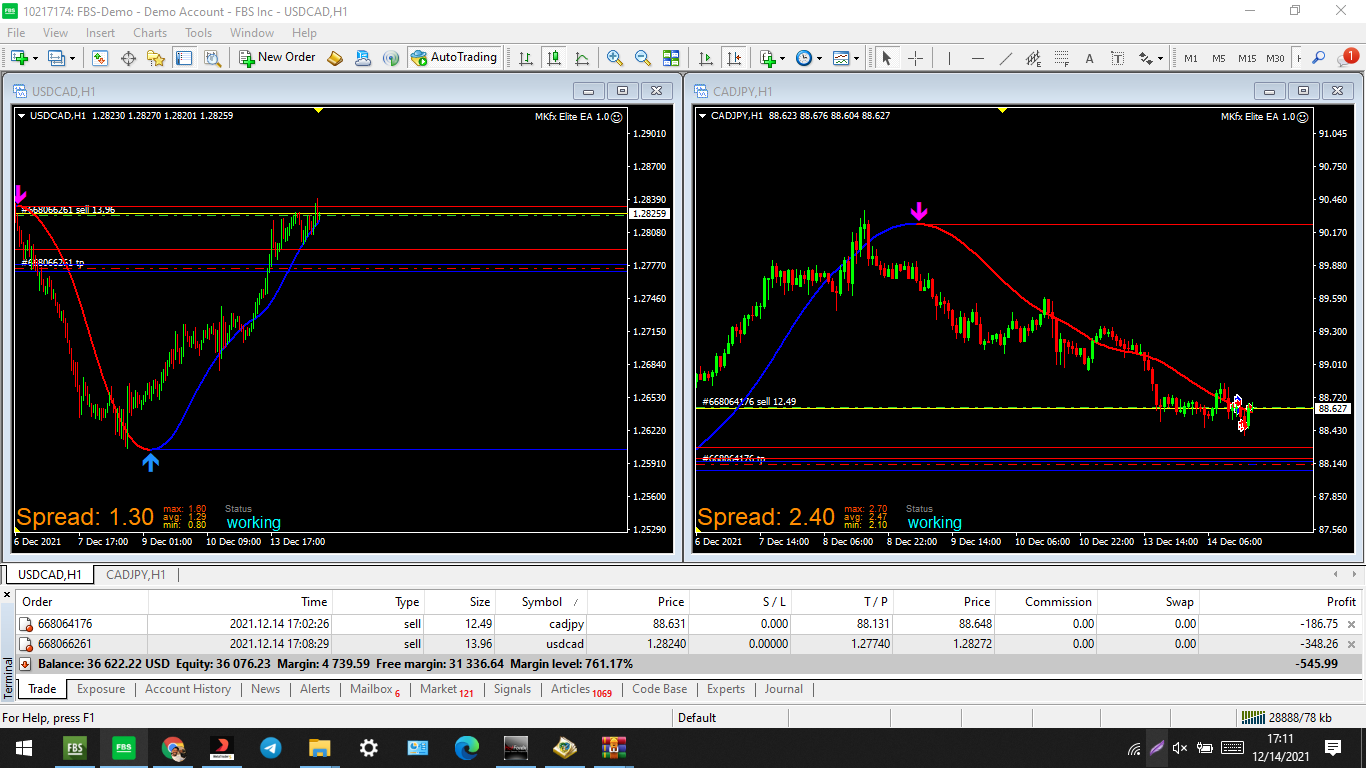
                  hi @jstap help me figure out where i could be going wrong.i replied on this thread because i seem to be having the same difficulty too and maybe with the indicator i have you could help us crack the problem.i have tried to build a hull MA EA but it either places buys or sell even when its suppose to go follow trend.kindly look at this and advise mate https://fxdreema.com/shared/LX0ZJHaCc
                  0_1639494771010_hull-moving-average-arrows.mq4
                  0_1639494820682_Screenshot_180.png

                  the EA is set at 3% of equity and the HMA Period is set at 110

                  would highly appreciate your effort.

                  thanks

                  MakabasaKing

                  jstap 1 Reply Last reply Reply Quote 0
                  • OntradingX
                    OntradingX @PipTheRipper last edited by

                    @piptheripper
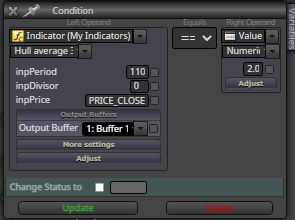
                    Try 2.0 to buy and 1.0 to sell.
                    0_1639496678108_hullbuy.png

                    Sou do Brasil e utilizo o sistema Fxdreema a alguns anos, sempre que tenho tempo disponível eu tento ajudar alguém por aqui, mas se quiser uma ajuda mais próxima me contacte:
                    Site: https://www.ontradingx.com.br
                    Youtube: https://www.youtube.com/@ontradingx
                    Boa sorte a todos nós!

                    English - I'm from Brazil and I've been using the Fxdreema system for a few years, whenever I have time available I try to help someone here, but if you want more help, contact me:
                    Website: https://www.ontradingx.com.br
                    Youtube: https://www.youtube.com/@ontradingx
                    Good luck to all of us!

                    1 Reply Last reply Reply Quote 0
                    • jstap
                      jstap @makabasaking last edited by

                      @makabasaking If you use indicator appears block with the correct buffers then it will buy/sell on the arrows.

                      https://fxdreema.com/shared/cRhcpGJ3b

                      Learn fxDreema Without the Wait!

                      My comprehensive book, available on Amazon, is packed with examples and invaluable insights to help you fast-track your learning journey.

                      The paperback and hardback editions include MT4 & MT5 QR codes for easy access to all prebuilt projects and robots, including my latest gold trading robot!

                      Don’t miss out

                      Click here➡️ https://mybook.to/fxDreema to get your copy today!

                      Enjoy! 😊

                      M 1 Reply Last reply Reply Quote 0
                      • M
                        makabasaking @jstap last edited by

                        @jstap thanks for your swift response mate.i tried following your instruction and it wouldnt follow the buffers. https://fxdreema.com/shared/jdguA7UBd0_1639498588289_Screenshot_181.png

                        i even changed the candle ID but am not getting any response

                        MakabasaKing

                        jstap 1 Reply Last reply Reply Quote 0
                        • jstap
                          jstap @makabasaking last edited by

                          @makabasaking That is the same as the link I sent, download, use that and all should work.

                          Learn fxDreema Without the Wait!

                          My comprehensive book, available on Amazon, is packed with examples and invaluable insights to help you fast-track your learning journey.

                          The paperback and hardback editions include MT4 & MT5 QR codes for easy access to all prebuilt projects and robots, including my latest gold trading robot!

                          Don’t miss out

                          Click here➡️ https://mybook.to/fxDreema to get your copy today!

                          Enjoy! 😊

                          M 1 Reply Last reply Reply Quote 0
                          • M
                            makabasaking @jstap last edited by

                            @jstap thank my brother.am still getting same error if i may call it an error.i simply downloaded the file and copied to my folder and it wont run when plugged.i even ran it through meta editor to compile and find errors is 0 errors,0 warnings.i dont know why it wont run on my PC.its frustrating because i spent the entire night fighting with it but it wont give me what i want
                            tell me if its playing on your side when your plug it on

                            MakabasaKing

                            jstap 1 Reply Last reply Reply Quote 0
                            • jstap
                              jstap @makabasaking last edited by

                              @makabasaking For me I doen load and run it and all works as expected.

                              Learn fxDreema Without the Wait!

                              My comprehensive book, available on Amazon, is packed with examples and invaluable insights to help you fast-track your learning journey.

                              The paperback and hardback editions include MT4 & MT5 QR codes for easy access to all prebuilt projects and robots, including my latest gold trading robot!

                              Don’t miss out

                              Click here➡️ https://mybook.to/fxDreema to get your copy today!

                              Enjoy! 😊

                              M 1 Reply Last reply Reply Quote 0
                              • M
                                makabasaking @jstap last edited by

                                @jstap its so funny because i just downloaded your link and added to my mt4 data folder and dstill it wont play.very frustrating.share the EX4 fie let me try run it here

                                MakabasaKing

                                jstap 1 Reply Last reply Reply Quote 0
                                • jstap
                                  jstap @makabasaking last edited by

                                  @makabasaking I know of no way of correcting this, may be worth reinstalling MT4 or installing another copy.

                                  Learn fxDreema Without the Wait!

                                  My comprehensive book, available on Amazon, is packed with examples and invaluable insights to help you fast-track your learning journey.

                                  The paperback and hardback editions include MT4 & MT5 QR codes for easy access to all prebuilt projects and robots, including my latest gold trading robot!

                                  Don’t miss out

                                  Click here➡️ https://mybook.to/fxDreema to get your copy today!

                                  Enjoy! 😊

                                  M 1 Reply Last reply Reply Quote 0
                                  • M
                                    makabasaking @jstap last edited by

                                    @jstap good day my friend.would you mind sending me an ex4 file of that?i have tried everything i could and i cant seem to get the EA to work.i ran it through a strategy test and it wont show results

                                    thanks

                                    MakabasaKing

                                    jstap 1 Reply Last reply Reply Quote 0
                                    • jstap
                                      jstap @makabasaking last edited by

                                      @makabasaking Go into the folder where your mt4 is stored, copy the folder and paste next to it, open folder, click the terminal and you will have a fresh copy.

                                      Learn fxDreema Without the Wait!

                                      My comprehensive book, available on Amazon, is packed with examples and invaluable insights to help you fast-track your learning journey.

                                      The paperback and hardback editions include MT4 & MT5 QR codes for easy access to all prebuilt projects and robots, including my latest gold trading robot!

                                      Don’t miss out

                                      Click here➡️ https://mybook.to/fxDreema to get your copy today!

                                      Enjoy! 😊

                                      M 1 Reply Last reply Reply Quote 0
                                      • M
                                        makabasaking @jstap last edited by

                                        @jstap okay.this is a bit tricky.i have read this 10 times and i cant figure out ecxatly what your instruction require.am confused Sir.

                                        MakabasaKing

                                        jstap 1 Reply Last reply Reply Quote 0
                                        • jstap
                                          jstap @makabasaking last edited by

                                          @makabasaking In your folder copy/paste to create a copy
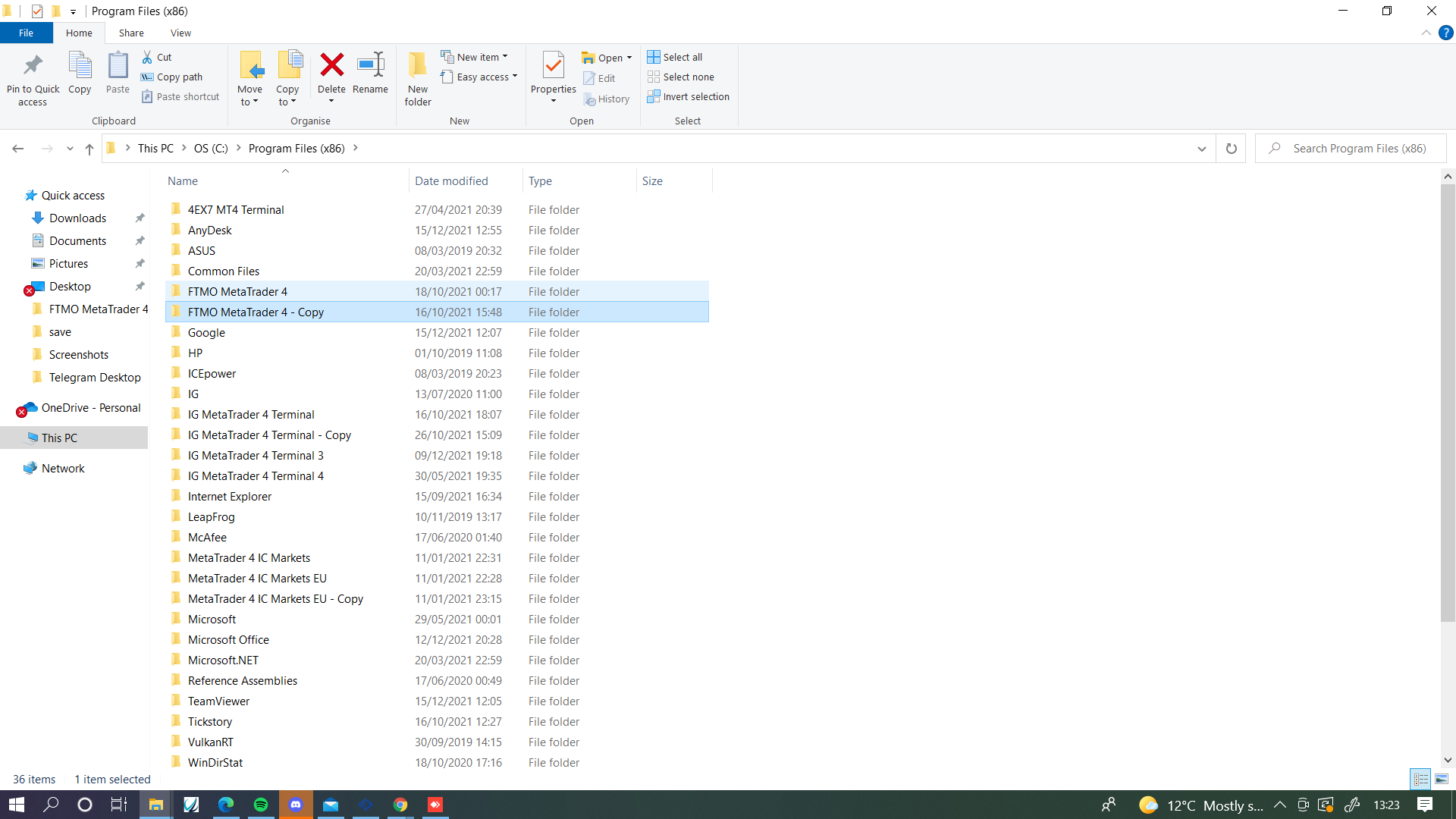
                                          0_1639574717646_Screenshot (1055).png

                                          Open the copied folder and double click terminal, new copy will be installed.
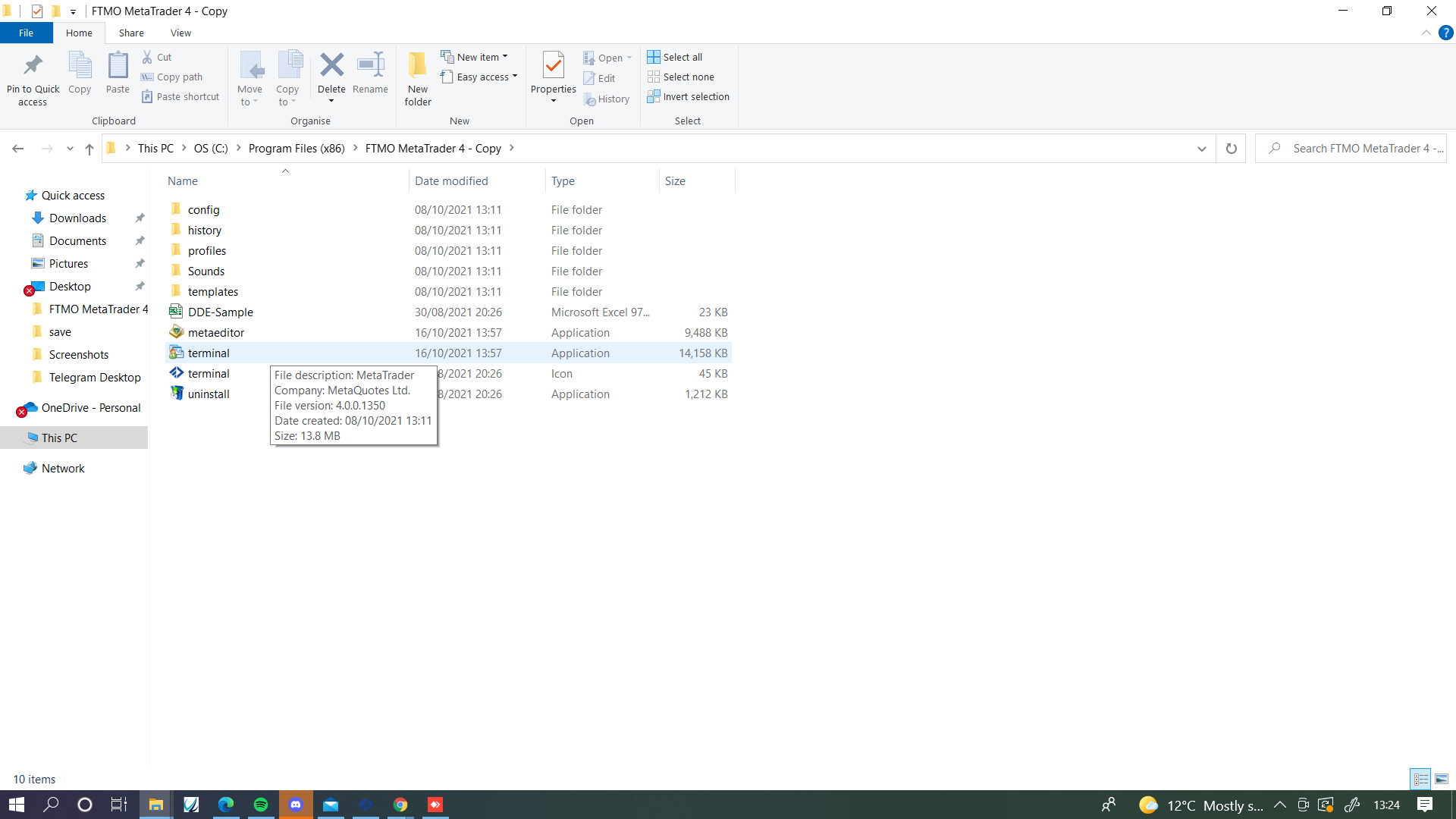
                                          0_1639574795371_31789c18-2ee6-4ff2-860a-ef4d07b19186-image.png

                                          Learn fxDreema Without the Wait!

                                          My comprehensive book, available on Amazon, is packed with examples and invaluable insights to help you fast-track your learning journey.

                                          The paperback and hardback editions include MT4 & MT5 QR codes for easy access to all prebuilt projects and robots, including my latest gold trading robot!

                                          Don’t miss out

                                          Click here➡️ https://mybook.to/fxDreema to get your copy today!

                                          Enjoy! 😊

                                          1 Reply Last reply Reply Quote 0
                                          • 1 / 1
                                          • First post
                                            Last post

                                          Online Users

                                          E
                                          A
                                          G
                                          Q
                                          C
                                          T
                                          S

                                          17
                                          Online

                                          146.7k
                                          Users

                                          22.4k
                                          Topics

                                          122.6k
                                          Posts

                                          Powered by NodeBB Forums | Contributors