fxDreema

    • Register
    • Login
    • Search
    • Back to the main page
    • Categories
    • Recent
    • Tags
    • Popular
    • Search

    I Want To Create A EA With Custom Indicator

    Questions & Answers
    2
    98
    16797
    Loading More Posts
    • Oldest to Newest
    • Newest to Oldest
    • Most Votes
    Reply
    • Reply as topic
    Log in to reply
    This topic has been deleted. Only users with topic management privileges can see it.
    • T
      TalalKhan @jstap last edited by

      @jstap sir i tried with differnt ways, please can you please set this for me, 😞 i am very confused

      jstap 1 Reply Last reply Reply Quote 0
      • jstap
        jstap @TalalKhan last edited by

        @talalkhan What you need to do is start with one condition and variable, once this is working add the other conditions one at a time until all is working. This is how me and many other people have learnt to use.

        Learn fxDreema Without the Wait!

        My comprehensive book, available on Amazon, is packed with examples and invaluable insights to help you fast-track your learning journey.

        The paperback and hardback editions include MT4 & MT5 QR codes for easy access to all prebuilt projects and robots, including my latest gold trading robot!

        Don’t miss out

        Click here➡️ https://mybook.to/fxDreema to get your copy today!

        Enjoy! 😊

        T 1 Reply Last reply Reply Quote 0
        • T
          TalalKhan @jstap last edited by

          @jstap I am doing exactly like this block by block and this is only possible when you know what logic are you applying on your EA, i am trying blindly because i am still confused what logic i should need for this problem
          Anyways check and tell me what is wrong with project because problem is still not solved
          https://fxdreema.com/shared/CNDVOvixb

          jstap 1 Reply Last reply Reply Quote 0
          • jstap
            jstap @TalalKhan last edited by

            @talalkhan In HERE is a simple RSI above/below EA that puts the answer into a comment, replace the RSI condition with your indicator, so you see what it takes to get the trade conditions you need, then add your other conditions.

            Learn fxDreema Without the Wait!

            My comprehensive book, available on Amazon, is packed with examples and invaluable insights to help you fast-track your learning journey.

            The paperback and hardback editions include MT4 & MT5 QR codes for easy access to all prebuilt projects and robots, including my latest gold trading robot!

            Don’t miss out

            Click here➡️ https://mybook.to/fxDreema to get your copy today!

            Enjoy! 😊

            T 1 Reply Last reply Reply Quote 1
            • T
              TalalKhan @jstap last edited by TalalKhan

              @jstap Thanks Alot Dear I Done It With A Different Way Till Now Its Working Fine, Hope It Will In Future, You Are Great, You Helped Me Alot In Past 2 Months ❤ More Power To You ❤
              Come To The Next Point If I Am Using Trade Count Block With Lower Than 3 Trades, EA Is Opening 4 Trades Not 3, If I Changed To 5 EA is Opening 6 Trades. Means Once More From Given Command. I Used Check Trade Count At Top Of Tree

              jstap 1 Reply Last reply Reply Quote 0
              • jstap
                jstap @TalalKhan last edited by

                @talalkhan This works for me is probably the condition, if it's set to =< it will place another trade so go over the number, if is set to < then to place a trade the number of trades has to be 1 under the set number, so you get the correct maximum set.

                Learn fxDreema Without the Wait!

                My comprehensive book, available on Amazon, is packed with examples and invaluable insights to help you fast-track your learning journey.

                The paperback and hardback editions include MT4 & MT5 QR codes for easy access to all prebuilt projects and robots, including my latest gold trading robot!

                Don’t miss out

                Click here➡️ https://mybook.to/fxDreema to get your copy today!

                Enjoy! 😊

                T 1 Reply Last reply Reply Quote 0
                • T
                  TalalKhan @jstap last edited by

                  @jstap yes you are right i was using =<, i just checked this, Thank you very very very much, < is working fine.
                  And please don't mind, I straiten/unsettle you very much 😞

                  jstap 1 Reply Last reply Reply Quote 0
                  • jstap
                    jstap @TalalKhan last edited by

                    @talalkhan It's ok, you are welcome.

                    Learn fxDreema Without the Wait!

                    My comprehensive book, available on Amazon, is packed with examples and invaluable insights to help you fast-track your learning journey.

                    The paperback and hardback editions include MT4 & MT5 QR codes for easy access to all prebuilt projects and robots, including my latest gold trading robot!

                    Don’t miss out

                    Click here➡️ https://mybook.to/fxDreema to get your copy today!

                    Enjoy! 😊

                    T 1 Reply Last reply Reply Quote 1
                    • T
                      TalalKhan @jstap last edited by TalalKhan

                      @jstap Bro i want to add this conditions in my EA

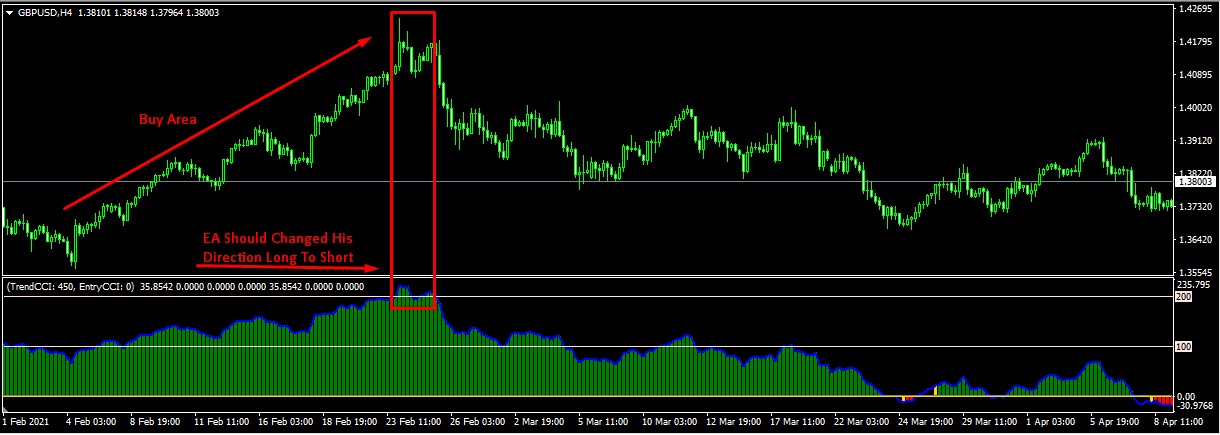
                      1. Custom oscillator value is above 0 to Max value EA find buying setups (Which already added in my EA)
                      2. EA changed direction buy to sell if oscillator value is crossing down from 200 (Check rectangle area in below picture)
                        Note: If value is above 200 EA direction is long when crossing down from 200 EA changed direction.
                        (Vice Versa For Sell Side)
                        0_1634897653753_Screenshot_188.jpg
                      jstap 1 Reply Last reply Reply Quote 0
                      • jstap
                        jstap @TalalKhan last edited by

                        @talalkhan I have showed you how to do this, set an variable for when tour cinditions are correct, use a condition to enter the trade in tree.

                        Learn fxDreema Without the Wait!

                        My comprehensive book, available on Amazon, is packed with examples and invaluable insights to help you fast-track your learning journey.

                        The paperback and hardback editions include MT4 & MT5 QR codes for easy access to all prebuilt projects and robots, including my latest gold trading robot!

                        Don’t miss out

                        Click here➡️ https://mybook.to/fxDreema to get your copy today!

                        Enjoy! 😊

                        T 1 Reply Last reply Reply Quote 1
                        • T
                          TalalKhan @jstap last edited by TalalKhan

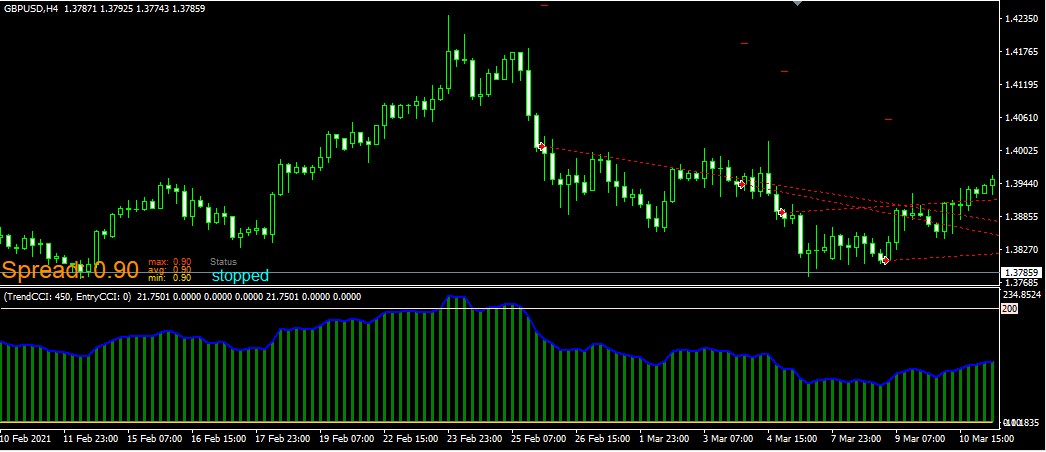
                          @jstap Sir please check looks like it's working, I will test it again, but one problem is i want to reset this condition to normal again when blue oscillator line touches 0. How can I ?
                          Project: https://fxdreema.com/shared/FolecOH7b
                          0_1634910637169_Screenshot_191.jpg

                          jstap 1 Reply Last reply Reply Quote 0
                          • jstap
                            jstap @TalalKhan last edited by

                            @talalkhan Set a separate tree with oscillator line = 25 reset variable.

                            Learn fxDreema Without the Wait!

                            My comprehensive book, available on Amazon, is packed with examples and invaluable insights to help you fast-track your learning journey.

                            The paperback and hardback editions include MT4 & MT5 QR codes for easy access to all prebuilt projects and robots, including my latest gold trading robot!

                            Don’t miss out

                            Click here➡️ https://mybook.to/fxDreema to get your copy today!

                            Enjoy! 😊

                            T 1 Reply Last reply Reply Quote 1
                            • T
                              TalalKhan @jstap last edited by

                              @jstap where is reset variable option?

                              jstap 1 Reply Last reply Reply Quote 0
                              • jstap
                                jstap @TalalKhan last edited by

                                @talalkhan another modify variable block with the reset value you want.

                                Learn fxDreema Without the Wait!

                                My comprehensive book, available on Amazon, is packed with examples and invaluable insights to help you fast-track your learning journey.

                                The paperback and hardback editions include MT4 & MT5 QR codes for easy access to all prebuilt projects and robots, including my latest gold trading robot!

                                Don’t miss out

                                Click here➡️ https://mybook.to/fxDreema to get your copy today!

                                Enjoy! 😊

                                T 1 Reply Last reply Reply Quote 1
                                • T
                                  TalalKhan @jstap last edited by TalalKhan

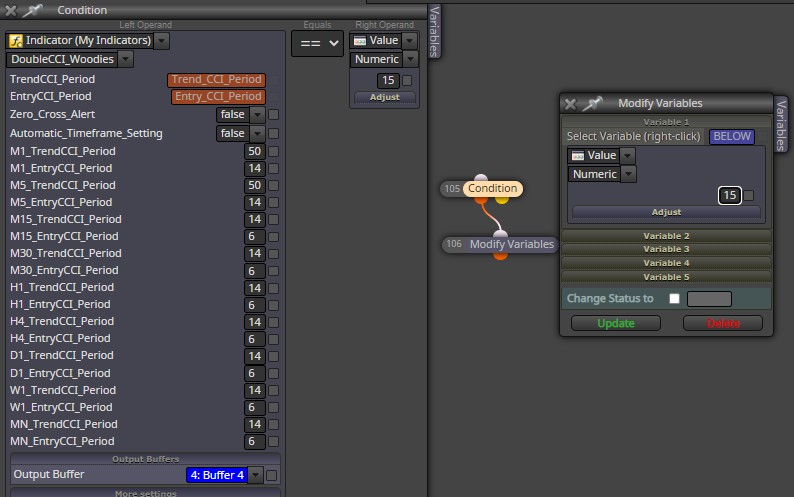
                                  @jstap Like this?
                                  I tried, This is not working. I am doing it wrong
                                  0_1634912639451_Screenshot_192.jpg

                                  jstap 1 Reply Last reply Reply Quote 0
                                  • jstap
                                    jstap @TalalKhan last edited by

                                    @talalkhan This depends on wether 15 is the result you need in the variable, would of thaught you need a Boolean true or false to allow/disallow trade.

                                    Learn fxDreema Without the Wait!

                                    My comprehensive book, available on Amazon, is packed with examples and invaluable insights to help you fast-track your learning journey.

                                    The paperback and hardback editions include MT4 & MT5 QR codes for easy access to all prebuilt projects and robots, including my latest gold trading robot!

                                    Don’t miss out

                                    Click here➡️ https://mybook.to/fxDreema to get your copy today!

                                    Enjoy! 😊

                                    T 1 Reply Last reply Reply Quote 0
                                    • T
                                      TalalKhan @jstap last edited by

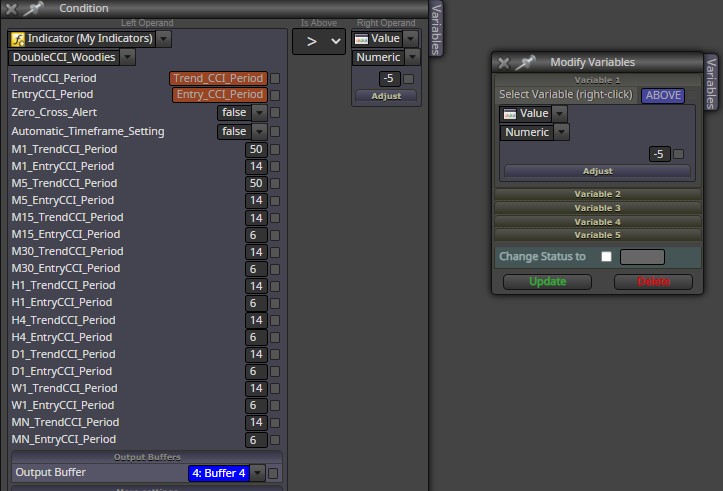
                                      @jstap its working fine i will test on live account then ask you about trade true false if needed, I want to ask something when indicator is below -200 means oversold zone i set the condition for buy, condition is working fine but i want this condition to reset when indicator value is above -5,
                                      This is not working with minus 5 but working with 0, how can i set - value ?
                                      0_1634931507036_Screenshot_193.jpg

                                      jstap 1 Reply Last reply Reply Quote 0
                                      • jstap
                                        jstap @TalalKhan last edited by jstap

                                        @talalkhan I am unsure what you mean, the modify variables block will change to any number you want it to.

                                        Learn fxDreema Without the Wait!

                                        My comprehensive book, available on Amazon, is packed with examples and invaluable insights to help you fast-track your learning journey.

                                        The paperback and hardback editions include MT4 & MT5 QR codes for easy access to all prebuilt projects and robots, including my latest gold trading robot!

                                        Don’t miss out

                                        Click here➡️ https://mybook.to/fxDreema to get your copy today!

                                        Enjoy! 😊

                                        T 1 Reply Last reply Reply Quote 0
                                        • T
                                          TalalKhan @jstap last edited by

                                          @jstap exactly i am also thinking the same, but when i am using negative value EA is not working fine, indicator have both side value + and -

                                          jstap 1 Reply Last reply Reply Quote 0
                                          • jstap
                                            jstap @TalalKhan last edited by

                                            @talalkhan When using a negative value use <.

                                            Learn fxDreema Without the Wait!

                                            My comprehensive book, available on Amazon, is packed with examples and invaluable insights to help you fast-track your learning journey.

                                            The paperback and hardback editions include MT4 & MT5 QR codes for easy access to all prebuilt projects and robots, including my latest gold trading robot!

                                            Don’t miss out

                                            Click here➡️ https://mybook.to/fxDreema to get your copy today!

                                            Enjoy! 😊

                                            T 1 Reply Last reply Reply Quote 0
                                            • 1
                                            • 2
                                            • 3
                                            • 4
                                            • 5
                                            • 2 / 5
                                            • First post
                                              Last post

                                            Online Users

                                            A
                                            A
                                            X
                                            K
                                            F

                                            15
                                            Online

                                            146.7k
                                            Users

                                            22.4k
                                            Topics

                                            122.6k
                                            Posts

                                            Powered by NodeBB Forums | Contributors