How to get line/MA slope
-
Have seen the question of how to find the slope angle, in here is how to do for a line on current timeframe, the same principle will work on all timeframes and for moving averages.
Learn fxDreema Without the Wait!
My comprehensive book, available on Amazon, is packed with examples and invaluable insights to help you fast-track your learning journey.
The paperback and hardback editions include MT4 & MT5 QR codes for easy access to all prebuilt projects and robots, including my latest gold trading robot!
Don’t miss out
Click here➡️ https://mybook.to/fxDreema to get your copy today!
Enjoy! 😊
-
@jstap said in How to get line/MA slope:
Have seen the question of how to find the slope angle, in here is how to do for a line on current timeframe, the same principle will work on all timeframes and for moving averages.
brother, you ought to just start drawing up tutorials for all the same questions you answer!
-
@tipsywisdom hah...just realized this is the tutorial section.
you're great stuff JSTAP!
-
-
@jstap Impressive work. Thank you for sharing.
(English) I will try to help everyone in these fxDreema forums. But if you want to learn how to use the platform in depth or more quickly, I can help you with my introductory fxDreema course in English at https://www.theandorraninvestor.eu.
(Català) Miraré d’ajudar tothom en aquests fòrums d’fxDreema. Tanmateix, si vols aprendre a fer servir la plataforma amb més profunditat o més de pressa, t’hi puc ajudar amb el meu curs d’introducció a fxDeema en català a https://www.theandorraninvestor.eu/ca.
(Español) Intentaré ayudar a todo el mundo en estos foros de fxDreema. Sin embargo, si quieres aprender a usar la plataforma en profundidad o más deprisa, te puedo ayudar con mi curso de introducción a fxDreema en español en https://www.theandorraninvestor.eu/es.
-
@l-andorrà Your welcome
Learn fxDreema Without the Wait!
My comprehensive book, available on Amazon, is packed with examples and invaluable insights to help you fast-track your learning journey.
The paperback and hardback editions include MT4 & MT5 QR codes for easy access to all prebuilt projects and robots, including my latest gold trading robot!
Don’t miss out
Click here➡️ https://mybook.to/fxDreema to get your copy today!
Enjoy! 😊
-
-
@alphaomega You can also do this with moving averages, just put the MA in the formula block.
Learn fxDreema Without the Wait!
My comprehensive book, available on Amazon, is packed with examples and invaluable insights to help you fast-track your learning journey.
The paperback and hardback editions include MT4 & MT5 QR codes for easy access to all prebuilt projects and robots, including my latest gold trading robot!
Don’t miss out
Click here➡️ https://mybook.to/fxDreema to get your copy today!
Enjoy! 😊
-
@jstap gonna try it .. because I have stoch/mach combination but need a trend direction as well.. thank you once again!!
-
@alphaomega I now use can ID 0 or 1 in left operand, what ever is in the constant in right operand, makes no difference just positive slope number trend is up instead of down. I quite often use 0 >< slope, means you get no flat angle.
Learn fxDreema Without the Wait!
My comprehensive book, available on Amazon, is packed with examples and invaluable insights to help you fast-track your learning journey.
The paperback and hardback editions include MT4 & MT5 QR codes for easy access to all prebuilt projects and robots, including my latest gold trading robot!
Don’t miss out
Click here➡️ https://mybook.to/fxDreema to get your copy today!
Enjoy! 😊
-
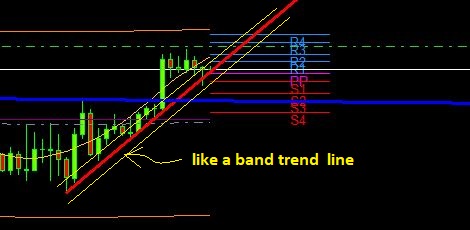
@jstap I need a helping hand here please brother.. I tried to compare the setting in your code to give me a comparison to this below photo EURUSD H1... but I cannot get close, I tried a million times.... would you be able to assist please? The problem is the timing, The Trend line should only move if a new bar close away from the previous Support or resistance Trend line. If you could create some sort of band in which the bottom or top candles close on a particular time frame.
In other words:
The code you created should scan the different time frames to find where candles has close in the same trend then draw the trend line and keep with it till a candle breaks that band. I hope I explained it the correct way
https://fxdreema.com/shared/P6ZIZHGwchttps://fxdreema.com/shared/P6ZIZHGwc -
@alphaomega Your project isn't loading.
Learn fxDreema Without the Wait!
My comprehensive book, available on Amazon, is packed with examples and invaluable insights to help you fast-track your learning journey.
The paperback and hardback editions include MT4 & MT5 QR codes for easy access to all prebuilt projects and robots, including my latest gold trading robot!
Don’t miss out
Click here➡️ https://mybook.to/fxDreema to get your copy today!
Enjoy! 😊
-
@jstap Dont know what happened there sorry..
https://fxdreema.com/shared/PX0WF1Pmb -
@alphaomega You don't need pass blocks when you have a condition, personally I don't connect yellow to top, this makes the block loop until it passes so avoiding the above conditions, every tick it will try to complete the tree, if it can't it waits until the next tick to try again. As for the draw blocks you need to name so when redrawn it knows what to redraw, this needs a condition so it will only redraw once needed, I would have a condition using object on chart, the slope angle, so if sloping up and candle closes above (>) it redraws, if sloping down and candle closes below(>) the line is redrawn, I would switch all off except the line drawing until this is working as needed.
Learn fxDreema Without the Wait!
My comprehensive book, available on Amazon, is packed with examples and invaluable insights to help you fast-track your learning journey.
The paperback and hardback editions include MT4 & MT5 QR codes for easy access to all prebuilt projects and robots, including my latest gold trading robot!
Don’t miss out
Click here➡️ https://mybook.to/fxDreema to get your copy today!
Enjoy! 😊
-
@jstap Thank you... I understand the language you writing but I do not totally understand the the logic. I will put the blocks off for now and just work on the draw then add as I go along.. This is very very advance for me.
-
@alphaomega Fair play, I still create a section and once it works I move on to the next.
Learn fxDreema Without the Wait!
My comprehensive book, available on Amazon, is packed with examples and invaluable insights to help you fast-track your learning journey.
The paperback and hardback editions include MT4 & MT5 QR codes for easy access to all prebuilt projects and robots, including my latest gold trading robot!
Don’t miss out
Click here➡️ https://mybook.to/fxDreema to get your copy today!
Enjoy! 😊
-
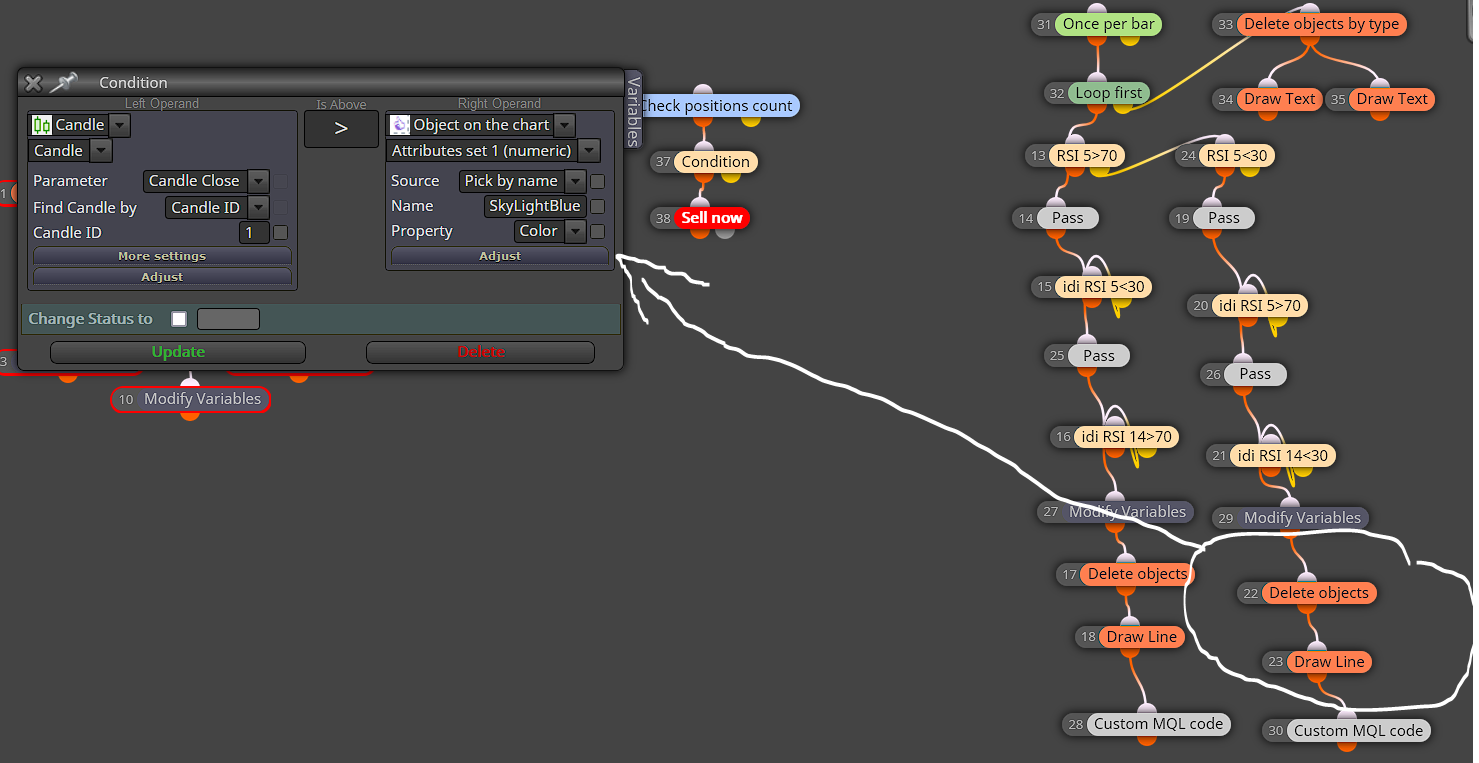
@jstap Could you give some idea as to how would you identify the object on chart please?
https://fxdreema.com/shared/MWYKe20Td -
@alphaomega In the name put the name you called the line.
Learn fxDreema Without the Wait!
My comprehensive book, available on Amazon, is packed with examples and invaluable insights to help you fast-track your learning journey.
The paperback and hardback editions include MT4 & MT5 QR codes for easy access to all prebuilt projects and robots, including my latest gold trading robot!
Don’t miss out
Click here➡️ https://mybook.to/fxDreema to get your copy today!
Enjoy! 😊
-
@jstap The code was originally started by roar and what he did was to put the lines created in variables.. This means the object on chart name changes every time the line moves.. This means that I cannot use the name as reference.. So I tried using the object color.. but the condition cannot find the object by color. If I use the variable names in the condition, the expert will not start up in meta trader.. ok.. let me give it another go, I must be missing something here.. Thank you
-
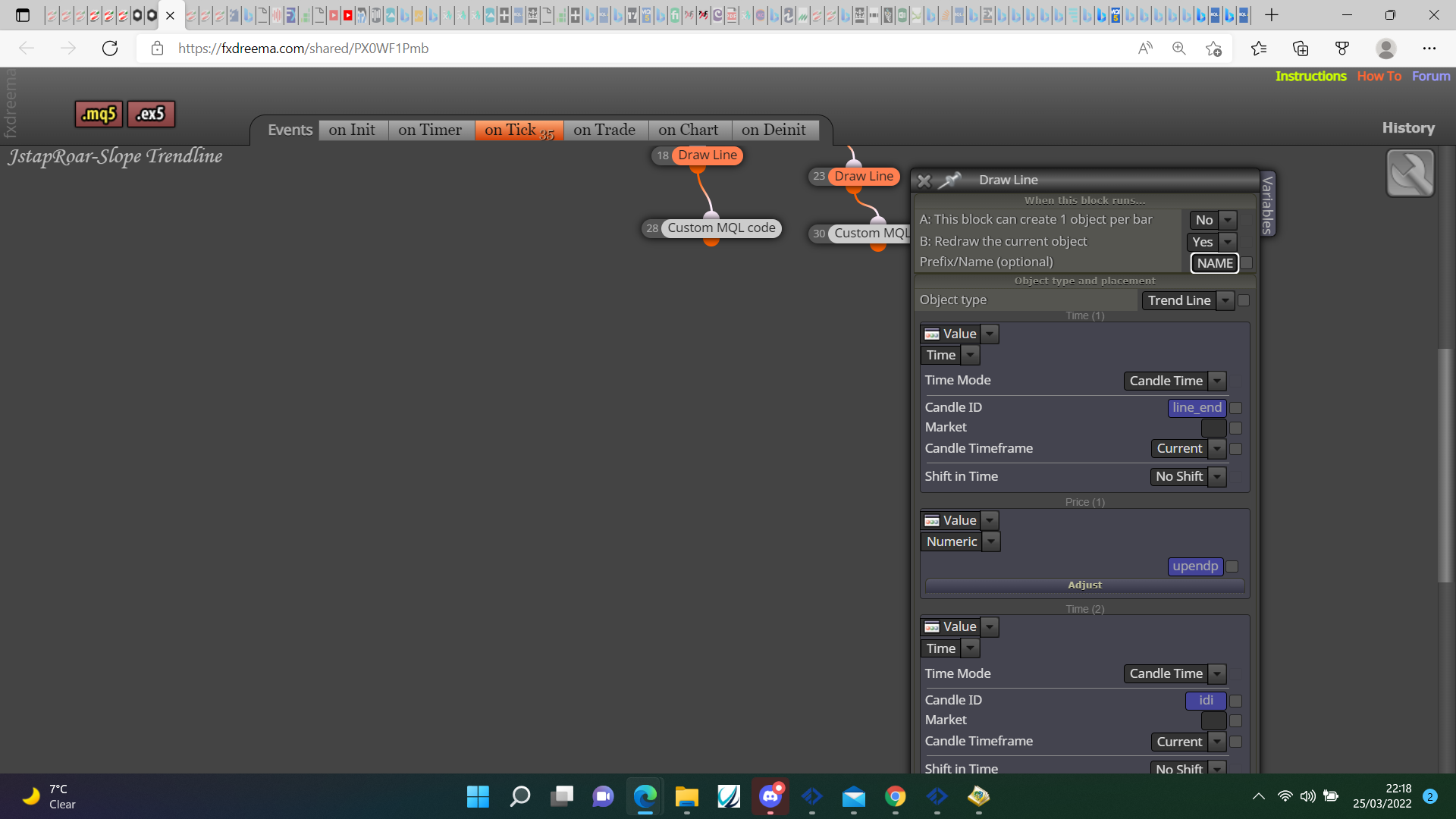
@alphaomega The line doesn't have a name, put one in there and put yes for redraw:
Learn fxDreema Without the Wait!
My comprehensive book, available on Amazon, is packed with examples and invaluable insights to help you fast-track your learning journey.
The paperback and hardback editions include MT4 & MT5 QR codes for easy access to all prebuilt projects and robots, including my latest gold trading robot!
Don’t miss out
Click here➡️ https://mybook.to/fxDreema to get your copy today!
Enjoy! 😊


