fxDreema

    • Register
    • Login
    • Search
    • Back to the main page
    • Categories
    • Recent
    • Tags
    • Popular
    • Search

    Buttons for quick Lot change on the panel

    Questions & Answers
    3
    4
    425
    Loading More Posts
    • Oldest to Newest
    • Newest to Oldest
    • Most Votes
    Reply
    • Reply as topic
    Log in to reply
    This topic has been deleted. Only users with topic management privileges can see it.
    • N
      nowywest last edited by

      Hello everyone, I am creating a panel for quick opening and closing. Buttons "Buy", "Sell", "C Buy" and "C Sell" work correctly. I have a problem with the "+" "-" buttons and the "Lot_size" display window. How to code blocks so that after pressing the "+" button, it adds Lot value to "Lot_size" (similarly with the "-" button) and displays the current Lot_size for the next Buy or Sell opening on the chart.
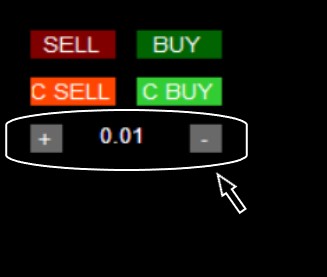
      0_1639222033010_111.jpg
      https://fxdreema.com/shared/xwJAmeCsd
      Either I build blocks 42, 43, 43 incorrectly, or the error is in blocks 49.50, or maybe I should use other blocks?. If you can, please help.

      jstap 1 Reply Last reply Reply Quote 0
      • jstap
        jstap @nowywest last edited by jstap

        @nowywest Use a formula block so every time you press - or + it changes the variable. Use a draw text block (probably on on tick) with a code in the text (code input), something like this: "LOT SIZE "+LOT -LOT being the variable you've created.

        Learn fxDreema Without the Wait!

        My comprehensive book, available on Amazon, is packed with examples and invaluable insights to help you fast-track your learning journey.

        The paperback and hardback editions include MT4 & MT5 QR codes for easy access to all prebuilt projects and robots, including my latest gold trading robot!

        Don’t miss out

        Click here➡️ https://mybook.to/fxDreema to get your copy today!

        Enjoy! 😊

        1 Reply Last reply Reply Quote 0
        • P
          parsian1402 last edited by

          how you put buy and sell button ?

          1 Reply Last reply Reply Quote 0
          • jstap
            jstap last edited by

            Create the button on init, use on tick for backtesting, on chart for live, use if testing on tick, when you click the button do what is needed, and redraw the button off.

            Learn fxDreema Without the Wait!

            My comprehensive book, available on Amazon, is packed with examples and invaluable insights to help you fast-track your learning journey.

            The paperback and hardback editions include MT4 & MT5 QR codes for easy access to all prebuilt projects and robots, including my latest gold trading robot!

            Don’t miss out

            Click here➡️ https://mybook.to/fxDreema to get your copy today!

            Enjoy! 😊

            1 Reply Last reply Reply Quote 0
            • 1 / 1
            • First post
              Last post

            Online Users

            D
            B

            20
            Online

            146.9k
            Users

            22.4k
            Topics

            122.6k
            Posts

            Powered by NodeBB Forums | Contributors