fxDreema

    • Register
    • Login
    • Search
    • Back to the main page
    • Categories
    • Recent
    • Tags
    • Popular
    • Search

    Read Information from a custom dashboard indicator?

    Questions & Answers
    2
    6
    748
    Loading More Posts
    • Oldest to Newest
    • Newest to Oldest
    • Most Votes
    Reply
    • Reply as topic
    Log in to reply
    This topic has been deleted. Only users with topic management privileges can see it.
    • J
      jjtrader last edited by

      Hi,

      I am trying to determine if I upload a custom indicator that produces a dashboard on the chart, can I configure an EA to read results from the indicator to use as a condition. Not sure what to enter (no buffers).

      Any advice?

      Thanks!

      jstap 1 Reply Last reply Reply Quote 0
      • jstap
        jstap @jjtrader last edited by jstap

        @jjtrader Look in your object list, if the information is there it will tell you the type, you can get this information by using object on chart and use in conditions.

        Learn fxDreema Without the Wait!

        My comprehensive book, available on Amazon, is packed with examples and invaluable insights to help you fast-track your learning journey.

        The paperback and hardback editions include MT4 & MT5 QR codes for easy access to all prebuilt projects and robots, including my latest gold trading robot!

        Don’t miss out

        Click here➡️ https://mybook.to/fxDreema to get your copy today!

        Enjoy! 😊

        J 2 Replies Last reply Reply Quote 0
        • J
          jjtrader @jstap last edited by

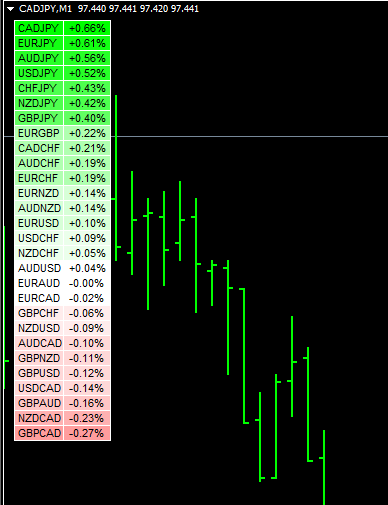
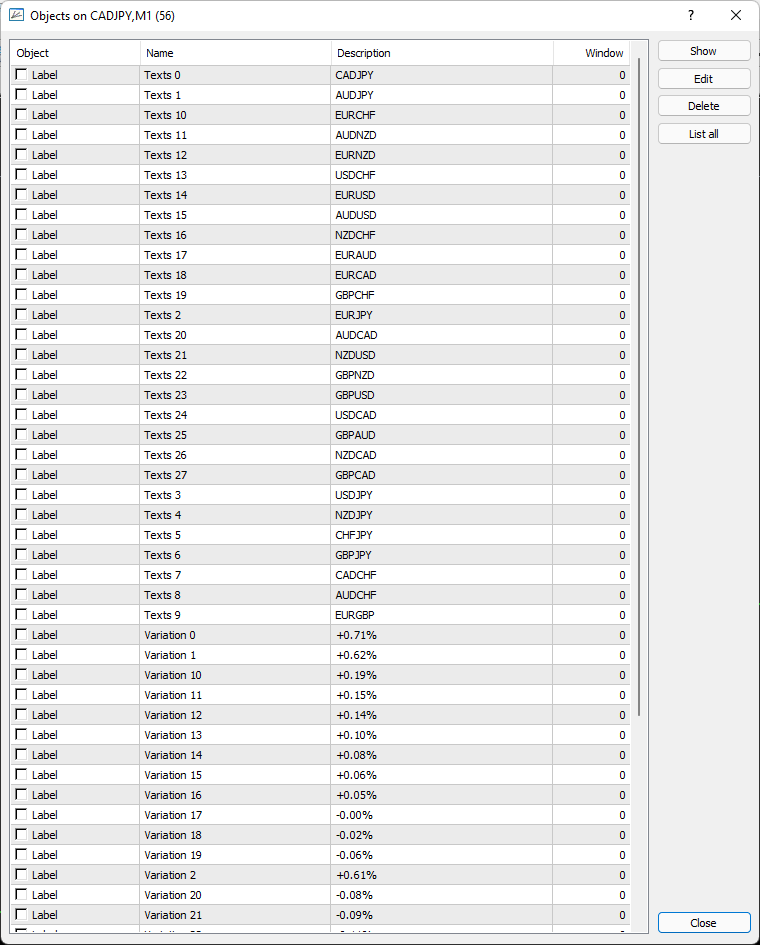
          @jstap Thank you! I have identified the objects in the table. But, the order switches around depending on the trend strength. Please see this example...

          https://fxdreema.com/shared/Fhw5QQx9d

          I am just trying to get it to draw a line when the conditions are met to test. - Not working 😞

          Here is a screenshot of the indicator and the indicator file is attached. My goal is to set up a filter and only trade the top pair listed for buys and the bottom air listed for sells.
          0_1648140537502_8302de94-cb8f-4cad-a1b6-92a64fb243e7-image.png

          Any advise would be appreciated!

          0_1648140611902_!Zeus-Arrow-Pairs.ex4

          1 Reply Last reply Reply Quote 0
          • J
            jjtrader @jstap last edited by

            @jstap PS - here is a screenshot of the objects list on my chart.
            0_1648140740394_49b0bc51-57ba-4439-a9ac-73b2ac365afa-image.png

            jstap 2 Replies Last reply Reply Quote 0
            • jstap
              jstap @jjtrader last edited by

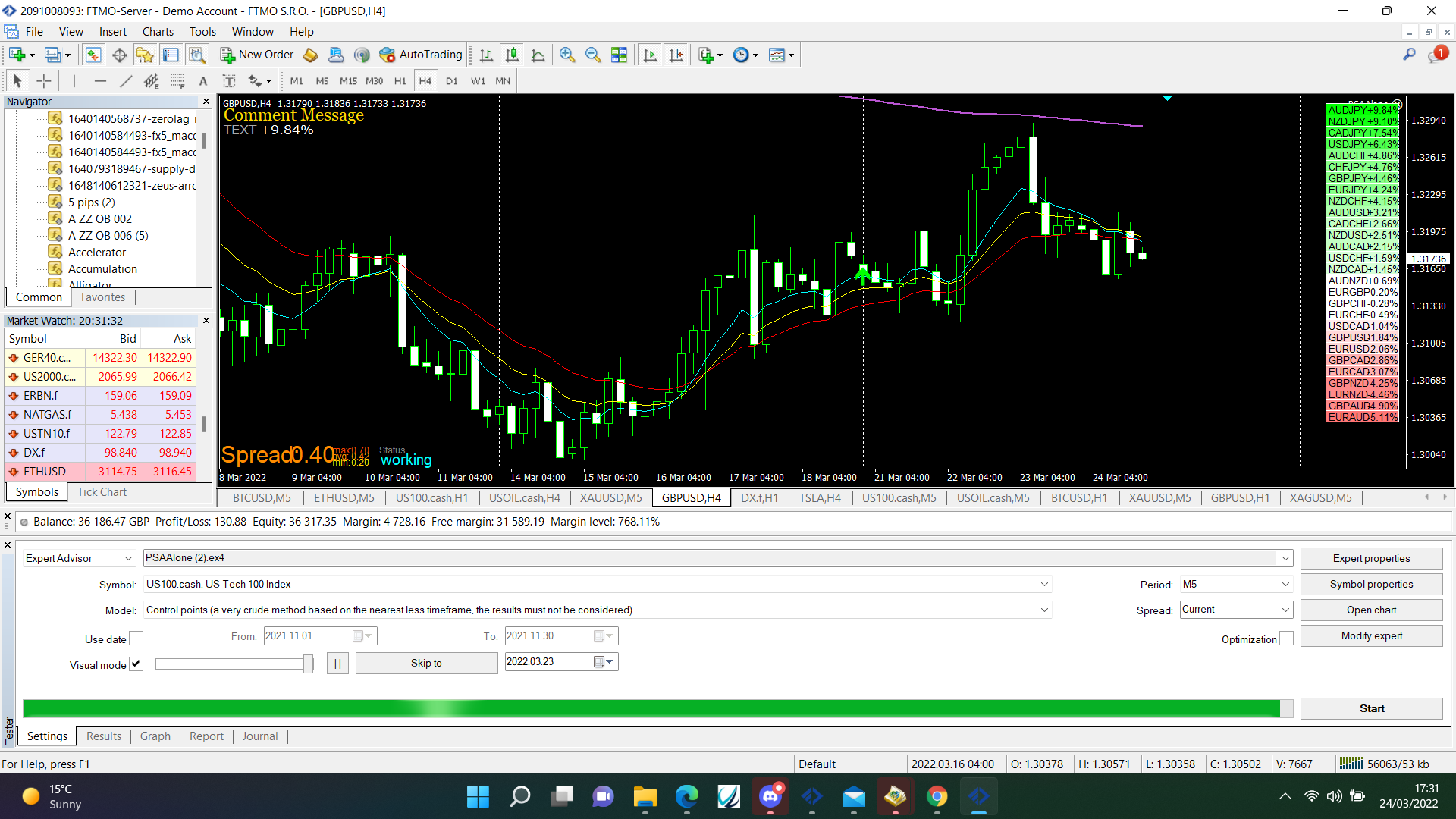
              @jjtrader The problem is that the information is text not numeric, I'll have a look at what you can do:

              https://fxdreema.com/shared/F7CljLlce
              0_1648143258802_16b543f6-9636-4e04-999d-48591265ca66-image.png

              Learn fxDreema Without the Wait!

              My comprehensive book, available on Amazon, is packed with examples and invaluable insights to help you fast-track your learning journey.

              The paperback and hardback editions include MT4 & MT5 QR codes for easy access to all prebuilt projects and robots, including my latest gold trading robot!

              Don’t miss out

              Click here➡️ https://mybook.to/fxDreema to get your copy today!

              Enjoy! 😊

              1 Reply Last reply Reply Quote 0
              • jstap
                jstap @jjtrader last edited by

                @jjtrader This is how to do it, check the modify variables block, the code string to double removes the + & % but keeps the -, copy what you need to create for what you need, good luck.

                https://fxdreema.com/shared/kZLYGLGP

                Learn fxDreema Without the Wait!

                My comprehensive book, available on Amazon, is packed with examples and invaluable insights to help you fast-track your learning journey.

                The paperback and hardback editions include MT4 & MT5 QR codes for easy access to all prebuilt projects and robots, including my latest gold trading robot!

                Don’t miss out

                Click here➡️ https://mybook.to/fxDreema to get your copy today!

                Enjoy! 😊

                1 Reply Last reply Reply Quote 0
                • 1 / 1
                • First post
                  Last post

                Online Users

                F
                R
                S
                D
                V
                O

                14
                Online

                146.7k
                Users

                22.4k
                Topics

                122.6k
                Posts

                Powered by NodeBB Forums | Contributors