My EA does not close losing positions sometimes???
-
My EA doesn't close losing positions sometimes and I don't know what the reason is? Can any of you have a look at my project, maybe I made a mistake. I will be grateful for your help.
-
@piotras10000 Quick note: Block 5 is unnecessary as there are two blocks connected below. That reason why trades are not closed when condition is true is due to that 'once per bar' block on top. Remove it and it will work normally.
(English) I will try to help everyone in these fxDreema forums. But if you want to learn how to use the platform in depth or more quickly, I can help you with my introductory fxDreema course in English at https://www.theandorraninvestor.eu.
(Català) Miraré d’ajudar tothom en aquests fòrums d’fxDreema. Tanmateix, si vols aprendre a fer servir la plataforma amb més profunditat o més de pressa, t’hi puc ajudar amb el meu curs d’introducció a fxDeema en català a https://www.theandorraninvestor.eu/ca.
(Español) Intentaré ayudar a todo el mundo en estos foros de fxDreema. Sin embargo, si quieres aprender a usar la plataforma en profundidad o más deprisa, te puedo ayudar con mi curso de introducción a fxDreema en español en https://www.theandorraninvestor.eu/es.
-
@l-andorrà Are blocks 23, 20, 22 correctly connected, because these two blocks are also supposed to close losing positions?
Does block numbers in order matter?
-
@piotras10000 I can't see any of those blocks in your project. And yes, block numbers are determining the order execution when when positioned on top of each tree and below a previous one when more than two are connected to the same one.
(English) I will try to help everyone in these fxDreema forums. But if you want to learn how to use the platform in depth or more quickly, I can help you with my introductory fxDreema course in English at https://www.theandorraninvestor.eu.
(Català) Miraré d’ajudar tothom en aquests fòrums d’fxDreema. Tanmateix, si vols aprendre a fer servir la plataforma amb més profunditat o més de pressa, t’hi puc ajudar amb el meu curs d’introducció a fxDeema en català a https://www.theandorraninvestor.eu/ca.
(Español) Intentaré ayudar a todo el mundo en estos foros de fxDreema. Sin embargo, si quieres aprender a usar la plataforma en profundidad o más deprisa, te puedo ayudar con mi curso de introducción a fxDreema en español en https://www.theandorraninvestor.eu/es.
-
@l-andorrà You can show in the picture which blocks are responsible for closing losing positions?
-
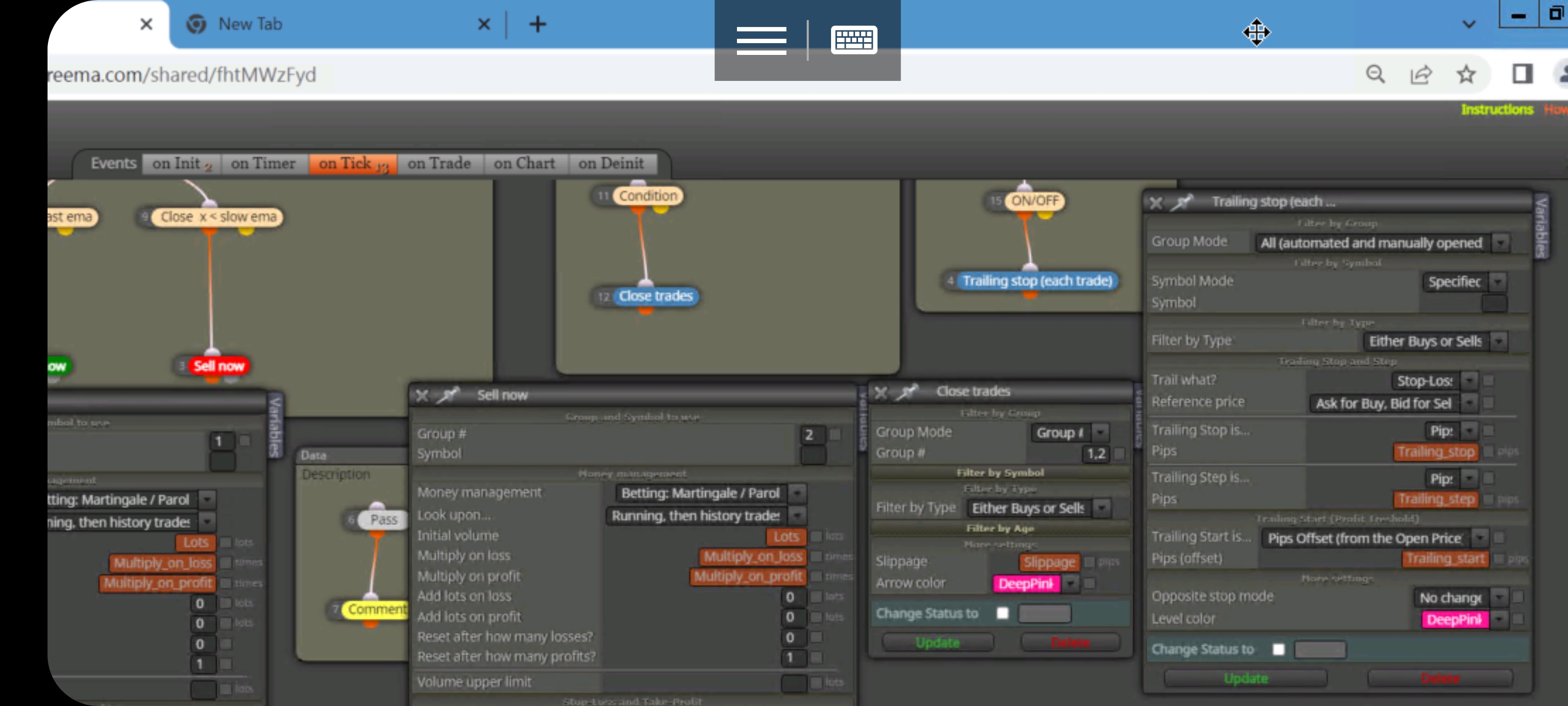
@piotras10000 The reason is very simple, the ea uses groups to recognize its operations, so you did not use this, what you did is place your trailing and tell it there that all open orders manually or EA modify them, so to be able to manage each 1 of them you must give 1 number (Really any variable would work (even string) to be able to later manipulate each purchase or sale as you decide, if you look I put group 1 purchase group 2 sale, so then in the closing block I use groups 1 ,2 of buy, sell close them when their condition passes. And leave the trailing as you had it so you can compare and see your mistake.
-
@realjoker Okey thanks. I Hopefully my EA will close every losing position from now on
-
@realjoker said in My EA does not close losing positions sometimes???:
@piotras10000 The reason is very simple, the ea uses groups to recognize its operations, so you did not use this, what you did is place your trailing and tell it there that all open orders manually or EA modify them, so to be able to manage each 1 of them you must give 1 number (Really any variable would work (even string) to be able to later manipulate each purchase or sale as you decide, if you look I put group 1 purchase group 2 sale, so then in the closing block I use groups 1 ,2 of buy, sell close them when their condition passes. And leave the trailing as you had it so you can compare and see your mistake.
I would suggest handling all trades as long and short instead of group numbers. As long as you have Group Mode All selected, you don't have to worry about a group # unless you do enter one in any of the original blocks. But once you do, be prepared to handle that group number separate from everything else. Its been a while, but I showed proof once to some colleagues that even those with a group # were not being handled by the "All" group mode.
I mean everything....if positions, close position, trail...each will need a separate group tree.
If you just keep it simple with longs and shorts, its much easier to handle because the Buy or Sell only selection works without hesitation.To that affect though, for the original poster, just put everything to All and it will work fine with the trails and closed trades.


