fxDreema

    • Register
    • Login
    • Search
    • Back to the main page
    • Categories
    • Recent
    • Tags
    • Popular
    • Search

    'input' - unexpected token error when compiling mq5 file

    Questions & Answers
    3
    5
    1881
    Loading More Posts
    • Oldest to Newest
    • Newest to Oldest
    • Most Votes
    Reply
    • Reply as topic
    Log in to reply
    This topic has been deleted. Only users with topic management privileges can see it.
    • S
      Smallous last edited by

      Hello,

      Any ideas on why the above is occurring? The indicator works ok on its own. I am manually entering the indicator values as I have not had any luck uploading an "MT5" indicator.

      The data type that is obscured below is ENUM_APPLIED_PRICE. Do I need to make entries into the Enumerations field and if so, what should I place there?
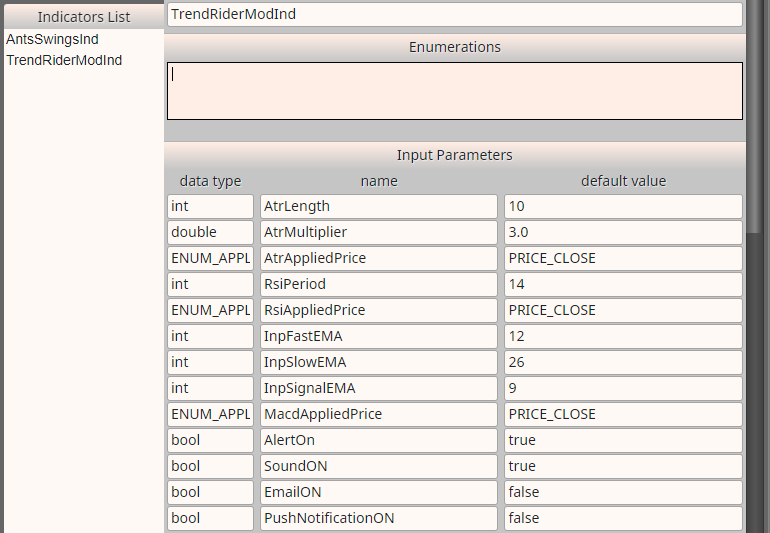
      0_1649537548067_a80427c8-e946-4604-8d4b-1b8d4e6a8cc0-image.png

      These all look ok.
      0_1649537806636_4ccce7b8-2da9-4114-9241-bab2c18bb676-image.png

      Indicator appears to be ok in Condition block.
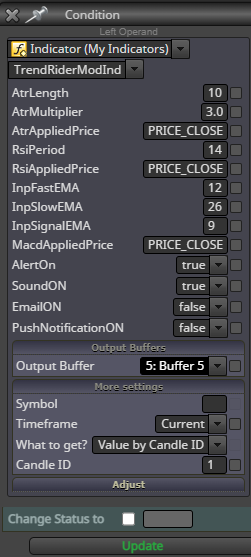
      0_1649537284851_0ef0035f-ab36-4c30-9bdc-a800d67f2517-image.png

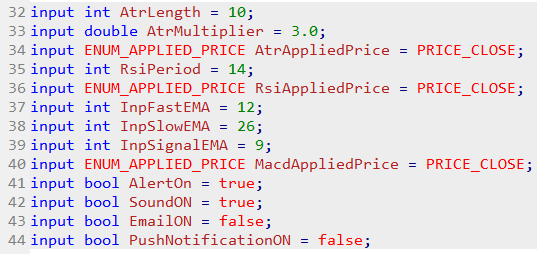
      Inputs from code:
      0_1649538188722_e1f79b0a-58f1-4812-ab3f-7e524c1f7426-image.png

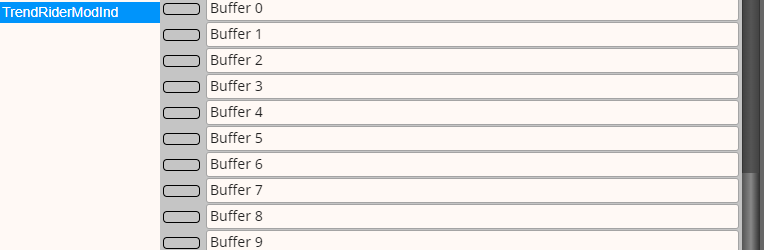
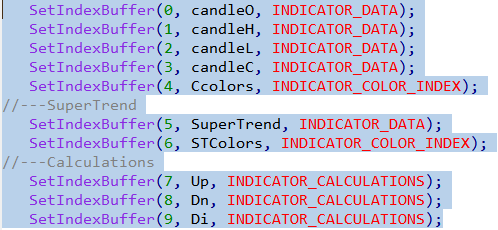
      Buffers from code:
      0_1649538423760_5a8f8515-90ba-40bf-a162-3545b73bc256-image.png

      Thank you
      Paul

      A jstap 2 Replies Last reply Reply Quote 0
      • A
        ambrogio @Smallous last edited by

        @smallous hello, the only thing I have in mind is to replace "PRICE_CLOSE" with number 0, since 0 corresponds to "Close" 1 corresponds to "Open" and so on

        S 1 Reply Last reply Reply Quote 0
        • jstap
          jstap @Smallous last edited by

          @smallous I agree with @ambrogio, if this was MT4 I would try changing the type to int, not sure if this works on MT5 though,

          Learn fxDreema Without the Wait!

          My comprehensive book, available on Amazon, is packed with examples and invaluable insights to help you fast-track your learning journey.

          The paperback and hardback editions include MT4 & MT5 QR codes for easy access to all prebuilt projects and robots, including my latest gold trading robot!

          Don’t miss out

          Click here➡️ https://mybook.to/fxDreema to get your copy today!

          Enjoy! 😊

          S 1 Reply Last reply Reply Quote 1
          • S
            Smallous @ambrogio last edited by

            @ambrogio Hello, I changed the settings in the the indicator first, but it stopped the indicator from working.

            1 Reply Last reply Reply Quote 0
            • S
              Smallous @jstap last edited by

              @jstap Thanks for your reply. I am now using another indicator and coded my EA differently to get around the error.

              1 Reply Last reply Reply Quote 0
              • 1 / 1
              • First post
                Last post

              Online Users

              F
              A
              H
              A

              11
              Online

              146.7k
              Users

              22.4k
              Topics

              122.6k
              Posts

              Powered by NodeBB Forums | Contributors