on Chart on mq4 [ not Refresh ]
-
Hi, I noticed that in mq4 if I change the values of a constant from the EA settings (for example the price of a horizontal line) the graphical objects are not updated until you pass the mouse over the graph, is there a way to activate the automatic updating of graphic objects when the confirmation ok is given after changing the values of a constant? In mq5 it is automatic, Thanks
-
@duepips To me they always update, add a shared project and I'll have a look.
-
@jstap said in on Chart on mq4 [ not Refresh ]:
To me they always update, add a shared project and I'll have a look.
https://fxdreema.com/shared/Mah2Vaf3
if I go into the settings and change the value of the constant and then click on ok the line on the graph with the new price does not update, to have it updated I have to click on the graph, if the ok button to confirm the settings and outside the graph it does not update
-
@duepips So if line = true draw line at constant price, this can only do this, as is a constant price is set before start.
-
@jstap said in on Chart on mq4 [ not Refresh ]:
@duepips So if line = true draw line at constant price, this can only do this, as is a constant price is set before start.
on mt5 if I modify a constant within the EA settings when I confirm with ok the chart updates with the new values ache if I change only the price leaving the true unchanged, which is a way to update the on Chart section after having changed the settings of the EA? example: change value input constant re draw on Chart, Because I need it to be updated even when the market is closed
-
@duepips If you change the constant in inputs, this is the value that will show on chart, if waiting for a tick the update will wait, run on back test and you'll see what it does.
-
@jstap said in on Chart on mq4 [ not Refresh ]:
@duepips If you change the constant in inputs, this is the value that will show on chart, if waiting for a tick the update will wait, run on back test and you'll see what it does.
forgive me I changed the text after you read, I need it to be updated even when the market is closed
-
@duepips All blocks on tick wait for a tick, possibly (although I don't do it) putting on timer will change it according to your on timer settings.
-
@jstap said in on Chart on mq4 [ not Refresh ]:
@duepips All blocks on tick wait for a tick, possibly (although I don't do it) putting on timer will change it according to your on timer settings.
can you launch the RedrawChart from on Timer?
-
@duepips Most probably, I have just never done it.
-
@jstap said in on Chart on mq4 [ not Refresh ]:
@duepips Most probably, I have just never done it.
damn mt4 LOL
-
@duepips Is mt5 I always have trouble with MT5, both almost do the same, is just working out what works, back test on mt5 is better.
-
@duepips if you change a constant "on the fly", the EA reinitializes. So put your graphical block to on Init (or just link it with "Run blocks" block)
-
@jstap said in on Chart on mq4 [ not Refresh ]:
@duepips Is mt5 I always have trouble with MT5, both almost do the same, is just working out what works, back test on mt5 is better.
much much much better mt5
-
@roar said in on Chart on mq4 [ not Refresh ]:
@duepips if you change a constant "on the fly", the EA reinitializes. So put your graphical block to on Init (or just link it with "Run blocks" block)
on mt4? Do you have an example to share?
@roar said in on Chart on mq4 [ not Refresh ]:
@duepips if you change a constant "on the fly", the EA reinitializes. So put your graphical block to on Init (or just link it with "Run blocks" block)
-
I don't understand how to work on mt4, when you enter the settings and change the values of an EA confirming them with OK each section from on Init to on Chart should be updated, in my opinion mt4 and to abandon
-
@duepips here's an example how to link the init event to your other events:
https://fxdreema.com/shared/JntnkXgecHowever, there is one more thing you need to do. The mq4 has a standard little code snippet that prevents reloading the EA when inputs change. So you need to remove this part:
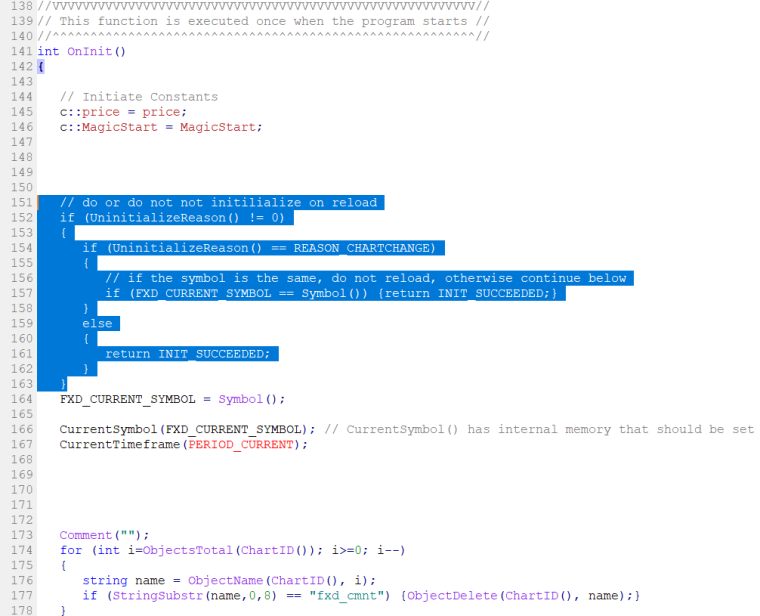
-
@roar said in on Chart on mq4 [ not Refresh ]:
@duepips here's an example how to link the init event to your other events:
https://fxdreema.com/shared/JntnkXgecHowever, there is one more thing you need to do. The mq4 has a standard little code snippet that prevents reloading the EA when inputs change. So you need to remove this part:
I try and let you know
-
@roar said in on Chart on mq4 [ not Refresh ]:
@duepips here's an example how to link the init event to your other events:
https://fxdreema.com/shared/JntnkXgecHowever, there is one more thing you need to do. The mq4 has a standard little code snippet that prevents reloading the EA when inputs change. So you need to remove this part:
even removing the code you selected doesn't update the graph without event, anyway Thanks
-
@duepips I tested my example on weekend (no ticks), it worked for me

