Error on the Block "No Trade Nearby" that doesn't find trades that are actually nearby...
-
The Block No Trade Nearby sometimes doesn't find trades that might actually exist nearby....

The reason why is that when the block is set to not use any time filters, in the source code, it is still using a time filter for the time (Time Now)... and then, sometimes, the tick data takes some time to be updated... and that causes a newly open position to have it's open time happening after the current server time that comes from the broker's data feed...
The result is the block doesn't identify the trades nearby...
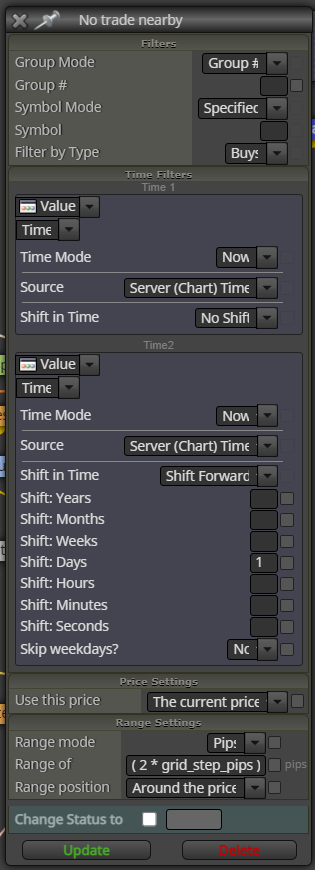
The workaround is to actually use the time filters and filter for only trades that are open "1 day ahead of current time" ...
I hope this helps...
Here is how the block should look if the developer DOESN't want to use time filters... (Applying only range filters...)
Quant Engineer
www.abfs.tech -
@quantengineer Never used a formula like the one you used on the 'range of' box. Are you sure it's working correctly?
-
Thanks for messaging !
Yes, that formula is ok...
What I am displaying is not about the calculation of the pip in that formula, but only about the time filters... where we need to use a shift forward to make the block work well on live accounts...Quant Engineer
www.abfs.tech -
@quantengineer I never use shift forward options, honestly. And what about searching that 'no trade nearby' block at the moment it is supposed to be instead of 'programming' it the way you tried?
-
@l-andorrà
How would you use the "No Trade Nearby" block, then?
If you open an order and that is exactly the order you want to take into account to for not opening the next ones (e.g. the newest order, or the least profitable one), how would you use the blocks, then? -
That depends on your excat requirements. The "No Trade Nearby" will effectively block any new trade withing the specified pips distance you selected. It doesn't matter it is the first or the last open trade. All trades will be using the block exactly in the same way.
(English) I will try to help everyone in these fxDreema forums. But if you want to learn how to use the platform in depth or more quickly, I can help you with my introductory fxDreema course in English at https://www.theandorraninvestor.eu.
(Català) Miraré d’ajudar tothom en aquests fòrums d’fxDreema. Tanmateix, si vols aprendre a fer servir la plataforma amb més profunditat o més de pressa, t’hi puc ajudar amb el meu curs d’introducció a fxDeema en català a https://www.theandorraninvestor.eu/ca.
(Español) Intentaré ayudar a todo el mundo en estos foros de fxDreema. Sin embargo, si quieres aprender a usar la plataforma en profundidad o más deprisa, te puedo ayudar con mi curso de introducción a fxDreema en español en https://www.theandorraninvestor.eu/es.
-
@l-andorrà The "No Trade Nearby" will effectively block any new trade withing the specified pips distance selected as long as the terminal is not closed,
once you close the terminal ( intentional or by accident ) all the number of trades in the grid will fill in rapidly !! ,
do you have any clue about this issue ?
I've been working around it in many ways but did not fined any solution@choppedice @TipsyWisdom @fxDreema @refaey @q8carpenter @jstap @roar
-
I know there is a solution to have some information to be stored in the global variables to make it work but i tried everything i could and I'm still trying
-
I just found out that The Global variables known in mql5 is The "Terminal variables" in FXDreeam , I managed to make use of it but not fully tested, i came across a problem that if i trade different symbols even with a different magic number the "gvar" interfere with the different symbol !, I'm not sure how to bond the terminal variables to the magic number/symbol
-
I'm afraid I'm not an expert on Terminal Variables usage. This is the field of jstap. Maybe he can be more helpful.
-
The EA's magic number is stored in an int variable "MagicStart" you get current chart symbol with Symbol()