Trendline move forward in time.
-
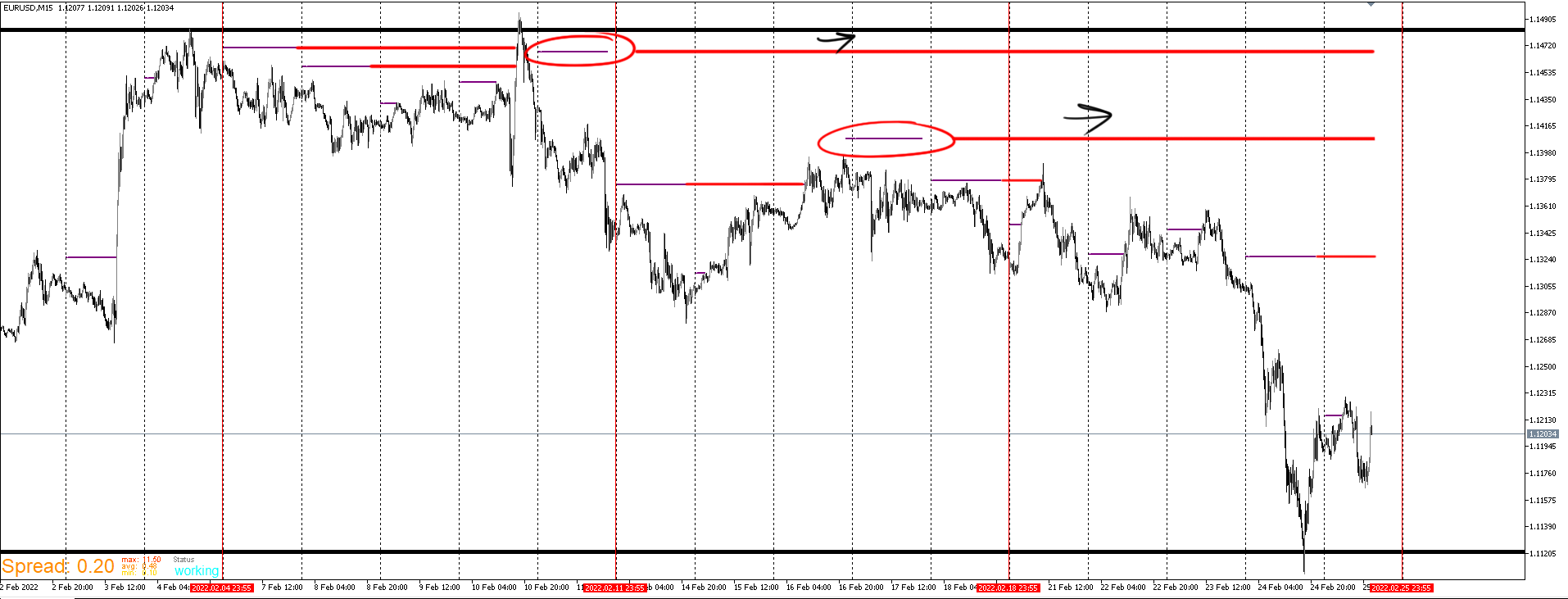
I've been using this platform for a year now and I'm grateful for the contributions people make on here. Sometimes I get stumped and come to here to find the answer. When I can't find the answer, I tinker with it long enough and eventually figure it out. For this issue, I couldn't find the answer anywhere and I've been messing around with it too long. What do I need to do in order for time 2 of the trendline to continue over the course of days as price updates? It works in a single day but I need that line to update everyday instead of that single day being the cutoff.The idea is that when price reaches that line, that's where the line stop. Here is a picture. The red is what I'm trying to achieve. Thanks.
-
@justin15012
Is it a indicator? Is the line an object or a buffer? Does it repaint? -
@sktsec It's not an indicator. I've been strictly doing EA's maybe that's the issue and I will look into indicator creation. The line is an object and it does repaint.
-
I finally figured it out. The answer was right in my face the entire time. I needed the object loop blocks. FOR EACH OBJECT--> MOVE-->SET TIME 2 TO NOW.
-
@justin15012 that's lovely.
Can you share the solution in a project format ?
-
@tec-nacks Sure no problem. I created a simple setup to get the basics across. I'm trying to blend it with other setups but there are some issues I'm trying to work out. I'm sure that I'll figure something out and this is definitely the baseline I've been working hard to figure out and couldn't find any threads on it.
