How to enable EA to Execute Button
-
Hi all,
Could anyone help me with how to enable the EA to automatically execute a button without me clicking it.
I have a dashboard that has buttons that execute different functions.
Buttons work OK when I click them, but also want the EA to execute same function if certain conditions met without me having to to be in front of chart to click the button.Have tried several ways to "Change Status" to 1 but can't get anything to work.
Simple example project:
https://fxdreema.com/shared/rnXhazwyeClicking "Button" (Block 10) changes button to "Button ON" (Block 12) and executes conditions attached (eg Block 13)
Click "Button ON" (Block 15) turns button, and functions, off and returns button to "Button"How can get Block 30 to 34 to execute Block 10? ie if other conditions met, EA runs Block 10 etc
Obviously just a simple example - hope it makes sense.Appreciate any help.
Cheers,
Jim -
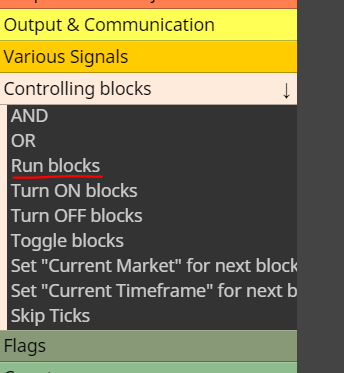
@Jim67 you can execute other blocks at any point with this bad boy here
-
Hey @roar thanks for your reply.
I had tried Run Blocks but that only executes blocks once - whereas activating the Button will run attached blocks whilst button is on (ie waiting for next conditions to be met)
But whilst I was redoing the example project to explain what I mean, I realised I haven't tried "Turn Blocks On"
So will give that a go once markets re-open next week.
Thanks again for your help mate
-
You can back test and check EA at any time
-
Hey @jstap Yeah I know Strategy Tester - but because mines a Dashboard with mostly manual buttons to execute things, I like to see in real time - but will try the automation side as you suggest. Thanks my man

-
So @roar or @jstap,
If there's no way for EA to enable button when I would normally after certain conditions are met, and have to use Turn Off/On Blocks .... can I askin this simple example
https://fxdreema.com/shared/JUfCuy1Rc
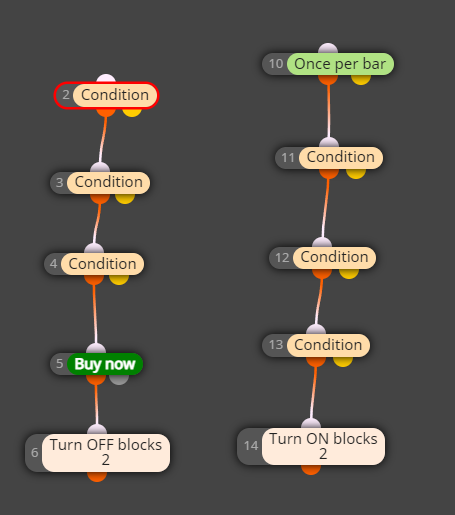
once conditions in Blocks 11,12 and 13 are met and Block 2 is Turned On by Block 14 - Will Blocks 2,3 and 4 continue to run (ie waiting for their conditions to met) until Block 2 is Turned Off again by Block 6?
-
@Jim67 block 2 is turned off again and again on every tick
-
That's what I was afraid of @roar
It would so much easier if EA could just enable a Button at Block 1.
So how can I get Blocks 2,3 and 4 to run until those conditions are met after Blocks 11, 12 and 13 conditions have been met? -
This might work. I dont use "turn on/off" blocks myself, a boolean variable does the same thing
-
Hmmm I think I'll have to learn what and how to use boolean variable - because don't want Blocks 2,3 4 to run at all until after 11,12,13.
Thanks @roar -
So @roar something like this?....maybe?
https://fxdreema.com/shared/F6aP3jCKd
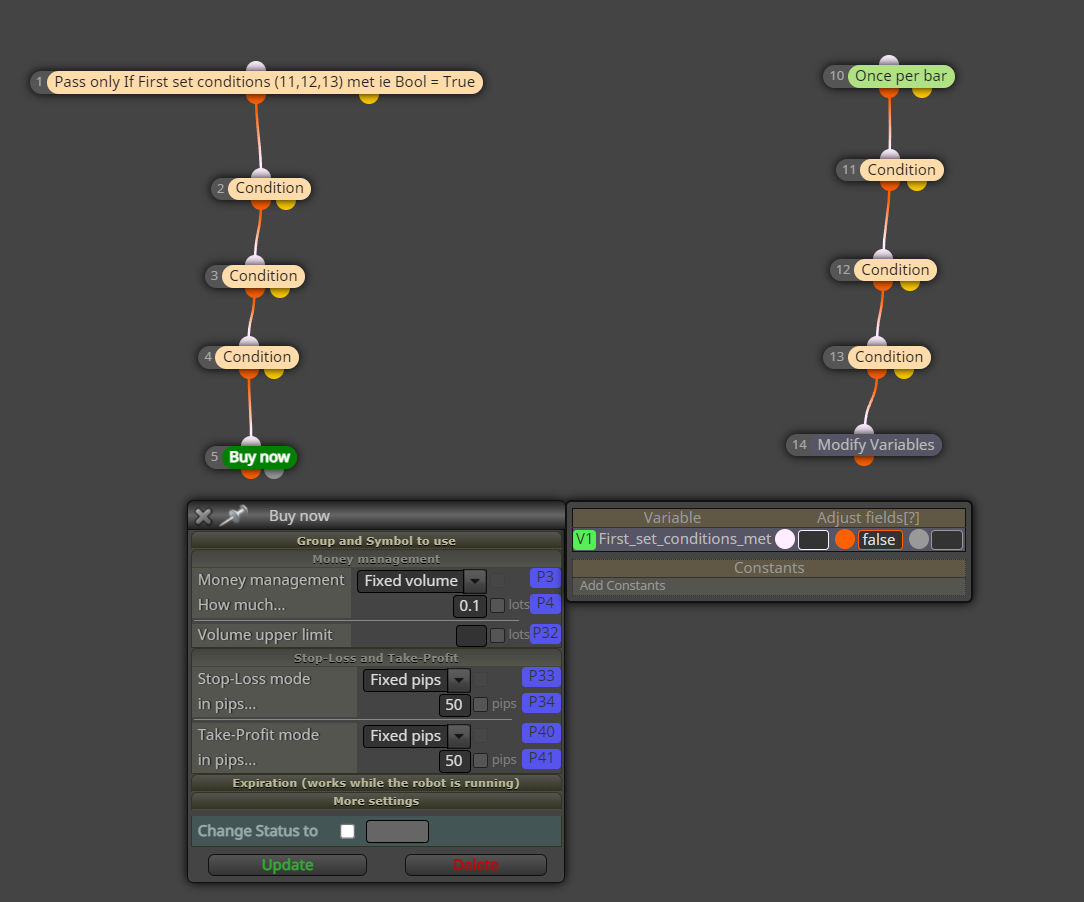
Bool Variable "First set conditions met" set to False by default - until changed to True by Block 14
-
@Jim67 that works. Remember to set the variable false again, after successful buy. You can use the quick variable adjust window to set the variable true or false, "modify variables" block is never needed for boolean variables.
-
Ahh OK great
Many thanks @roar
Love learning more about FxDreema


