Custom Indicator Parameter*
-
Hello Dreemas,
I am using a custom indicator with only 1 parameter.
Length = 14
Yet when I open the Indicator block the field is empty.
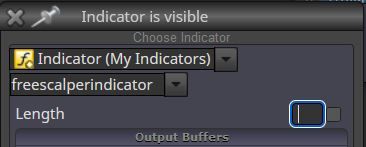
Also in the settings it doesn't show up.
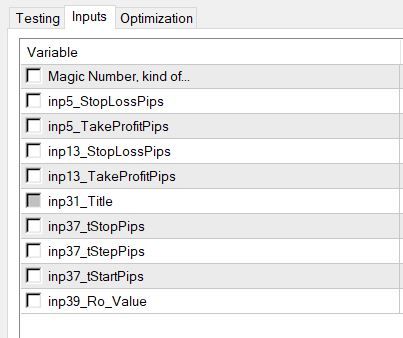
I want to change the Length to 28 but if I input 28 in the Block, the EA will still only read the default of 14......
How do I do this...??
Regards*
-
Have you tried making input variable then attach it to the Length window?
-
@William29 Thanks for replying. Yes I tried that....
-
@Morpheus_0 Did you select the correct variable type for it? Is it integer instead of double maybe?
(English) I will try to help everyone in these fxDreema forums. But if you want to learn how to use the platform in depth or more quickly, I can help you with my introductory fxDreema course in English at https://www.theandorraninvestor.eu.
(Català) Miraré d’ajudar tothom en aquests fòrums d’fxDreema. Tanmateix, si vols aprendre a fer servir la plataforma amb més profunditat o més de pressa, t’hi puc ajudar amb el meu curs d’introducció a fxDeema en català a https://www.theandorraninvestor.eu/ca.
(Español) Intentaré ayudar a todo el mundo en estos foros de fxDreema. Sin embargo, si quieres aprender a usar la plataforma en profundidad o más deprisa, te puedo ayudar con mi curso de introducción a fxDreema en español en https://www.theandorraninvestor.eu/es.
-
@l-andorrà Hello my friend. Thanks for replying*
So the weird thing is: If I select int the field comes up as empty.
If I select double, the field comes up with 14 in the box....However, if I change it to 28, the EA still reads the value as 14 in the backtesting....
In the indicators inputs, it looks like the int icon....
Any further ideas....?
Regards*
-
Man, that goes beyond my knowledge, sorry.

(English) I will try to help everyone in these fxDreema forums. But if you want to learn how to use the platform in depth or more quickly, I can help you with my introductory fxDreema course in English at https://www.theandorraninvestor.eu.
(Català) Miraré d’ajudar tothom en aquests fòrums d’fxDreema. Tanmateix, si vols aprendre a fer servir la plataforma amb més profunditat o més de pressa, t’hi puc ajudar amb el meu curs d’introducció a fxDeema en català a https://www.theandorraninvestor.eu/ca.
(Español) Intentaré ayudar a todo el mundo en estos foros de fxDreema. Sin embargo, si quieres aprender a usar la plataforma en profundidad o más deprisa, te puedo ayudar con mi curso de introducción a fxDreema en español en https://www.theandorraninvestor.eu/es.
-
@l-andorrà - Damn....
So have you successfully changed parameters in custom indicators before and actually had it work....?
Regards*
-
@Morpheus_0 Here's the thing with testing using custom indicators. The parameters of testing will be default indicator parameters. So your thing might only can be tested in real time.
-
@William29 said in Custom Indicator Parameter*:
@Morpheus_0 Here's the thing with testing using custom indicators. The parameters of testing will be default indicator parameters. So your thing might only can be tested in real time.
Dear William,
Thankyou. That would indeed explain the issue.
Regards
Morpheus*

