fxDreema

    • Register
    • Login
    • Search
    • Back to the main page
    • Categories
    • Recent
    • Tags
    • Popular
    • Search

    GMT Time not Working as expected

    Questions & Answers
    5
    13
    1497
    Loading More Posts
    • Oldest to Newest
    • Newest to Oldest
    • Most Votes
    Reply
    • Reply as topic
    Log in to reply
    This topic has been deleted. Only users with topic management privileges can see it.
    • S
      s00071609 last edited by

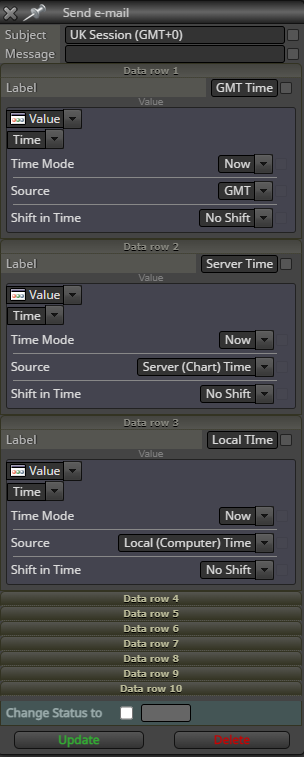
      GMT Local Time and Server TIme all show the same values. This should not be the case. I tested it by sending an email with these values. They are all the same. Can someone please clarify. GMT time should return Current London time, is it?

      Here is the email sent by EA:
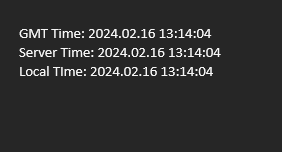
      image.png

      Here is the block Sending the email:
      04781586-1c45-4309-ae09-8c106d4a9a92-image.png

      1 Reply Last reply Reply Quote 0
      • A
        ambrogio last edited by

        from the screenshot no one sees what the real time of the server is and what the real local time is. Who can say?

        1 Reply Last reply Reply Quote 0
        • S
          s00071609 last edited by s00071609

          Why does it matter? The 3 times (GMT, SERVER and LOCAL) that were emailed should not be the same regardless of what the server time is.

          By the way, the server time is the that the time emailed: 13:14:04

          1 Reply Last reply Reply Quote 0
          • A
            ambrogio last edited by

            I mean: if I were to live in London and my broker was based in London, I could see that the three times GMT, server time and local time certainly coincide

            S 1 Reply Last reply Reply Quote 0
            • S
              s00071609 @ambrogio last edited by

              @ambrogio
              No you wouldn't. MT5 server time is GMT+2 or GMT+3 no matter where the broker is located. So let's not argue nonsense, let someone who understands this provide some help. My local time is Australia time, so none of what you have said applies anyway

              A 1 Reply Last reply Reply Quote 0
              • jstap
                jstap last edited by jstap

                This has been noticed before, hopefully @fxDreema will fix it, for now you need to use code to get the correct time. Run this on live/demo to see what to do. Do not know about MT5 but I assume it is the same, this code will work on either: https://fxdreema.com/shared/thE0m6Xtd

                Learn fxDreema Without the Wait!

                My comprehensive book, available on Amazon, is packed with examples and invaluable insights to help you fast-track your learning journey.

                The paperback and hardback editions include MT4 & MT5 QR codes for easy access to all prebuilt projects and robots, including my latest gold trading robot!

                Don’t miss out

                Click here➡️ https://mybook.to/fxDreema to get your copy today!

                Enjoy! 😊

                1 Reply Last reply Reply Quote 0
                • A
                  ambrogio @s00071609 last edited by

                  @s00071609 said in GMT Time not Working as expected:

                  @ambrogio
                  No you wouldn't. MT5 server time is GMT+2 or GMT+3 no matter where the broker is located. So let's not argue nonsense, let someone who understands this provide some help. My local time is Australia time, so none of what you have said applies anyway

                  if you think about it better, it's not nonsense, normally the server time corresponds the broker's time and the local time corresponds to that of your PC. I would like to point out that you have only now specified your location and the time zone of your server. So now, yes, your topic makes sense and jstap has answered you.

                  1 Reply Last reply Reply Quote 0
                  • jstap
                    jstap last edited by

                    GMT = Greenwich Mean Time, which is winter time in the UK, before DST comes into effect. Server is broker/chart time (also used in backrtesting). Local time is whatever your computer thinks it is, normally the time your clock/phone says it is.

                    Learn fxDreema Without the Wait!

                    My comprehensive book, available on Amazon, is packed with examples and invaluable insights to help you fast-track your learning journey.

                    The paperback and hardback editions include MT4 & MT5 QR codes for easy access to all prebuilt projects and robots, including my latest gold trading robot!

                    Don’t miss out

                    Click here➡️ https://mybook.to/fxDreema to get your copy today!

                    Enjoy! 😊

                    D 1 Reply Last reply Reply Quote 0
                    • D
                      deathkid13 @jstap last edited by

                      @jstap so for better backtesting specially when using vps to deploy an ea , server time is the best option?? coz it uses chart time?

                      1 Reply Last reply Reply Quote 0
                      • jstap
                        jstap last edited by

                        Chart time is server time.

                        Learn fxDreema Without the Wait!

                        My comprehensive book, available on Amazon, is packed with examples and invaluable insights to help you fast-track your learning journey.

                        The paperback and hardback editions include MT4 & MT5 QR codes for easy access to all prebuilt projects and robots, including my latest gold trading robot!

                        Don’t miss out

                        Click here➡️ https://mybook.to/fxDreema to get your copy today!

                        Enjoy! 😊

                        1 Reply Last reply Reply Quote 0
                        • A
                          albyxx last edited by albyxx

                          @s00071609 A bit late to the party here but this is a very simple solution by using Market Properties:
                          https://fxdreema.com/shared/QdX8oPs0e

                          S 1 Reply Last reply Reply Quote 1
                          • S
                            s00071609 @albyxx last edited by

                            @albyxx
                            they may have now fixed the issue. That block with gmt, local and server all returned server time, so workaround was needed, its good its working now

                            1 Reply Last reply Reply Quote 0
                            • A
                              albyxx last edited by albyxx

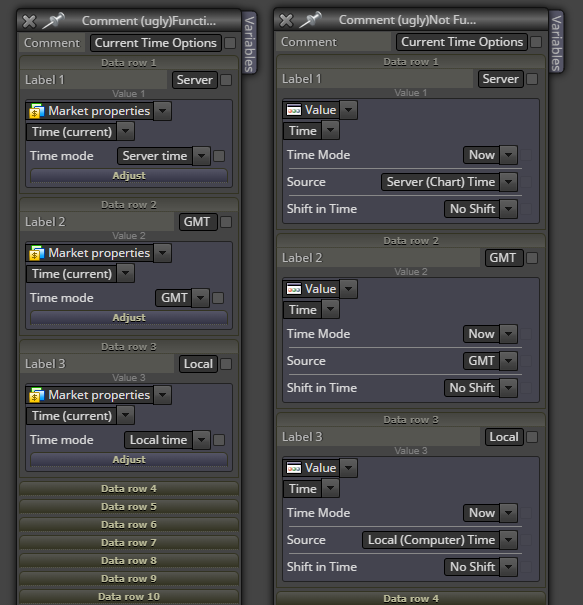
                              @s00071609 just to clarify the situation; your original method of calling the various time stamps through a "Value" and then "Time" still does not function correctly, all return the server time.
                              The method of calling time through "Market Properties" and then "Time" does function correctly for all time stamp types.
                              So, the left side block in the below screen shot functions correctly, the right side block does not.
                              06d70fe7-893a-4833-af21-6b46ee5077ad-image.png

                              1 Reply Last reply Reply Quote 0
                              • 1 / 1
                              • First post
                                Last post

                              Online Users

                              F
                              R
                              S
                              D
                              V
                              O

                              15
                              Online

                              146.7k
                              Users

                              22.4k
                              Topics

                              122.6k
                              Posts

                              Powered by NodeBB Forums | Contributors