fxDreema

    • Register
    • Login
    • Search
    • Back to the main page
    • Categories
    • Recent
    • Tags
    • Popular
    • Search

    "For each closed position" block doesn't loop trades as specified

    Questions & Answers
    4
    14
    338
    Loading More Posts
    • Oldest to Newest
    • Newest to Oldest
    • Most Votes
    Reply
    • Reply as topic
    Log in to reply
    This topic has been deleted. Only users with topic management privileges can see it.
    • L
      Lerumo last edited by

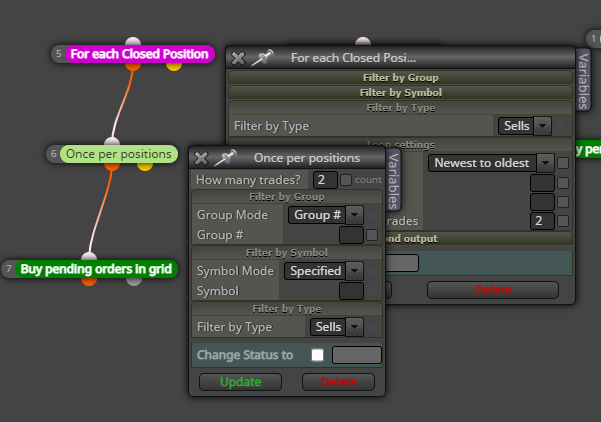
      Hi all. The abovesaid block - which I understand is meant to work as a loop - only performs the required action once and then stops altogether i.e. I want it to place "sell pending orders in grid" every two buy positions closed; and "buy pending orders in grid" every two sell positions closed. What changes should I make? See below a snap and the link. Thanks

      https://fxdreema.com/shared/ttNvREDyd
      Screenshot 2024-03-11 102514.png

      1 Reply Last reply Reply Quote 0
      • l'andorrà
        l'andorrà last edited by

        Do you mean waiting for the last two sell trades to be closed and then a new buy grid to be programmed? That 'once per positions' block doesn't help. You should use a boolean variable instead controlling that grid happened and then waiting for two more sells to be closed to allow the new grid.

        (English) I will try to help everyone in these fxDreema forums. But if you want to learn how to use the platform in depth or more quickly, I can help you with my introductory fxDreema course in English at https://www.theandorraninvestor.eu.

        (Català) Miraré d’ajudar tothom en aquests fòrums d’fxDreema. Tanmateix, si vols aprendre a fer servir la plataforma amb més profunditat o més de pressa, t’hi puc ajudar amb el meu curs d’introducció a fxDeema en català a https://www.theandorraninvestor.eu/ca.

        (Español) Intentaré ayudar a todo el mundo en estos foros de fxDreema. Sin embargo, si quieres aprender a usar la plataforma en profundidad o más deprisa, te puedo ayudar con mi curso de introducción a fxDreema en español en https://www.theandorraninvestor.eu/es.

        1 Reply Last reply Reply Quote 0
        • L
          Lerumo last edited by Lerumo

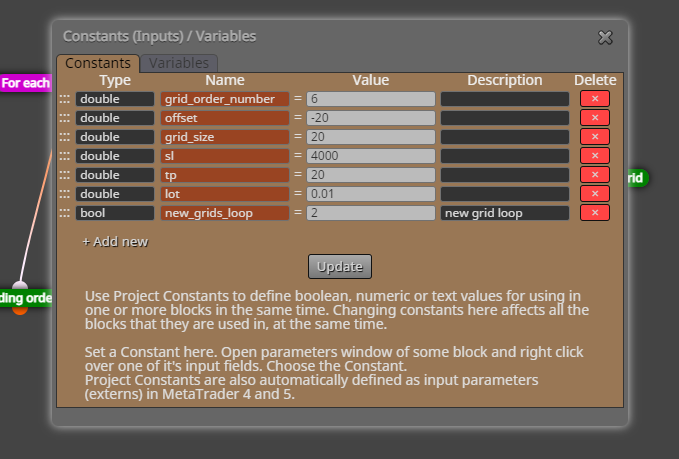
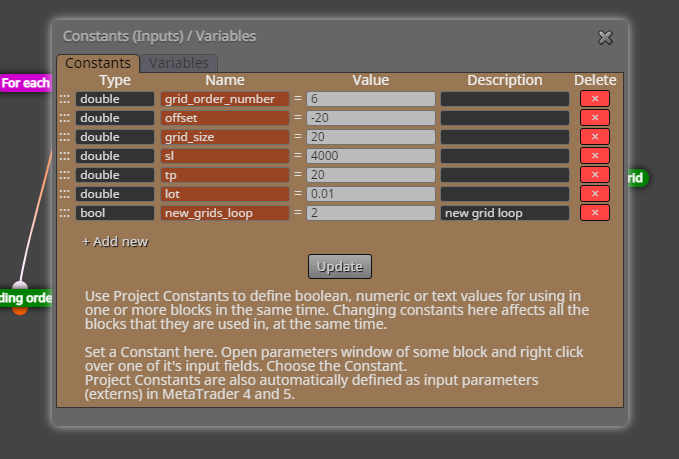
          Yes, that's precisely what I mean. I tried it first without the 'once per positions' block, but this caused it to uncontrollably place unwanted grids with every tick. How do I go about using the boolean variable as you suggest (haven't used it before)?

          Would this work?
          Screenshot 2024-03-11 125538.png

          1 Reply Last reply Reply Quote 0
          • jstap
            jstap last edited by

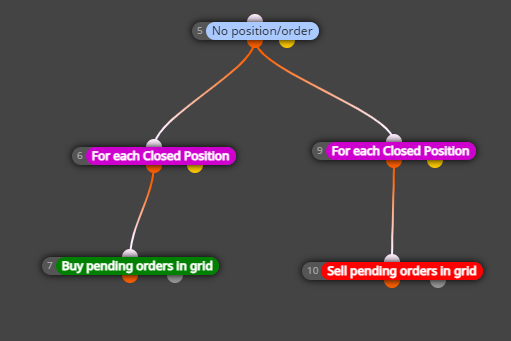
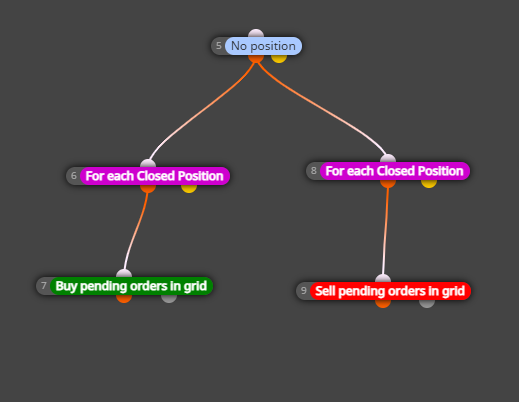
            You need a no position/order block on top, so this restricts new trades opening

            Learn fxDreema Without the Wait!

            My comprehensive book, available on Amazon, is packed with examples and invaluable insights to help you fast-track your learning journey.

            The paperback and hardback editions include MT4 & MT5 QR codes for easy access to all prebuilt projects and robots, including my latest gold trading robot!

            Don’t miss out

            Click here➡️ https://mybook.to/fxDreema to get your copy today!

            Enjoy! 😊

            1 Reply Last reply Reply Quote 0
            • L
              Lerumo last edited by Lerumo

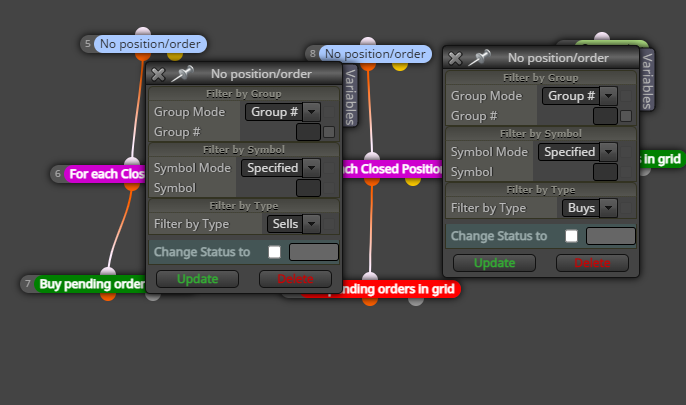
              With the 'no position' or 'no position/order' blocks on top, it doesn't place the new grids at all (unless the boolean settings are incorrect?). I have also tried restricting the 'no position/order' blocks to 'sells' in the case of buy grids, and 'buys' in the case of the sell grids. See link (https://fxdreema.com/shared/KEtKkOe4b) and snaps below
              Screenshot 2024-03-11 133604.png

              Screenshot 2024-03-11 125538.png

              Screenshot 2024-03-11 131631.png

              Screenshot 2024-03-11 135119.png
              Screenshot 2024-03-11 135155.png

              1 Reply Last reply Reply Quote 0
              • jstap
                jstap last edited by

                This will only work if there's no existing trade, if there is you will need to use groups or another way to restrict trade.

                Learn fxDreema Without the Wait!

                My comprehensive book, available on Amazon, is packed with examples and invaluable insights to help you fast-track your learning journey.

                The paperback and hardback editions include MT4 & MT5 QR codes for easy access to all prebuilt projects and robots, including my latest gold trading robot!

                Don’t miss out

                Click here➡️ https://mybook.to/fxDreema to get your copy today!

                Enjoy! 😊

                1 Reply Last reply Reply Quote 0
                • L
                  Lerumo last edited by Lerumo

                  See edits to above reply - any further comments/observations? Also, I notice that it doesn't work on the "On trade" tab - how can I get it to work here, since this is not based on ticks?

                  1 Reply Last reply Reply Quote 0
                  • L
                    Lerumo last edited by

                    Hello @ambrogio - do you have any insights/thoughts on the above issue?

                    1 Reply Last reply Reply Quote 0
                    • A
                      ambrogio last edited by

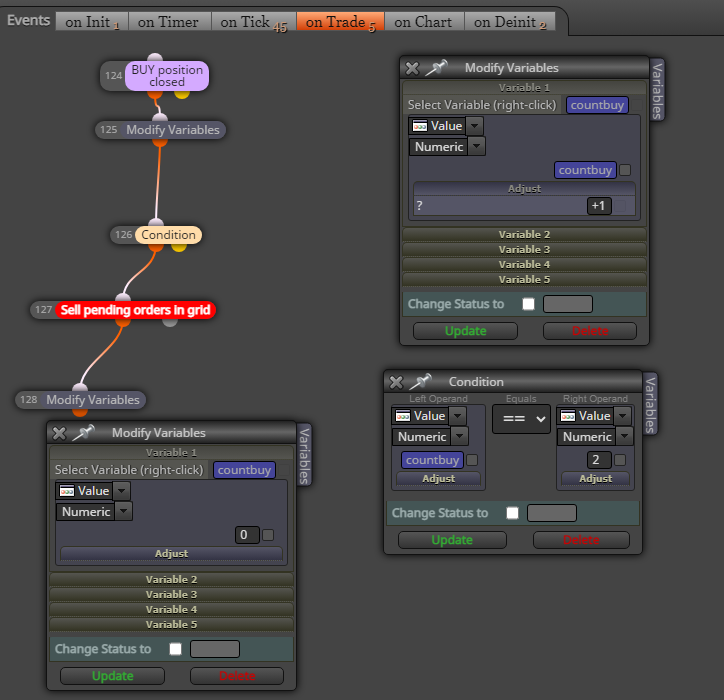
                      i think .... create a variable eg.: countbuy, then in "on trade" section > trade closed buy > modify variable countbuy +1
                      then in "on tick" put a condition countbuy==2 > no sell pending order > sell pending order

                      1 Reply Last reply Reply Quote 0
                      • A
                        ambrogio last edited by

                        Reset variable

                        1 Reply Last reply Reply Quote 0
                        • L
                          Lerumo last edited by

                          Is this correct? - https://fxdreema.com/shared/2uffZWHX

                          1 Reply Last reply Reply Quote 0
                          • A
                            ambrogio last edited by ambrogio

                            not a constant, a variable. But only now i see you want like a loop. This way should work
                            Screenshot (74).png

                            1 Reply Last reply Reply Quote 0
                            • L
                              Lerumo last edited by

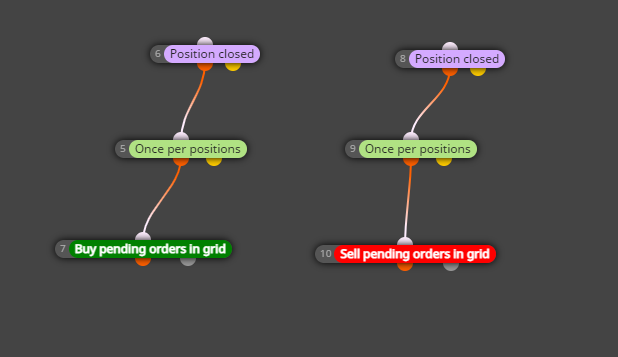
                              @ambrogio Thanks a lot - I also tried another way (pic below, in the "on trade" tab) and both work! Keep well
                              Screenshot 2024-03-11 203053.png

                              A 1 Reply Last reply Reply Quote 0
                              • A
                                ambrogio @Lerumo last edited by

                                @Lerumo you're welcome!

                                1 Reply Last reply Reply Quote 0
                                • 1 / 1
                                • First post
                                  Last post

                                Online Users

                                J
                                P
                                B
                                S
                                H
                                A

                                12
                                Online

                                146.7k
                                Users

                                22.4k
                                Topics

                                122.6k
                                Posts

                                Powered by NodeBB Forums | Contributors