fxDreema

    • Register
    • Login
    • Search
    • Back to the main page
    • Categories
    • Recent
    • Tags
    • Popular
    • Search

    IDWMA - custom indicator not loading properly

    Questions & Answers
    2
    8
    245
    Loading More Posts
    • Oldest to Newest
    • Newest to Oldest
    • Most Votes
    Reply
    • Reply as topic
    Log in to reply
    This topic has been deleted. Only users with topic management privileges can see it.
    • B
      bfallon88 last edited by bfallon88

      Hi All

      Newcomer to FXD just getting my head around the UI and putting my first EA together.

      Can someone help me with why this indicator won't load to FXD properly? It's an MQL5 file type but none of the buffers or input parameters are loading. If I was to do this manually, how should the output look? This is how I've done it:
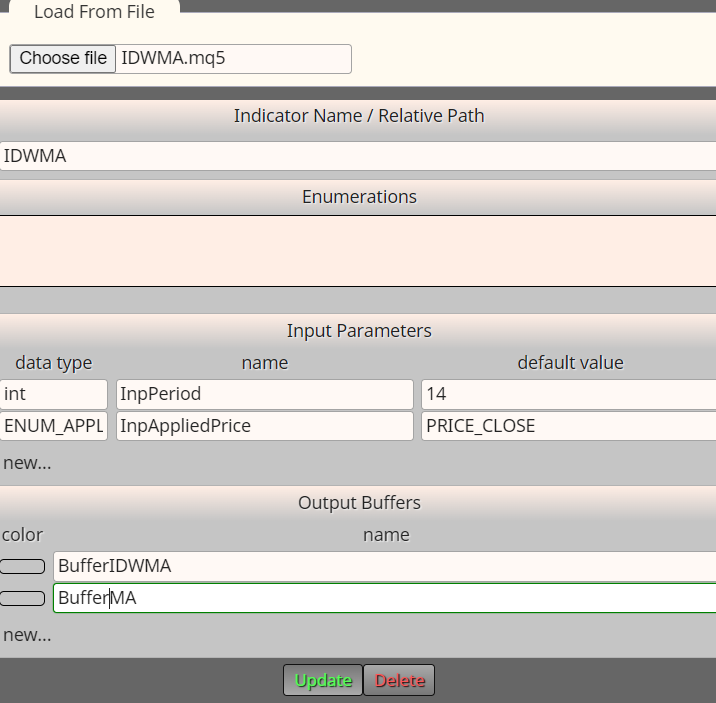
      5be2ce93-c802-4659-ba4b-5b93dbab6e1d-image.png

      IDWMA.mq5

      Thanks all!

      1 Reply Last reply Reply Quote 0
      • jstap
        jstap last edited by jstap

        You need to declare the enum in the enumerations section. Will be something like:

        enum enMaTypes
        {
        ma_sma,
        ma_ema,
        ma_smma,
        ma_lwma,
        };

        Learn fxDreema Without the Wait!

        My comprehensive book, available on Amazon, is packed with examples and invaluable insights to help you fast-track your learning journey.

        The paperback and hardback editions include MT4 & MT5 QR codes for easy access to all prebuilt projects and robots, including my latest gold trading robot!

        Don’t miss out

        Click here➡️ https://mybook.to/fxDreema to get your copy today!

        Enjoy! 😊

        1 Reply Last reply Reply Quote 0
        • B
          bfallon88 last edited by

          Cheers for reply. Are you sure on that, I don't see that expressed in the source file anywhere like I do with other indicators? File is attached btw

          1 Reply Last reply Reply Quote 0
          • jstap
            jstap last edited by jstap

            More of a guess, but enum normally needs to be added, these are pre defined, but still worth a try. if you have the source code add it from the MQ file?

            Learn fxDreema Without the Wait!

            My comprehensive book, available on Amazon, is packed with examples and invaluable insights to help you fast-track your learning journey.

            The paperback and hardback editions include MT4 & MT5 QR codes for easy access to all prebuilt projects and robots, including my latest gold trading robot!

            Don’t miss out

            Click here➡️ https://mybook.to/fxDreema to get your copy today!

            Enjoy! 😊

            1 Reply Last reply Reply Quote 0
            • B
              bfallon88 last edited by

              The MQ file doesn't have the enum types in it.

              Here's what I've put now -

              image.png

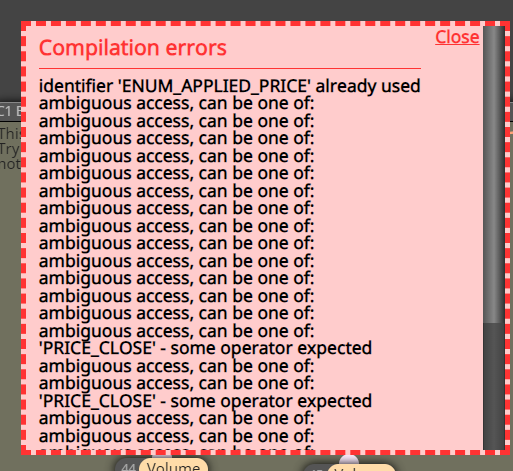
              But getting an error -

              image.png
              image.png

              1 Reply Last reply Reply Quote 0
              • jstap
                jstap last edited by

                When you add the indicator from the MQ file all inputs and buffers will be added, working better than manually adding. If no buffers are added automatically, then the indicator probably doesn't have them.

                Learn fxDreema Without the Wait!

                My comprehensive book, available on Amazon, is packed with examples and invaluable insights to help you fast-track your learning journey.

                The paperback and hardback editions include MT4 & MT5 QR codes for easy access to all prebuilt projects and robots, including my latest gold trading robot!

                Don’t miss out

                Click here➡️ https://mybook.to/fxDreema to get your copy today!

                Enjoy! 😊

                1 Reply Last reply Reply Quote 0
                • B
                  bfallon88 last edited by

                  Yeah I've got the MQ file but nothing is loading in... guess I'll just move on - thanks anyway!

                  1 Reply Last reply Reply Quote 0
                  • jstap
                    jstap last edited by

                    .......👍

                    Learn fxDreema Without the Wait!

                    My comprehensive book, available on Amazon, is packed with examples and invaluable insights to help you fast-track your learning journey.

                    The paperback and hardback editions include MT4 & MT5 QR codes for easy access to all prebuilt projects and robots, including my latest gold trading robot!

                    Don’t miss out

                    Click here➡️ https://mybook.to/fxDreema to get your copy today!

                    Enjoy! 😊

                    1 Reply Last reply Reply Quote 0
                    • 1 / 1
                    • First post
                      Last post

                    Online Users

                    M
                    E
                    L
                    S
                    L

                    11
                    Online

                    147.0k
                    Users

                    22.4k
                    Topics

                    122.6k
                    Posts

                    Powered by NodeBB Forums | Contributors