fxDreema

    • Register
    • Login
    • Search
    • Back to the main page
    • Categories
    • Recent
    • Tags
    • Popular
    • Search

    Close All MT5 trades quickly

    Tutorials by Users
    9
    18
    2440
    Loading More Posts
    • Oldest to Newest
    • Newest to Oldest
    • Most Votes
    Reply
    • Reply as topic
    Log in to reply
    This topic has been deleted. Only users with topic management privileges can see it.
    • jstap
      jstap last edited by jstap

      This tutorial is how to close all trades at once (this only works on MT5).
      1st click on custom, then click on create custom blocks to create a custom block.

      f39fff41-435a-4042-8288-89ef0c0346d7-Screenshot (1996).png

      ce7e1516-a743-4053-9b5c-0f94e80dfb7f-Screenshot (1995).png


      This code is for the first section. This section is classed as on tick because the block is to be used in the on tick tab, it ends with a ~next~ to activate the next connected block:

      startTime = GetMicrosecondCount(); // Record start time
      sTrade.SetAsyncMode(true); // Enable asynchronous trade operations

      CloseAllPositions(); // Call function to close all positions
      PrintPerformance(startTime); // Monitor performance

      ~next~


      This code is for the Global variables, includes section:

      #include <Trade/Trade.mqh>
      ulong startTime; // To store the start time for performance measurement
      CTrade sTrade; // Trade object used for operations


      This code is for the custom functions section, when added the function will be named from the first line:

      void CloseAllPositions() {
      for (int cnt = PositionsTotal() - 1; cnt >= 0 && !IsStopped(); cnt--) {
      if (PositionGetTicket(cnt)) {
      sTrade.PositionClose(PositionGetInteger(POSITION_TICKET), 100);
      uint code = sTrade.ResultRetcode();
      Print("Close result code: ", IntegerToString(code));
      }
      }
      }

      void PrintPerformance(ulong startTime) {
      for (int i = 0; i < 100; i++) {
      Print("Elapsed time: ", IntegerToString(GetMicrosecondCount() - startTime), " microseconds. Open positions: ", IntegerToString(PositionsTotal()));
      if (PositionsTotal() <= 0) { break; }
      Sleep(100);
      }
      }

      Learn fxDreema Without the Wait!

      My comprehensive book, available on Amazon, is packed with examples and invaluable insights to help you fast-track your learning journey.

      The paperback and hardback editions include MT4 & MT5 QR codes for easy access to all prebuilt projects and robots, including my latest gold trading robot!

      Don’t miss out

      Click here➡️ https://mybook.to/fxDreema to get your copy today!

      Enjoy! 😊

      1 Reply Last reply Reply Quote 3
      • B
        bgvulk last edited by

        There is a block for this...

        jstap 1 Reply Last reply Reply Quote 0
        • jstap
          jstap @bgvulk last edited by

          @bgvulk No there's not, this does not close 1 at a time till all is closed (which could take a long time), it closes them all at once...

          Learn fxDreema Without the Wait!

          My comprehensive book, available on Amazon, is packed with examples and invaluable insights to help you fast-track your learning journey.

          The paperback and hardback editions include MT4 & MT5 QR codes for easy access to all prebuilt projects and robots, including my latest gold trading robot!

          Don’t miss out

          Click here➡️ https://mybook.to/fxDreema to get your copy today!

          Enjoy! 😊

          1 Reply Last reply Reply Quote 0
          • Z
            zentex74 last edited by

            Thanks for this tutorial and the help you gave me previously. That was really helpful.
            By the way, I assume the Close All here works on all trades, regardless of the magic number as it imitates MT5 close all.
            How can we restrict the Close All to one magic number or maybe if that is difficult, to a certain text in Comment.

            jstap 1 Reply Last reply Reply Quote 0
            • X
              XDV last edited by XDV

              @jstap Do you have any way to turn ON/OFF Algo Trading in MT5 ?

              123.jpg

              jstap 1 Reply Last reply Reply Quote 0
              • jstap
                jstap @zentex74 last edited by

                @zentex74 To do this you can add a global variable, then in your EA modify the terminal variable with the magic number. I have not tested this but it should work.

                On Tick Section

                mql5
                Copy code
                startTime = GetMicrosecondCount(); // Record start time
                sTrade.SetAsyncMode(true); // Enable asynchronous trade operations

                ClosePositionsByMagicNumber(magicNumberToClose); // Use the global variable for the magic number
                PrintPerformance(startTime); // Monitor performance

                ~next~

                Global Variables/Includes Section

                mql5
                Copy code
                #include <Trade/Trade.mqh>
                ulong startTime; // To store the start time for performance measurement
                CTrade sTrade; // Trade object used for operations
                int magicNumberToClose = 12345; // Magic number for trades to close (change as needed)

                Custom Functions Section

                mql5
                Copy code
                void ClosePositionsByMagicNumber(int magicNumber) {
                for (int cnt = PositionsTotal() - 1; cnt >= 0 && !IsStopped(); cnt--) {
                if (PositionSelectByIndex(cnt)) {
                // Check if the position's magic number matches the desired one
                if (PositionGetInteger(POSITION_MAGIC) == magicNumber) {
                // Close the position
                sTrade.PositionClose(PositionGetInteger(POSITION_TICKET), 100);
                uint code = sTrade.ResultRetcode();
                Print("Close result code: ", IntegerToString(code));
                }
                }
                }
                }

                void PrintPerformance(ulong startTime) {
                for (int i = 0; i < 100; i++) {
                Print("Elapsed time: ", IntegerToString(GetMicrosecondCount() - startTime), " microseconds. Open positions: ", IntegerToString(PositionsTotal()));
                if (PositionsTotal() <= 0) { break; }
                Sleep(100);
                }
                }

                Learn fxDreema Without the Wait!

                My comprehensive book, available on Amazon, is packed with examples and invaluable insights to help you fast-track your learning journey.

                The paperback and hardback editions include MT4 & MT5 QR codes for easy access to all prebuilt projects and robots, including my latest gold trading robot!

                Don’t miss out

                Click here➡️ https://mybook.to/fxDreema to get your copy today!

                Enjoy! 😊

                B 1 Reply Last reply Reply Quote 0
                • jstap
                  jstap @XDV last edited by

                  @XDV You can find that here: https://fxdreema.com/forum/topic/19004/help-custom-mql-code?_=1718300737685

                  Learn fxDreema Without the Wait!

                  My comprehensive book, available on Amazon, is packed with examples and invaluable insights to help you fast-track your learning journey.

                  The paperback and hardback editions include MT4 & MT5 QR codes for easy access to all prebuilt projects and robots, including my latest gold trading robot!

                  Don’t miss out

                  Click here➡️ https://mybook.to/fxDreema to get your copy today!

                  Enjoy! 😊

                  X 1 Reply Last reply Reply Quote 1
                  • JMaxFx
                    JMaxFx last edited by

                    Greeting sir

                    Pls i wanted to create EA to open buy trade "on tick" without any condition, and when the trade hit stop_Loss or trailing_stop, Sell trade should open and when the Sell trade too hit stop loss or trailing stops the Buy should open.

                    pls can you help me out with that.

                    i dont want buy and sell trade should open at once but buy trade first and when sl or ts hit sell trade should open.

                    jstap 1 Reply Last reply Reply Quote 0
                    • jstap
                      jstap @JMaxFx last edited by

                      @JMaxFx This is not the post for that, start a fresh question, and add a shared link on what you have already done

                      Learn fxDreema Without the Wait!

                      My comprehensive book, available on Amazon, is packed with examples and invaluable insights to help you fast-track your learning journey.

                      The paperback and hardback editions include MT4 & MT5 QR codes for easy access to all prebuilt projects and robots, including my latest gold trading robot!

                      Don’t miss out

                      Click here➡️ https://mybook.to/fxDreema to get your copy today!

                      Enjoy! 😊

                      1 Reply Last reply Reply Quote 0
                      • JMaxFx
                        JMaxFx last edited by

                        OOhok Sir

                        1 Reply Last reply Reply Quote 0
                        • X
                          XDV @jstap last edited by

                          @jstap Thank you very very much 😊

                          1 Reply Last reply Reply Quote 0
                          • C
                            creatingrobot last edited by

                            please i want to know how to stop the robot from placing trade after making $20 profit daily. for example, "if the robot make $20 today, it should not execute any trade again for the day until the next day" i will appreciate your guide. Thanks

                            jstap l'andorrà 2 Replies Last reply Reply Quote 0
                            • jstap
                              jstap @creatingrobot last edited by

                              @creatingrobot Create a new post for these questions.

                              Learn fxDreema Without the Wait!

                              My comprehensive book, available on Amazon, is packed with examples and invaluable insights to help you fast-track your learning journey.

                              The paperback and hardback editions include MT4 & MT5 QR codes for easy access to all prebuilt projects and robots, including my latest gold trading robot!

                              Don’t miss out

                              Click here➡️ https://mybook.to/fxDreema to get your copy today!

                              Enjoy! 😊

                              1 Reply Last reply Reply Quote 0
                              • l'andorrà
                                l'andorrà @creatingrobot last edited by

                                @creatingrobot This is the third time you asked for the same question. Please stop duplicating questions.

                                (English) I will try to help everyone in these fxDreema forums. But if you want to learn how to use the platform in depth or more quickly, I can help you with my introductory fxDreema course in English at https://www.theandorraninvestor.eu.

                                (Català) Miraré d’ajudar tothom en aquests fòrums d’fxDreema. Tanmateix, si vols aprendre a fer servir la plataforma amb més profunditat o més de pressa, t’hi puc ajudar amb el meu curs d’introducció a fxDeema en català a https://www.theandorraninvestor.eu/ca.

                                (Español) Intentaré ayudar a todo el mundo en estos foros de fxDreema. Sin embargo, si quieres aprender a usar la plataforma en profundidad o más deprisa, te puedo ayudar con mi curso de introducción a fxDreema en español en https://www.theandorraninvestor.eu/es.

                                1 Reply Last reply Reply Quote 0
                                • B
                                  Byens @jstap last edited by

                                  @jstap can you modify it with internal magicnumber, im sure we will forget to change magic number

                                  https://entrepreneurstart.pw | https://www.mql5.com/en/users/byens8199

                                  1 Reply Last reply Reply Quote 0
                                  • B
                                    Byens last edited by

                                    Next question how do we change only close buy or only close sell?

                                    https://entrepreneurstart.pw | https://www.mql5.com/en/users/byens8199

                                    1 Reply Last reply Reply Quote 0
                                    • B
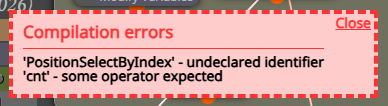
                                      Byens last edited by

                                      image.png

                                      i got this error using magic number

                                      https://entrepreneurstart.pw | https://www.mql5.com/en/users/byens8199

                                      1 Reply Last reply Reply Quote 0
                                      • Q
                                        qinxinfudj last edited by

                                        MT5生成器在哪里打开页面

                                        1 Reply Last reply Reply Quote 0
                                        • 1 / 1
                                        • First post
                                          Last post

                                        Online Users

                                        O
                                        K
                                        M
                                        M
                                        C

                                        13
                                        Online

                                        146.7k
                                        Users

                                        22.4k
                                        Topics

                                        122.6k
                                        Posts

                                        Powered by NodeBB Forums | Contributors