fxDreema

    • Register
    • Login
    • Search
    • Back to the main page
    • Categories
    • Recent
    • Tags
    • Popular
    • Search

    Rusume Trade

    Questions & Answers
    2
    11
    314
    Loading More Posts
    • Oldest to Newest
    • Newest to Oldest
    • Most Votes
    Reply
    • Reply as topic
    Log in to reply
    This topic has been deleted. Only users with topic management privileges can see it.
    • J
      jpsam last edited by jpsam

      Hi guys, How do I make a closed trade resume trading after some time? Thanks in advance

      J 1 Reply Last reply Reply Quote 0
      • jstap
        jstap last edited by

        Add a shared link, what closed the trade and what conditions lead to the replace?

        Learn fxDreema Without the Wait!

        My comprehensive book, available on Amazon, is packed with examples and invaluable insights to help you fast-track your learning journey.

        The paperback and hardback editions include MT4 & MT5 QR codes for easy access to all prebuilt projects and robots, including my latest gold trading robot!

        Don’t miss out

        Click here➡️ https://mybook.to/fxDreema to get your copy today!

        Enjoy! 😊

        1 Reply Last reply Reply Quote 0
        • J
          jpsam last edited by jpsam

          The trade was closed by turning off the "Buy now" block when a loss was made. The problem is turning on the "buy now" block, using the "Turn On" block or any other block, so that it resumes buying. I just wanted the EA to rest for a day after making a loss. I would greatly appreciate your solution; this problem has defied solutions and has almost frustrated me. Thanks sir. Here is the shared link https://fxdreema.com/shared/xCnh2xYVc

          1 Reply Last reply Reply Quote 0
          • J
            jpsam last edited by

            Here is the shared link https://fxdreema.com/shared/xCnh2xYVc

            1 Reply Last reply Reply Quote 0
            • jstap
              jstap last edited by

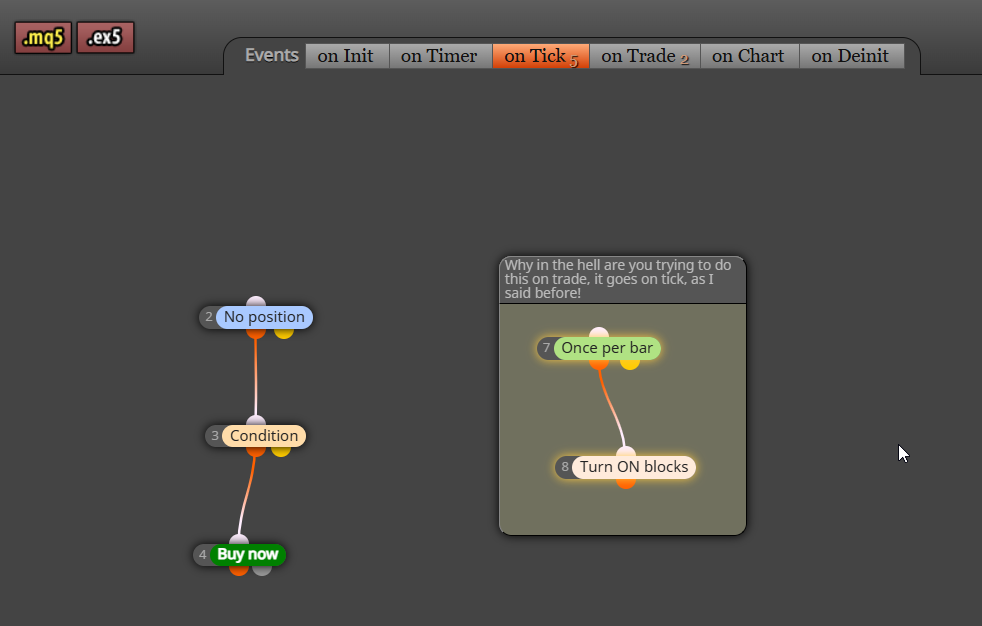
              I showed you in another post how to turn back on on tick, add then test to see what is/isn't working

              Learn fxDreema Without the Wait!

              My comprehensive book, available on Amazon, is packed with examples and invaluable insights to help you fast-track your learning journey.

              The paperback and hardback editions include MT4 & MT5 QR codes for easy access to all prebuilt projects and robots, including my latest gold trading robot!

              Don’t miss out

              Click here➡️ https://mybook.to/fxDreema to get your copy today!

              Enjoy! 😊

              1 Reply Last reply Reply Quote 0
              • J
                jpsam last edited by

                To ensure I get it right this time, I want to share this link with you so that you can see what needs to change, then I will test again. The last time I tested this project, it closed but couldn't open again. Here is the link https://fxdreema.com/shared/u49ORs5ce

                1 Reply Last reply Reply Quote 0
                • jstap
                  jstap last edited by

                  image.png

                  Learn fxDreema Without the Wait!

                  My comprehensive book, available on Amazon, is packed with examples and invaluable insights to help you fast-track your learning journey.

                  The paperback and hardback editions include MT4 & MT5 QR codes for easy access to all prebuilt projects and robots, including my latest gold trading robot!

                  Don’t miss out

                  Click here➡️ https://mybook.to/fxDreema to get your copy today!

                  Enjoy! 😊

                  1 Reply Last reply Reply Quote 0
                  • J
                    jpsam last edited by jpsam

                    Thank you so much, jstap. It didn't work this time, too. I am not surprised because the example you posted doesn't include the block to turn off the trade. It has only Turn On block; logically, the EA must turn off after making a loss before we talk of Turning back on. Your example has only 5 blocks, which doesn't include the Position closed block, where the condition to stop trading should be tied. It also doesn't include Turn off block, which will do the turning off. I appreciate the role you are playing in this project as a helper, but we must understand each other to succeed. As I said earlier, this EA should stop trading for the day once it makes a loss and resume trading tomorrow; therefore, if it doesn't have a condition to turn off the "buy" block, we shouldn't want to Turn on something that is already On. See the link to your example I followed. I only changed the name; everything else remains the way it shows on your post https://fxdreema.com/shared/r9EJ8YlCb

                    1 Reply Last reply Reply Quote 0
                    • jstap
                      jstap last edited by

                      your turn off is on on trade

                      Learn fxDreema Without the Wait!

                      My comprehensive book, available on Amazon, is packed with examples and invaluable insights to help you fast-track your learning journey.

                      The paperback and hardback editions include MT4 & MT5 QR codes for easy access to all prebuilt projects and robots, including my latest gold trading robot!

                      Don’t miss out

                      Click here➡️ https://mybook.to/fxDreema to get your copy today!

                      Enjoy! 😊

                      1 Reply Last reply Reply Quote 0
                      • J
                        jpsam @jpsam last edited by

                        @jpsam Great! It now works perfectly as expected! That's why I call you my prof. Thanks so much! I am delighted.

                        jstap 1 Reply Last reply Reply Quote 0
                        • jstap
                          jstap @jpsam last edited by

                          @jpsam You are welcome

                          Learn fxDreema Without the Wait!

                          My comprehensive book, available on Amazon, is packed with examples and invaluable insights to help you fast-track your learning journey.

                          The paperback and hardback editions include MT4 & MT5 QR codes for easy access to all prebuilt projects and robots, including my latest gold trading robot!

                          Don’t miss out

                          Click here➡️ https://mybook.to/fxDreema to get your copy today!

                          Enjoy! 😊

                          1 Reply Last reply Reply Quote 0
                          • 1 / 1
                          • First post
                            Last post

                          Online Users

                          L
                          A
                          S
                          E

                          10
                          Online

                          146.7k
                          Users

                          22.4k
                          Topics

                          122.6k
                          Posts

                          Powered by NodeBB Forums | Contributors