Custom indicator values
-
@jstap unfortunately that does not work. it is passing on every candle and ignoring the condition same as before.
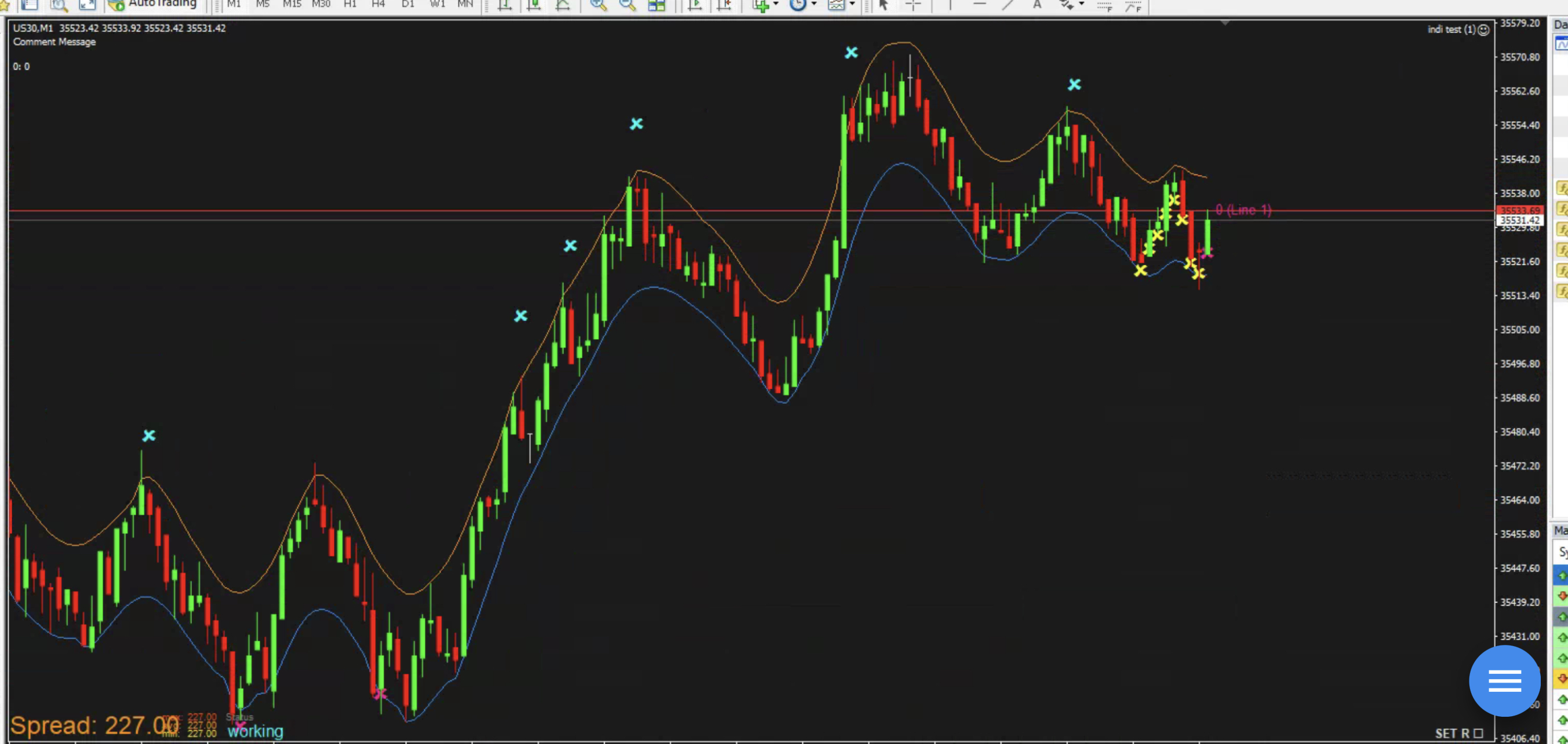
In this example I tried draw an X instead of buy block. You can see it passes on every candle even though the condition is current candle high > Buffer1 (the orange upper line) -
@sauce This works for me, for me it only opens a new trade once one has opened.
Learn fxDreema Without the Wait!
My comprehensive book, available on Amazon, is packed with examples and invaluable insights to help you fast-track your learning journey.
The paperback and hardback editions include MT4 & MT5 QR codes for easy access to all prebuilt projects and robots, including my latest gold trading robot!
Don’t miss out
Click here➡️ https://mybook.to/fxDreema to get your copy today!
Enjoy! 😊
-
@jstap im not sure what that means, can you try having it draw an arrow on chart instead of a buy trade
Or Remove the No Trade block and i bet it will take a new buy order every candle, regardless of condition
-
@sauce Yes it will that is what the no trade block does, with out it every time a candle (can even be the same one) crosses the price line a trade will be placed, their is many ways to prevent this, you just need to decide and implement how you want your EA to work
Learn fxDreema Without the Wait!
My comprehensive book, available on Amazon, is packed with examples and invaluable insights to help you fast-track your learning journey.
The paperback and hardback editions include MT4 & MT5 QR codes for easy access to all prebuilt projects and robots, including my latest gold trading robot!
Don’t miss out
Click here➡️ https://mybook.to/fxDreema to get your copy today!
Enjoy! 😊
-
@jstap no, I’m saying that it is not working correctly, it is not following the condition, you said it only opens a trade because you have a no trade block. it shouldn’t take more trades if the condition block is not met, the condition states when high is above the upper line. Yet it continues opening trades when high is NOT above upper line which means it’s not reading the condition at all. See my screenshot above, notice how it drew yellow X’s even though the high is not above the upper orange line? That is incorrect.
-
@jstap what I’m saying is you’ve created a No Trade Block and Buy Now block because the condition is passing regardless because it is not reading the buffer. It should only pass when high > upper orange line. How do we get it to read the line properly? Just comparing to buffer does not work.
-
@sauce When I tested it was doing as expected, put a shared link of what you have got to and I'll have a look.
Learn fxDreema Without the Wait!
My comprehensive book, available on Amazon, is packed with examples and invaluable insights to help you fast-track your learning journey.
The paperback and hardback editions include MT4 & MT5 QR codes for easy access to all prebuilt projects and robots, including my latest gold trading robot!
Don’t miss out
Click here➡️ https://mybook.to/fxDreema to get your copy today!
Enjoy! 😊
-
@jstap thanks again for working this thru with me!
Before I set it up with all the conditions, I''m just sticking to a basic if current high > upper band = draw arrow
heres a shared link: https://fxdreema.com/shared/3znsAbiRc
-
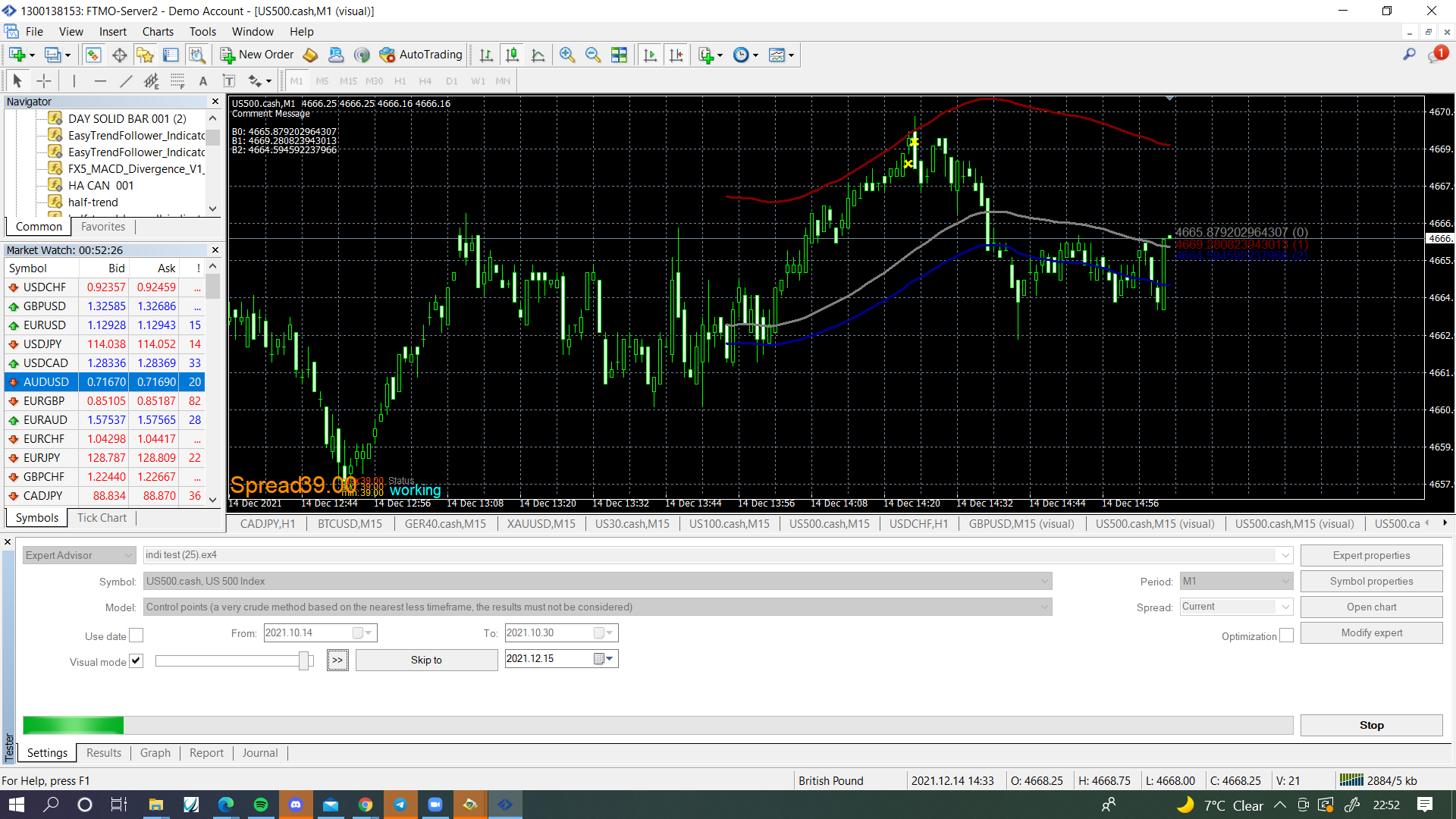
@sauce I think your EA couldn't find the indicator in your MT4 platform. Make sure the line/comment are displaying something other than 0, have made a couple of changes.
https://fxdreema.com/shared/zveQowlkd
Learn fxDreema Without the Wait!
My comprehensive book, available on Amazon, is packed with examples and invaluable insights to help you fast-track your learning journey.
The paperback and hardback editions include MT4 & MT5 QR codes for easy access to all prebuilt projects and robots, including my latest gold trading robot!
Don’t miss out
Click here➡️ https://mybook.to/fxDreema to get your copy today!
Enjoy! 😊
-
@jstap success! I switched to a different MT4 terminal and it worked on there. (not sure why it didn't work on my other terminal, but oh well, glad I got it working)
Can you explain what the EA is doing here just so I know for future reference? How does the comment and trace work for the EA to see the line?
-
@sauce The comment on the left tell you the current line prices, the yellow x are being placed once per candle whenever the line goes above the line, the lines are being drawn as per the indicator buffers.
Learn fxDreema Without the Wait!
My comprehensive book, available on Amazon, is packed with examples and invaluable insights to help you fast-track your learning journey.
The paperback and hardback editions include MT4 & MT5 QR codes for easy access to all prebuilt projects and robots, including my latest gold trading robot!
Don’t miss out
Click here➡️ https://mybook.to/fxDreema to get your copy today!
Enjoy! 😊
-
@jstap what I’m asking is for future custom indicators, in order for them to work I need a “comment” and “trace” blocks if buffers don’t work the traditional way?
Basically is the EA pulling the values from the trace and/or comment blocks? I’ve never used those before and I don’t understand the description of them
(Trying to understand how EA is pulling the buffer values so I can avoid future posts)
-
@sauce This can be done but I don't think by a standard FX block, create a constant to put the indicator name, then use icustom code so you can use this name.
In this like you will see how to do it.
-
@l-andorrà @fxdreema see below post, any advice?
-
@jstap I'm trying to compare two other custom indicators with their buffers like we did above but they are not working. (I've even tried comparing the buffers separately by drawing arrows if >0).
Objective:
if ZeroLag buffer1 > FX5 buffer2 = Draw Green arrow
if ZeroLag buffer1 < FX5 buffer2 = Draw Orange arrowSame problem as before. We have buffer values, but they are not comparing values successfully for me. Not sure why this won't work with how I've set it up. Thanks for the help!
Shared project: https://fxdreema.com/shared/AtHctCUwc
ZeroLag Indicator: 0_1640140568524_ZeroLag_MACD.mq4
FX5 Indicator: 0_1640140584292_FX5_MACD_Divergence_V1_1.mq4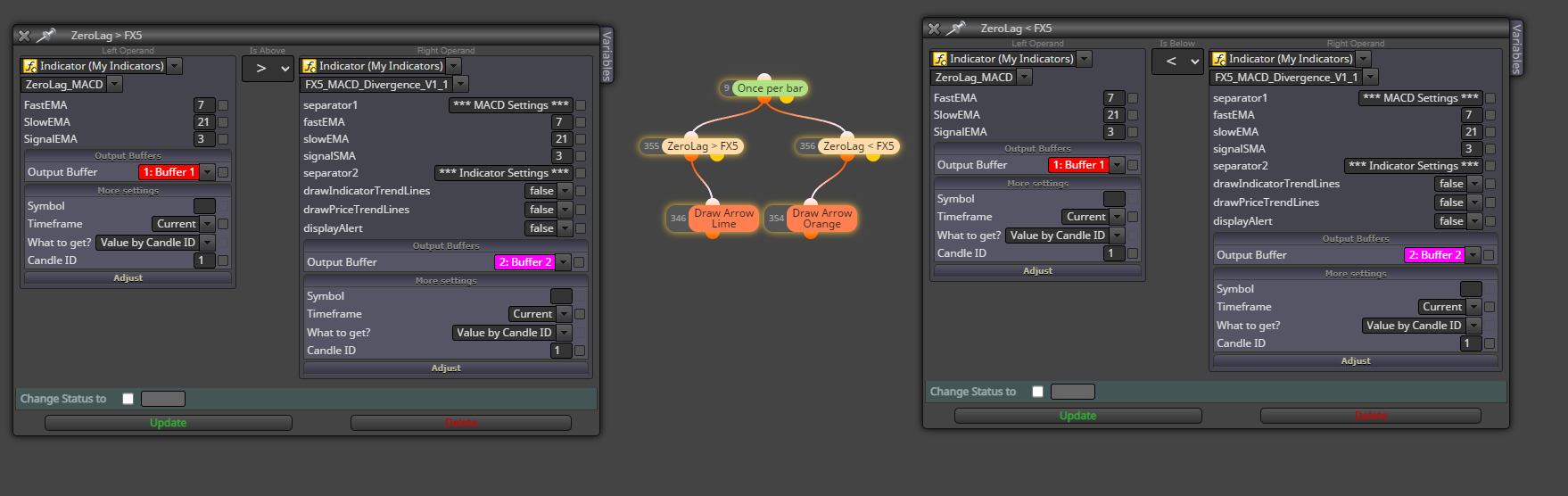
-
@sauce Your logic is correct. I'm afraid the problem is with the indicators. I'm not a programmer so I can't say what is wrong, but I guess they repaint too much. Additionally, you selected a 'once per bar' block on top. This means you will get your arrow at the opening of the candle only. Is that how you want them to be visible?
-
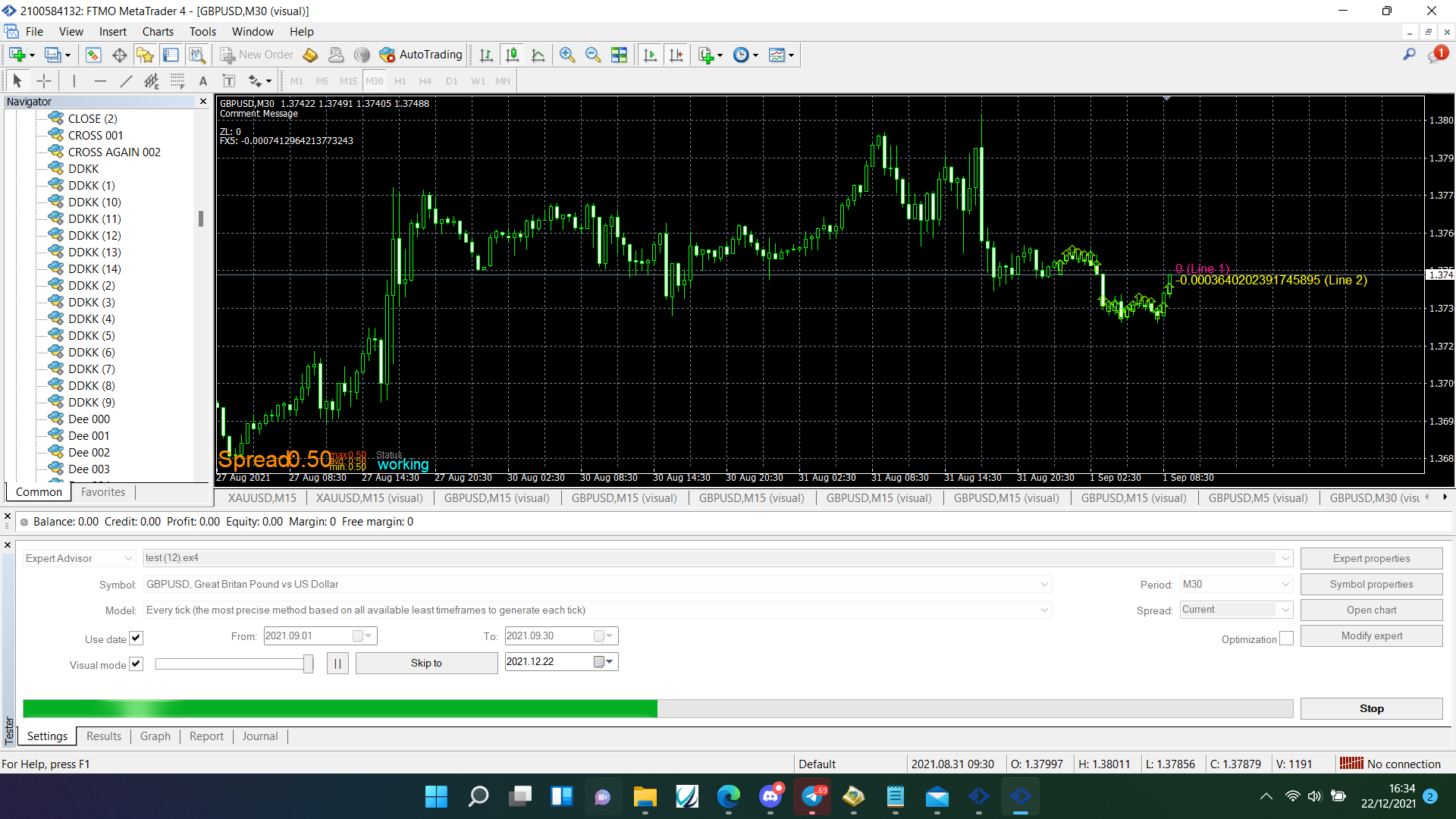
@sauce @l-andorrà Is correct, place the once per bar under your condition so it only activates after your condition, put these buffer values into a comment block, check they produce numbers that at times match each other. Once you can visually check this you should know why things don't work.
-
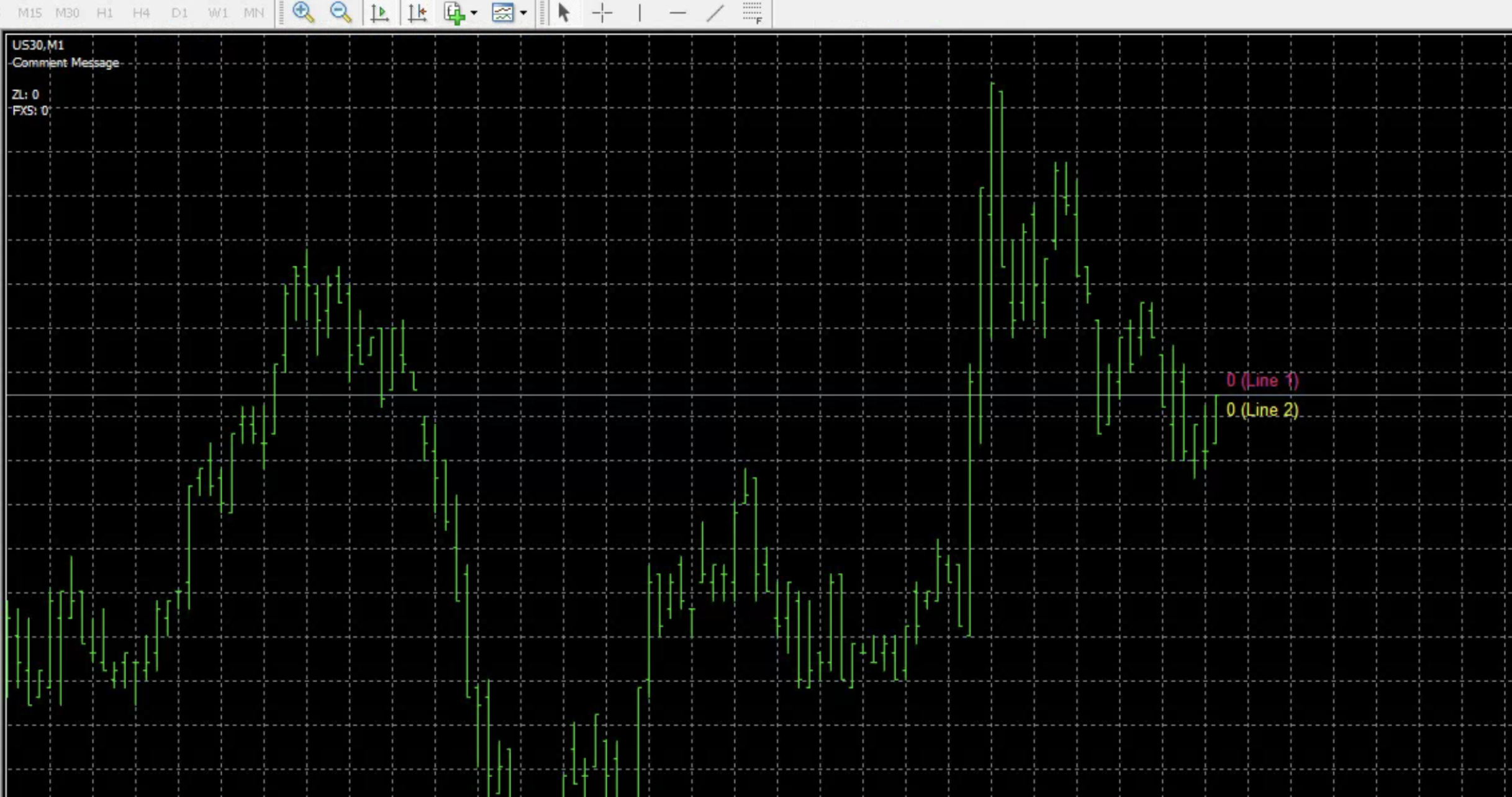
@jstap @l-andorrà thank you both for your help! I removed the once per bar block. i added the comment and trace blocks but im not seeing anything listed for values? can you see what i did wrong?
updated shared project: https://fxdreema.com/shared/y556nZkrb
-
@sauce It doesn't look like the ZL buffer contains any useable information, so the buffers won't ever match.
Learn fxDreema Without the Wait!
My comprehensive book, available on Amazon, is packed with examples and invaluable insights to help you fast-track your learning journey.
The paperback and hardback editions include MT4 & MT5 QR codes for easy access to all prebuilt projects and robots, including my latest gold trading robot!
Don’t miss out
Click here➡️ https://mybook.to/fxDreema to get your copy today!
Enjoy! 😊
-
@jstap what would I have to do to get the ZL to show a value? Is there something I could edit in the code? I mean there is a line so there must be a way to have that line show a value, right?