Trading Pullbacks
-
Good evening together,
I'm new here and love the approach to code only visual with logic without needing to learn a coding language. And so I'm here with my first idea and the hopefully not poor try to take the right steps All comments are welcomed cause I'm really want to learn and love the possibilities that are offered with such an unbelievable website. So thumbs up for the creator and moderator - fantastic work. That's for sure
  And here we go ...:
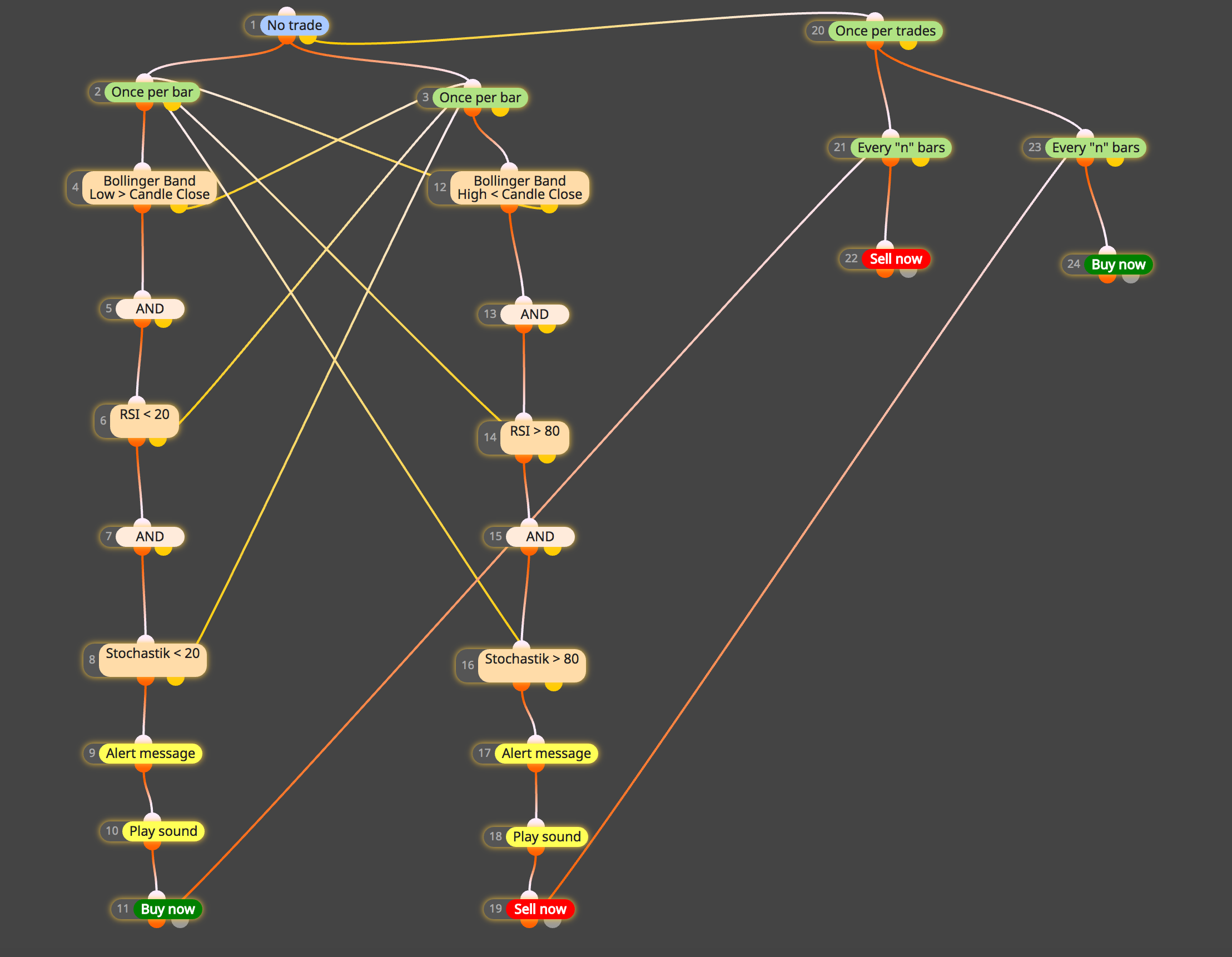 Idea
Idea
I want to look for possible Pullbacks and trade them using Binary Options.
The EA is to alert me if a scenario is triggered. After that I check the chart and decide if I take a binary option or not. So in the end it's simply a big timesaver for me and NOT an automatic trading tool.
Setup
1. The Buy Scenario is triggered if-
The actual candle closes with most of the body outside of the Low Bollinger Band AND
-
RSI is below 20 (=> Oversold) AND
-
Stochastic is below 20 (=> Oversold)
-
Alert message should popup with sound and a green Up Arrow under the trigger candle
-
Buy now
-
Trade Close after the close of the next 5 Candles
2. The Sell Scenario is triggered if -
The actual candle closes with most of the body outside the Upper Bollinger Band AND
-
RSI is above 80 (=> Overbought) AND
-
Stochastic is above 80 (=> Overbought)
-
Alert message should popup with sound and a red Down Arrow above the trigger candle
-
Sell now
-
Trade Close after the close of the next 5 Candles
3. One common rule for both scenarios -
If a trade is active NO additional trades should be triggered
Thoughts & Questions
For better understanding my thoughts and/or questions will be related to the steps in the above attached diagram. If my logic is not ok, please correct me
2/3 => I did start here with Once per bar cause I want the EA to look only for the conditions after the close of a candle. If afterwards a condition is not met I change to the other side of the string in order to check if conditions are met. Always Bollinger has priority. No candle outside Bollinger means no trade can be triggered and we wait for the next candle to close. Meaning we are back to step 2/3.
If we somewhen are happy and meet all three conditions - meaning we have a buy or sell trade (step 11 or 19) I connect that to No trade (step 1 / yellow) cause the answer to No trade is now No => we have a trade. (For my understanding going from there to step 20 means also that my rule that NO additional trades should be triggered is ok cause I can't get back to trading prior to the close of my open trade. No matter if it was a buy or sell trade.)
Now I did take two times the Every "n" bars in order to force the EA to wait till the 5th candle is closed (so n = 5). The duplication of Every "n" bars did allow me to connect my Buy now (step 11) with the Sell now in step 22. And if my open trade is a Sell now I close it with the connection between 19 => 23 => 24 where the Buy now closes the open Sell now.
What I did not know at all is:
1. Would I be able to realise somehow the idea that the big part of the candle should be outside the Bolliger low or high Band? And if yes how would I do that?
2. Could you plot the arrows on the chart if a trade is triggered? Green up arrow for the buy and red down arrow for the sell?
3. At Events I did take on Tick. What I was not sure about is:
Should I change after Step 11 / 19 to "on Trade"? Cause now I'm trading.
Or is it ok to stay in the "on Tick" area?
4.) Do I need to connect steps 22 / 24 with step one again so that after closing trades the EA starts the whole process again?
I think no cause I said every candle should be checked if a trade is open or not with the starting No Trade box ......It would be great if someone could check if my thoughts and logic is ok or if I did make mistakes. And if you see an easier way to reach the goals your comments are also very much welcomed. Being new to all this means needing a lot to learn which will for sure be fun cause I love the way things are handled in the forum and I love the idea of the concept to create an EA without coding.
So thanks a lot for your time and your comments and enjoy your weekend
Cheers
Claus -
-
AND blocks are not needed. The fact that 2 blocks are connected one after another is a natural And logic, because if the block above doesn't pass, the block below would not run.
I think that those yellow Alert and Play blocks are better to be placed below the trading blocks. Well, depends on what they say, but I guess that they say that a new trade has been created. If this is the case, you don't have a trade before Buy/Sell blocks are executed, so why Alerting about that?
The right side with those Once and Every blocks... I'm not sure about it. If you are a newbie, you probably don't know how these blocks work exactly. Even I don't have much sense of how they work.
-
1 - You are the first one to ask such question. In theory you need to compare (Close - BB) with (BB - Low), but I don't think there is a block that can do exactly this. With multiple Formula blocks and Variables it can be done, or with a custom block. As a MQL4 code this is something simple, but sometimes simple things can only be made with multiple blocks in this tool.
2 - No one ever asked me about this as well
But there is a block for that - (Re)draw trades on chart. I think it's enough to connect it somewhere at top level, so it can run on every tick. Or it could be enough to run it after Buy/Sell blocks3 - That Trade even does not mean that you are trading. The "Trade" word here means that the even fires when some trading event happens.
4 - Because blocks are under "on Tick", they run on every tick. At the top we normally put those blocks that check something and below them we put those who do something. When does the process start again? Let's say that all trades are closed - then you have 0 trades and "No trade" would pass. "No trade" cannot pass until you have trades.
So you don't have to create strange loops with blocks. Again, blocks run on every tick! Again and again and again... multiple times pes second probably. The "process" loop is not what you imagine. Everything starts again when certain conditions could pass (for example "No trade" block) -
Hi fxDreema,
thanks a lot for taking your time to check all this. And for your great answers.
That helps me a lot to understand the logic better. Like dropping the AND block.
I'll also put the Alerts after the Buy or Sell is triggered. Makes absolutely sense to me.
The reason I love to get an alert is the fact I'd love to check the chart as soon as my conditions are met.
And then decide if I trade or not manually. So the alert tells me to check in case I'm doing something else at that time.About the right side - I maybe will be able to find out how it works as soon as I have the time to backtest.
And if I find out if it does what I expect (or not) I'm gonna write the result.Concerning the questions - 1 and 2 is no big deal. Cause I check the situation after I get an alert. So it would have been just nice to have but not need to have. 3 and 4 I understand what you mean and my first idea to have everything as "On Tick" event was the correct logic.
So I'll do it a bit shorter and more effective on weekend and maybe already backtest. But in every case I'll write how backtesting was.
Have a nice weekend and thanks a lot
Cheers
Claus
