How to write a formula on Fxdreema
-
Hi I am new to to FxDreema and also doing this EA building first time. I have a question if some body help me with he answer I really appreciate:
How to write this formula on Fxdreema :{(0.5/100) x (Previous Candle High– Previous Candle Low)} + Current Candle Open
and " Current Candle Open - {(0.5/100) x (Previous Candle High– Previous Candle Low)}"
-
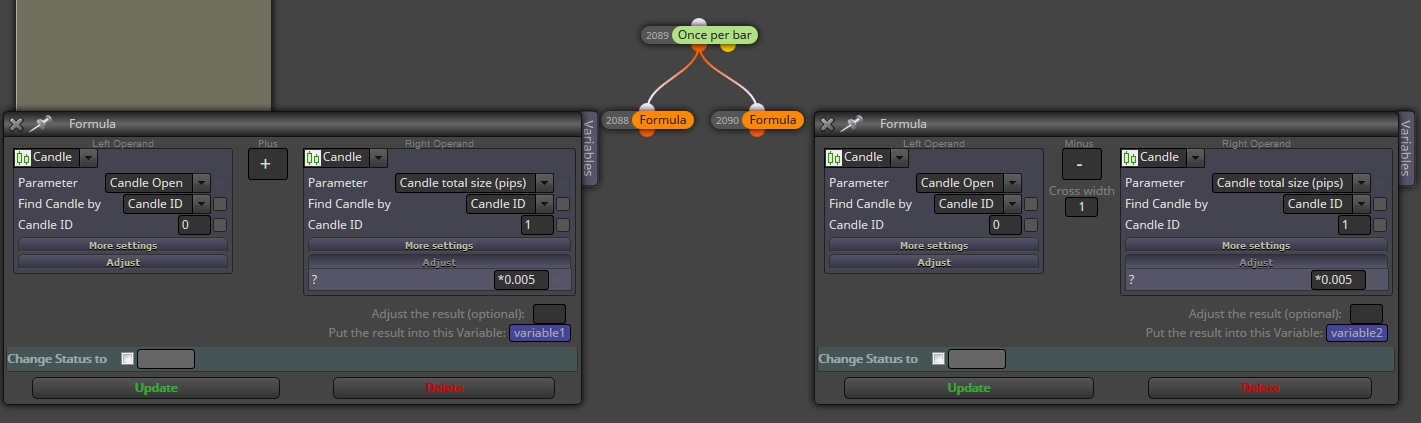
@ali1 for "Candle High– Candle Low" you can pick it from "candle/candle total size (pips)" and if you want it for last candle just set candle ID to 1. Here it goes a visual example as to how the formula block should look.
-
Thank you for your help , I going to try this now and will be in touch.
-
Hi @Andermaiden2nd
Thank you for your kind help, now If you don't mind to answer two things for me-
What is variable and why the formula function is asking me "you must update variable"? when I press "update"
-
With your help I manage to do : {(0.5/100) x (Previous Candle High– Previous Candle Low)}
But where and how I put: + Current Candle Open
to get the final result of the equation because I want to do
{(0.5/100) x (Previous Candle High– Previous Candle Low)}+ Current Candle Open
-
-
@ali1 You might find useful to check the examples to get started https://fxdreema.com/examples#Constants-and Variables
Now for the sake of this case, constants are inputs that are unchangable to the program while variables are changable inputs the program can manipulate (this is the kind of input with which you will manipulate data inside any program).
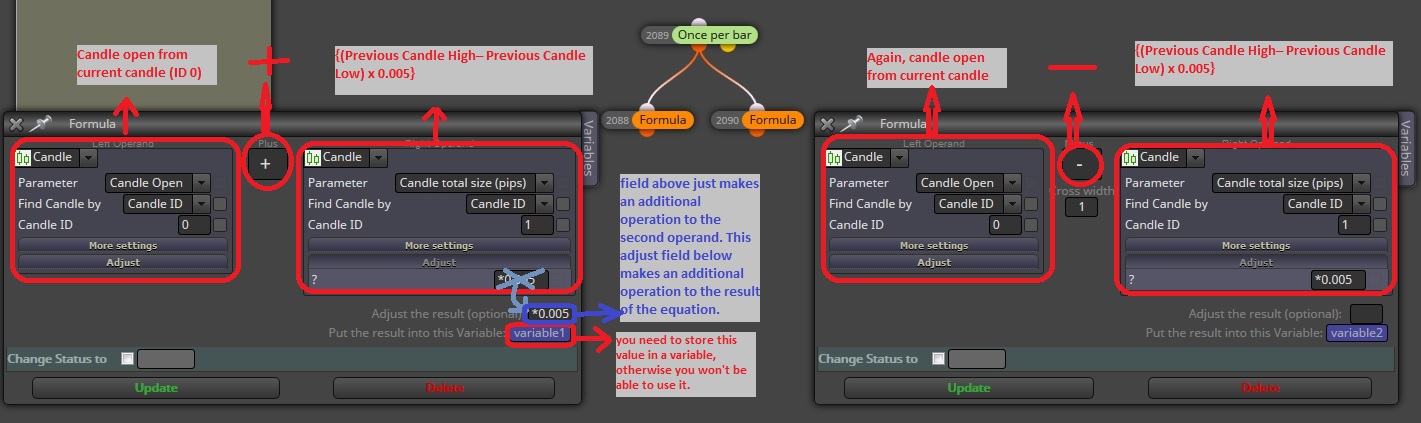
Edit: I forgot to change on the right side too the mutiplier which should also go in the adjust field below (where it says "Adjust the result (optional):" just above the variable field) instead of the one above in the area marked in red.
-
Another more direct way:
https://fxdreema.com/shared/L2IDgoGJd
http://prntscr.com/gx0o8d... which makes me think that he can probably work with the Typical or Median price that can be found somewhere in Condition -> Candle


