New user! MQ4 file won't run.
-
Hi all,
I literally started using FX Dreema this week. However, I'm struggling to get my first algorithm working with MT4 using the Strategy Tester window (to backtest it)
 .
.The .ex4 file is in the correct folder but the 'Start' button won't press, or any of the buttons above it, such as 'Expert Properties.'
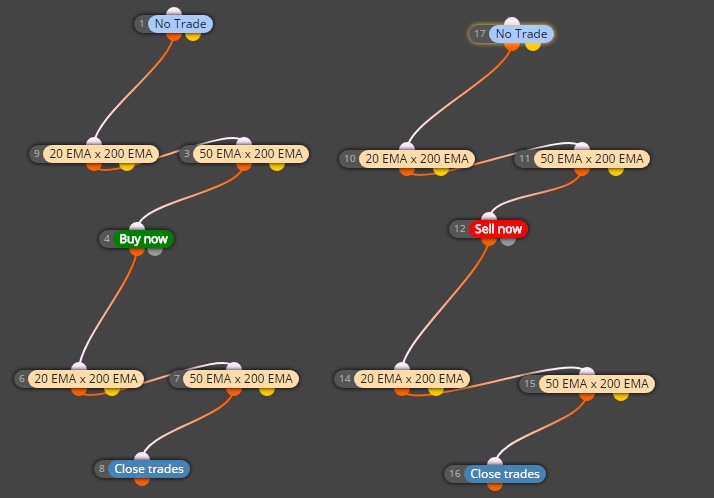
I've attached a screenshot for reference. I was wondering if there's anything common that I may be missing. The left hand side have all been grouped number '1' for longs and the right hand side have been grouped number '2' for shorts. It's basically a moving average crossover strategy.
Many thanks, Dave Pierce.
-
The algorithm runs on every tick, from start (block 1) to finish (block 8).
You probably don't want your trades to be closed on the same tick as you open it
Try connecting the closing logic to the yellow (false) output of "no trade" block.
Also, be careful with multiple crossing conditions - they rarely happen on the same candle.
-
@roar Thanks for the reply. I see what you mean now about 2 moving averages not crossing at the same time. I'll need to figure out how the EA can take action only when both have crossed over the 200EMA, which may be several candles apart.
Does the layout make sense about the trading position closing only when the two shorter term MA's have crossed back over the 200EMA? Would it really open and close the trade on the same tick?
Thanks again.
-
The .ex4 file is in the correct folder but the 'Start' button won't press, or any of the buttons above it, such as 'Expert Properties.'
This sounds like a problem with your terminal, does it run the other EAs properly?
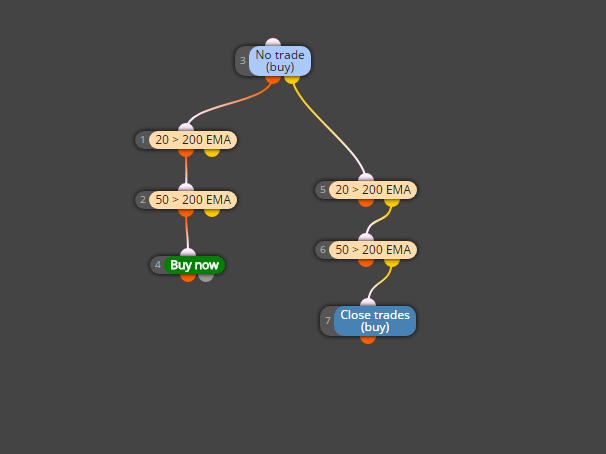
Check this example, I think this is close to what you want.
https://fxdreema.com/shared/Ossluy54
First it checks if there is no buy- if true, it checks if both 20 and 50 emas are above 200, and then opens buy
- if false (trade is running), it checks if both emas are below 200, then closes.
-
Thanks for this. I'll try it out later!
The MT4 terminal does run other EAs so it's definitely an issue with my FXDreema set up.
