A simple EA question
-
Hello everyone on fxdreema,
https://fxdreema.com/shared/LboEbHIod
I have done before 2 custom indicators (wrote directly on MT4)
but never had experience with EA,
today I just want to write a simple EA : when the last candle close price is higher/lower then a price I set (input),
then open a trade Buy/Sell with lot input (can be without S/L or T/P)I have tested with this EA of shared link, but it did not opened any trade,
for example I tested EURUSD M1, input condition price = 1.3337
when last candle close at 1.3338, it did not open the trade,any suggestion if I did wrong ?
any help will be greatfull, thank you~PS: btw, I got an error when I check the checkbox of input of "CurrentTimeFrame", if I uncheck it, it compiled successfully
-
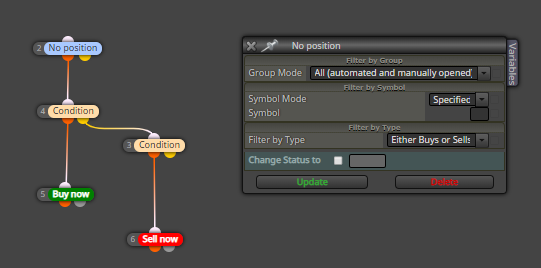
Do try this out
-
Gracias Jose,
I will try your form soon,
so the condition block I'm doing well ?
setted Close candle > numeric Value, -
It looks that it should work, but it really depends on the values you provide. Look at the logs to see if there are any errors.
-
@fxdreema wow~ thanks for reply Admin,
btw,
I got it work when I changed to MT4,
but with same logic I can't let it work in MT5,
it will work on MT5 when I disconnect the one of the two condition to "Non position",
I mean, if I disconnect second condition, the first condition will buy,
if I disconnect first condition, the second condition will sell,
but connected both condition, no one is working,In MT4, both condition connected to "No Trade" will work both,
btw, May I ask how to get value of indicator ATR to declare a variable for TP/SL?
I wish to put for example,
current ATR value (when open trade) * ATR_Multiplier (constant input or can be putted by user) = SL/TPThanks in advance,
also thanks again for your reply @josecortesllobat -
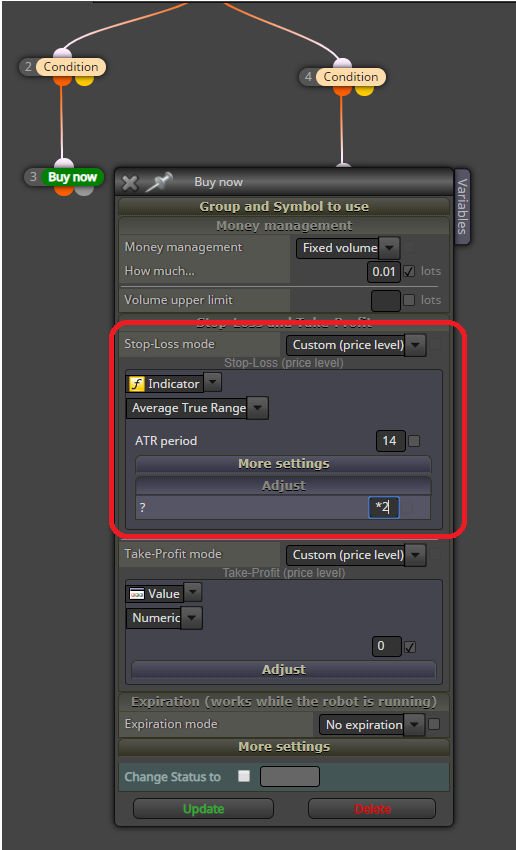
can be this working?
if yes, I know I can change the number "2" to a constant,
but can I write to " * constant name"? -
ART gives us values like 0.0010. I call them "price fraction", because this is like a small difference between two prices, like a small fraction of the whole vertical axis of the price. And to use that as a SL value, instead of "Custom (price level)" select "Custom (price fraction)". Price level - this is the value as it is.
About MT5... in which mode do you have it, because the profile can be in "netting" or "hedging" mode, and things are different.
-
Thanks again for reply dear Admin,
I will write and test both "Custom (Price Level)" and "Custom (Price Fraction)" in a demo to see the difference,
and about the mode netting or hedging, where I can check this?
btw, I let them default while creating my MT4 and MT5 project -
btw, I wish to add "Once per day" filter,
"Once per day" mean it will check the condition I putted and open a trade only once per single day right?
and how can I write if I wish to close all opened trade on the finish of each day?
will be two block of "Once per day" Time filter?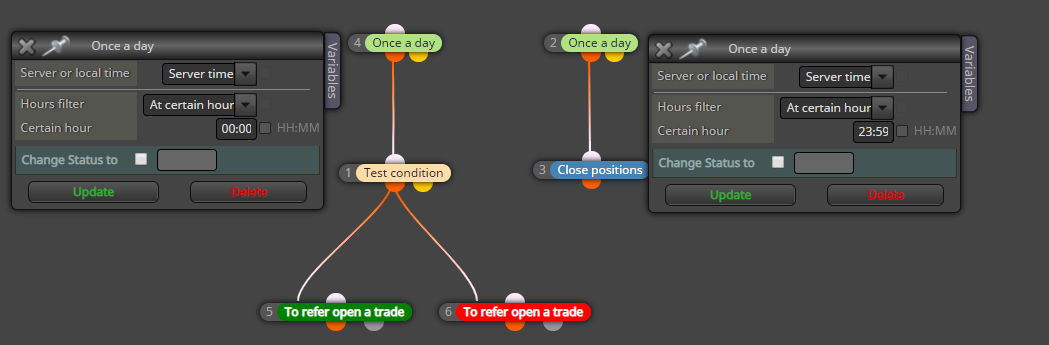
is this logic correct? (forget about the blocks number because I created them in random just to take a screenshot :P)
-
Hedging or netting - this is one small check when you make a new account in MT5.
"Once a day" means that the block can pass max 1 times in a day. You see that it has some settings inside to choose the hour - it's more like a period of 1 particular minute in which the block is allowed to pass once. With default settings if you have this block on the top (and under the "on Tick" event of course) it will pass once in 00:00 every day. Well, on the first tick of the day, which is normally at 00:00.
-
I have noticed most brokers nowadays offer only hedging mode on new accounts, I've usually had to ask their support to change my account to netting mode.
-
@fxDreema thanks again Admin, I will google about hedging and netting or ask my broker,
regards the "Once per day", if I choice "Hours Period",
let's say Start hour from (00:00) End hour to (12:00)
the condition I put under the block "Once per day" will be checked repeatedly during 00:00~12:00?
or will only check max 1 time during these hours,
here's where I'm a bit confused@roar Thanks also for your reply, I will check this with the broker
-
Every "Once per..." block is checked on every tick if you place it on top level under "on Tick". In other words, such block will check if it is allowed to pass or not every time it runs. And it will pass 1 time in its period. "Once per bar" for example, when it runs, it can recognize if the current candle is new for it and will pass is this is true, then until the candle is the same it will not pass again.
-
@fxDreema Thanks again Admin for the detailed explanation
I will continue learn and do more to build mi EA
really appreciate your fxdreema project and the website

