fxDreema

    • Register
    • Login
    • Search
    • Back to the main page
    • Categories
    • Recent
    • Tags
    • Popular
    • Search

    How to make ADJUST field as an optimization input?

    Questions & Answers
    3
    3
    964
    Loading More Posts
    • Oldest to Newest
    • Newest to Oldest
    • Most Votes
    Reply
    • Reply as topic
    Log in to reply
    This topic has been deleted. Only users with topic management privileges can see it.
    • I
      Ibrahamt last edited by

      Hello,

      I am trying to make my SL as X pips above the previous candle's close. I want to test this X number on the optimization till I find the optimal number.

      I didn't find the tick mark (for optimization) on the right side of ADJUST field. What is the easiest way to do that?

      Thanks,

      1 Reply Last reply Reply Quote 0
      • J
        josecortesllobat last edited by

        Adjust field is not intended for that mainly.

        You can use a "Formula" block for that purpose using X as an input.

        StopLosslevel = CandleClose[1] + X (pips as a price fraction)
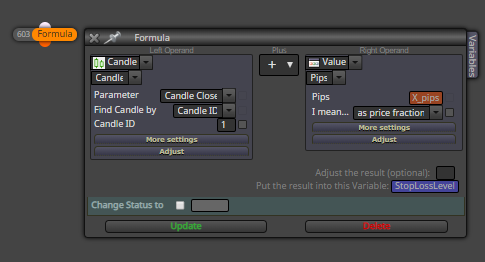
        0_1550858108181_19902165-86a5-463f-8821-49d9fa51e852-image.png

        1 Reply Last reply Reply Quote 0
        • fxDreema
          fxDreema last edited by

          The Adjust field is MQL4/MQL5 code, it is not one single variable. But if you have some Constant, which is actually an input parameter of the EA and can be used for optimization, you can just write the name of the constant in Adjust. Something like this:

          • MyConstant

          or evven...

          • MyConstant pips
          1 Reply Last reply Reply Quote 0
          • 1 / 1
          • First post
            Last post

          Online Users

          K
          A
          D
          S
          G

          16
          Online

          146.7k
          Users

          22.4k
          Topics

          122.6k
          Posts

          Powered by NodeBB Forums | Contributors

