How to do a trailing stop and a stop loss for fractals?
-
How to do a trailing stop and a stop loss for fractals?
-
@cristobaljosemt5
The fractal differs from the usual indicators in many ways:- Fractal is never on candle ID 0 or ID 1, because it needs 2 candles to complete. So the first candle to look for a fractal is ID 2.
- When a candle doesn't have a fractal, indicator value is 0 (I think).
- Up fractal value is candle high, down fractal value is candle low.
We need to track the fractals with variables:
https://fxdreema.com/shared/BedFyvXUdOnce we have the fractal stored in a variable, setting the stop loss level shoud be simple.
-
Hello my friend, thank you very much, I only have one thing left, which are the variables or constants that I must declare so that when compiling I do not get the error
-
@cristobaljosemt5
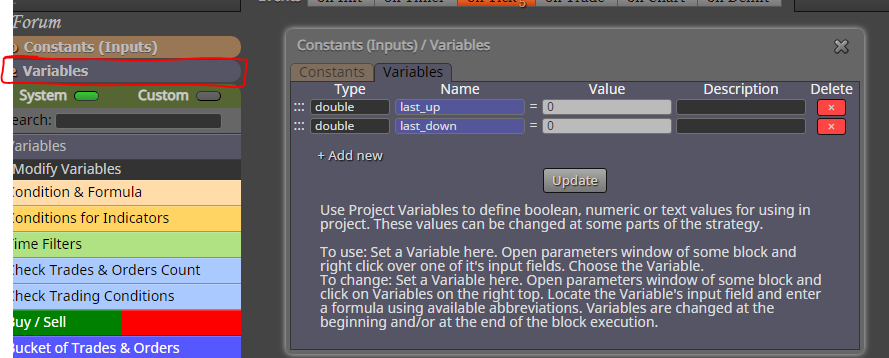
Oh, of course - these are the needed variables:
-
I can not get the stop to work for fractals, what happens?
-
@cristobaljosemt5
Use this to share -
-
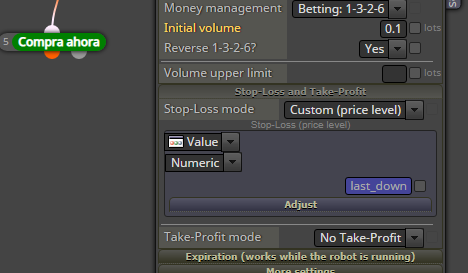
Use right click to put a variable to the stop-loss field.
Stop-loss at last fractal:

-
@roar
https://fxdreema.com/shared/awkEMTCbe
Hello friend, thank you very much for your contributions, now I try to add a trailing stop, but it does not work, which is what is failing -
Connect like this:
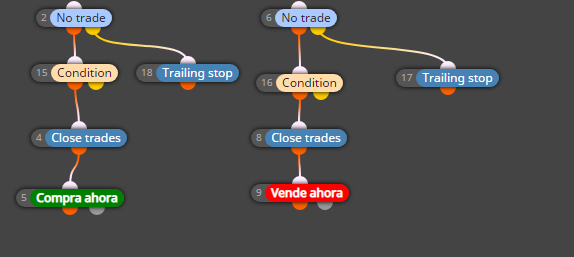
https://fxdreema.com/shared/oRPyrJOBd