Trailing stop after sometime of opening trade
-
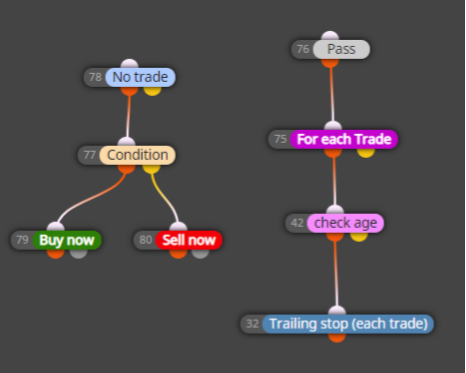
I want to make a trailing stop after 5 minutes of opening trades. Will this achieve it? or is there a more efficient way to achieve this?
https://fxdreema.com/shared/OdIGXYQ6e
-
Instead of the trailing stop block put the pink "close" block. But in fact in the Buy/Sell blocks there are expiration settings, so you won't need the right part
-
@fxdreema said in Trailing stop after sometime of opening trade:
Instead of the trailing stop block put the pink "close" block. But in fact in the Buy/Sell blocks there are expiration settings, so you won't need the right part
I need trailing stop. But pink "close" block will just close the trade?? Wont the current design activate trailing stop after the specified time (5 mins) on every tick?
-
The thing is that "Trailing stop" doesn't care about the blocks above it and would work on all trades it can see. Let's say you have 1 buy and 1 sell trade, the buy trade is 20 minutes old and the sell trade is 2 minutes old. "For each Trade" loads the sell trade first, but it is too young and doesn't pass "check age". Then "For each Trade" goes to the buy trade, which is old enough and eventually the "Trailing stop" is reached. But "Trailing stop" doesn't care, as I mentioned, and would move the stop of the buy trade and/or the sell trade if it needs to.
To separate trades, you can try this. After "check age" put "check type". And if the type is Buy - go to one Trailing stop which only works for buys (in the filter settings). Or, if the type is Sell go to another Trailing stop that works only for sells.
Or, here is an example for trailing stop made with pink blocks - https://fxdreema.com/demo/mt4-loop-trailing-stop. After "check age" you can put those "pips away" and "modify stops" blocks. This will work, because all these pink blocks are working on individual trades loaded by "For each Trade'. While the blue "Trailing stop" has its own "for each" loop inside and works over all trades by itself.

