fxDreema

    • Register
    • Login
    • Search
    • Back to the main page
    • Categories
    • Recent
    • Tags
    • Popular
    • Search

    How to send a screenshot to a Telegram channel

    Questions & Answers
    10
    23
    13031
    Loading More Posts
    • Oldest to Newest
    • Newest to Oldest
    • Most Votes
    Reply
    • Reply as topic
    Log in to reply
    This topic has been deleted. Only users with topic management privileges can see it.
    • vish
      vish last edited by

      How do I send a screenshot to a Telegram channel via HTTP requests? I guess I need to use "Send HTTP request" and "Chart screenshot" blocks but I just cant figure out how to do it. I have created a Telegram bot and I want to post screenshots to my telegram group when there is a signal. I see several EAs on mql5 market that can do this and I want to create similar one with fxdreema. Can anyone help me achieve this?

      E 1 Reply Last reply Reply Quote 0
      • fxDreema
        fxDreema last edited by

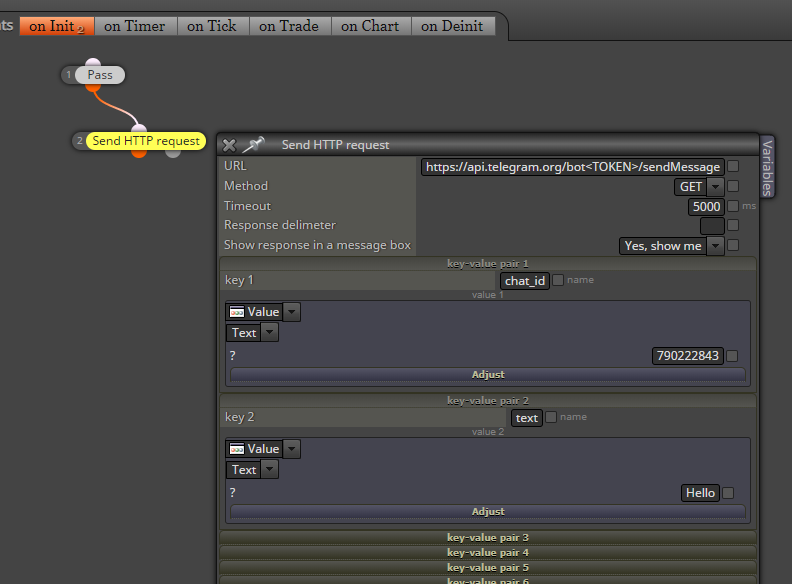
        I was able to send a message to Telegram. It works from the browser as well, because it is a normal http request.
        0_1553523016823_43be72c6-111f-441e-a4e5-51af468fb3e5-image.png

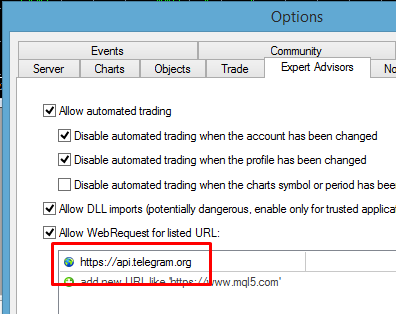
        First of all, you need to go to MetaTrader settings and add https://api.telegram.org
        0_1553523079177_d1242541-3076-4bca-accd-25b847a07664-image.png

        Here is the Telegram API: https://core.telegram.org/bots/api

        I used sendMessage (Ctrl+F on the page, type sendMessage and you will find the description). Here is direct link: https://core.telegram.org/bots/api#sendmessage I obviously used these parameters chat_id and text.

        From where to get the chat ID? Call to getUpdates in the browser, like that:
        https://api.telegram.org/bot<TOKEN>/getUpdates
        ... where <TOKEN> is of course your token. You should see some response, which is a JSON format response. Search for "chat" and after that you will see the id. It's some number, in my case 790222843.

        Here is more info and how to do this in the browser: https://www.shellhacks.com/telegram-api-send-message-personal-notification-bot/

        I don't know how to send photos, it's more complicated than that 🙂 Look at the second example here: https://docs.mql4.com/common/webrequest

        vish 1 Reply Last reply Reply Quote 0
        • E
          ezzyxo @vish last edited by

          @vish Hey have you figured it out? im trying to do the same, but i dont wanna do a screenshot, i just wanna send a signal if its a buy/sell/pending order and modified order

          vish 1 Reply Last reply Reply Quote 0
          • vish
            vish @fxDreema last edited by vish

            @fxdreema
            I was able to send signal already but I really need to send a screenshot to the Telegram channel.

            Can you have a look at this link that has some example files/code that can be used
            https://www.mql5.com/en/articles/2355

            This is what it is telling:
            alt text

            Here is a discussion on the same:
            https://www.mql5.com/en/forum/89826

            I tried myself but I just couldnt do it. Hope you will help on this.

            H 1 Reply Last reply Reply Quote 0
            • vish
              vish @ezzyxo last edited by

              @ezzyxo Nope. check out above links. If you could just tell us too

              1 Reply Last reply Reply Quote 0
              • R
                ranjayforex last edited by ranjayforex

                zzzzzzzzz

                1 Reply Last reply Reply Quote 0
                • H
                  halisman @vish last edited by

                  @vish Hello i am able to send a text, but i want it to include the symbol name and a text with instruction like BUY or SELL. right now i am only able to send only a text or the symbol. please help. thank you

                  l'andorrà jstap 2 Replies Last reply Reply Quote 0
                  • l'andorrà
                    l'andorrà @halisman last edited by

                    @halisman Can you please share the link to your project?

                    (English) I will try to help everyone in these fxDreema forums. But if you want to learn how to use the platform in depth or more quickly, I can help you with my introductory fxDreema course in English at https://www.theandorraninvestor.eu.

                    (Català) Miraré d’ajudar tothom en aquests fòrums d’fxDreema. Tanmateix, si vols aprendre a fer servir la plataforma amb més profunditat o més de pressa, t’hi puc ajudar amb el meu curs d’introducció a fxDeema en català a https://www.theandorraninvestor.eu/ca.

                    (Español) Intentaré ayudar a todo el mundo en estos foros de fxDreema. Sin embargo, si quieres aprender a usar la plataforma en profundidad o más deprisa, te puedo ayudar con mi curso de introducción a fxDreema en español en https://www.theandorraninvestor.eu/es.

                    H 1 Reply Last reply Reply Quote 0
                    • jstap
                      jstap @halisman last edited by

                      @halisman Use text code input with something like:

                      Symbol()+" BUY";

                      you can use multiple functions and multiple text strings, just put + in-between every section.

                      Learn fxDreema Without the Wait!

                      My comprehensive book, available on Amazon, is packed with examples and invaluable insights to help you fast-track your learning journey.

                      The paperback and hardback editions include MT4 & MT5 QR codes for easy access to all prebuilt projects and robots, including my latest gold trading robot!

                      Don’t miss out

                      Click here➡️ https://mybook.to/fxDreema to get your copy today!

                      Enjoy! 😊

                      P 1 Reply Last reply Reply Quote 0
                      • H
                        halisman @l'andorrà last edited by

                        @l-andorrà https://fxdreema.com/builder here is the link thank you guys, i was using pnone notification before..

                        l'andorrà H 2 Replies Last reply Reply Quote 0
                        • l'andorrà
                          l'andorrà @halisman last edited by

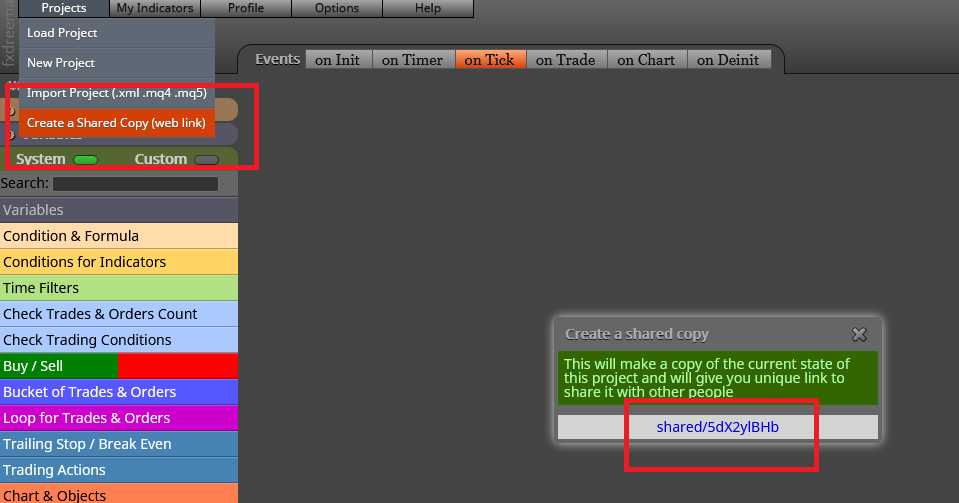
                          @halisman This is the way to upload the link:
                          0_1640521511147_01.png

                          (English) I will try to help everyone in these fxDreema forums. But if you want to learn how to use the platform in depth or more quickly, I can help you with my introductory fxDreema course in English at https://www.theandorraninvestor.eu.

                          (Català) Miraré d’ajudar tothom en aquests fòrums d’fxDreema. Tanmateix, si vols aprendre a fer servir la plataforma amb més profunditat o més de pressa, t’hi puc ajudar amb el meu curs d’introducció a fxDeema en català a https://www.theandorraninvestor.eu/ca.

                          (Español) Intentaré ayudar a todo el mundo en estos foros de fxDreema. Sin embargo, si quieres aprender a usar la plataforma en profundidad o más deprisa, te puedo ayudar con mi curso de introducción a fxDreema en español en https://www.theandorraninvestor.eu/es.

                          H 1 Reply Last reply Reply Quote 0
                          • H
                            halisman @halisman last edited by halisman

                            thank you

                            1 Reply Last reply Reply Quote 0
                            • H
                              halisman @l'andorrà last edited by

                              @l-andorrà shared/V85DKZHJ thank you

                              l'andorrà 1 Reply Last reply Reply Quote 0
                              • l'andorrà
                                l'andorrà @halisman last edited by

                                @halisman said in How to send a screenshot to a Telegram channel:

                                shared/V85DKZHJ

                                This is not my field of expertise, but the logic is correct so I'm afraid I cannot provide any help other than recommend any programmer to look at it, sorry.

                                (English) I will try to help everyone in these fxDreema forums. But if you want to learn how to use the platform in depth or more quickly, I can help you with my introductory fxDreema course in English at https://www.theandorraninvestor.eu.

                                (Català) Miraré d’ajudar tothom en aquests fòrums d’fxDreema. Tanmateix, si vols aprendre a fer servir la plataforma amb més profunditat o més de pressa, t’hi puc ajudar amb el meu curs d’introducció a fxDeema en català a https://www.theandorraninvestor.eu/ca.

                                (Español) Intentaré ayudar a todo el mundo en estos foros de fxDreema. Sin embargo, si quieres aprender a usar la plataforma en profundidad o más deprisa, te puedo ayudar con mi curso de introducción a fxDreema en español en https://www.theandorraninvestor.eu/es.

                                H 1 Reply Last reply Reply Quote 1
                                • H
                                  halisman @l'andorrà last edited by

                                  @l-andorrà thank you

                                  1 Reply Last reply Reply Quote 0
                                  • K
                                    kritcher last edited by

                                    @halisman said in How to send a screenshot to a Telegram channel:

                                    V85DKZHJ

                                    use text code input

                                    H 1 Reply Last reply Reply Quote 0
                                    • H
                                      halisman @kritcher last edited by

                                      @kritcher said in How to send a screenshot to a Telegram channel:

                                      V85DKZHJ

                                      let me try it

                                      1 Reply Last reply Reply Quote 0
                                      • aman
                                        aman last edited by

                                        anyone get done on it? have have a screenshot fot complete sample?

                                        1 Reply Last reply Reply Quote 0
                                        • P
                                          Pheaktra Capo @jstap last edited by

                                          @jstap Hello brother
                                          I try this (Symbol()+" BUY";) already and it work.
                                          The problem is that it print only the symbol that we apply EA on chart only.
                                          For example, if we put it on EURUSD, every buy or sell of any pair, it print EURUSD BUY only.
                                          So, how to get any symbol print out after it is open BUY or SELL at any symbol?
                                          Thanks in advance and have a nice day . . . .

                                          jstap 1 Reply Last reply Reply Quote 0
                                          • jstap
                                            jstap @Pheaktra Capo last edited by

                                            @Pheaktra-Capo said in How to send a screenshot to a Telegram channel:

                                            Add a shared link, not sure if I can do this but I will look.

                                            Learn fxDreema Without the Wait!

                                            My comprehensive book, available on Amazon, is packed with examples and invaluable insights to help you fast-track your learning journey.

                                            The paperback and hardback editions include MT4 & MT5 QR codes for easy access to all prebuilt projects and robots, including my latest gold trading robot!

                                            Don’t miss out

                                            Click here➡️ https://mybook.to/fxDreema to get your copy today!

                                            Enjoy! 😊

                                            P 1 Reply Last reply Reply Quote 0
                                            • 1
                                            • 2
                                            • 1 / 2
                                            • First post
                                              Last post

                                            Online Users

                                            S
                                            A
                                            B
                                            A
                                            J
                                            D

                                            23
                                            Online

                                            146.7k
                                            Users

                                            22.4k
                                            Topics

                                            122.6k
                                            Posts

                                            Powered by NodeBB Forums | Contributors
