MTF Indicator Rising / Falling Advice needed
-
Hey folks,
I need an idea how to deal with my custom indicator which is multi timeframe aware. That means, if I put it on a lower timefrme chart, it generates some kind of stairs - just like this ..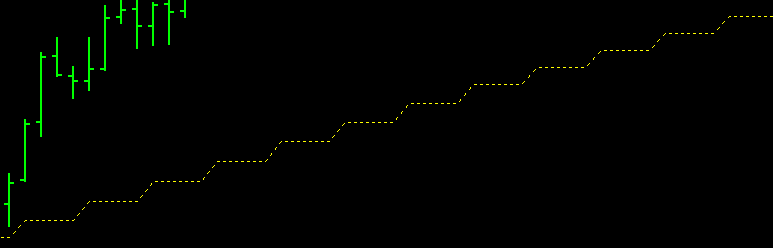
I want to know if the indicator is raising or falling. As it's smoothed MA based, the indicator values per bar do not change much - one stair in the screenshot is about 1 or 2 pips maximum.
I tried with indicator rise and indicator fall blocks, but I didn't find a good setting that deals with the stairs.Does anyone has a different approach?
-
i think for mtf type of indie, is unable to avoid such issue due to the value is taken from higher tf to plot lower (a range of value that tally up in higher tf) tf...
-
@vnpython-0 Yeah, I was thinking take the values by the indicator from the higher timeframe as is (specify in block). Hence I can easily calculate the slope.
-
Catching the value of every 'step' increase, maybe?
-
@trader-philipps said in MTF Indicator Rising / Falling Advice needed:
@vnpython-0 Yeah, I was thinking take the values by the indicator from the higher timeframe as is (specify in block). Hence I can easily calculate the slope.
if slope, using lower tf might be better since whatever happens at lower tf will drives the bigger tf... higher tf is for trend directions...
-
@vnpython-0 Thanks for your advice. However, it is a trend confirmation as trades should be opened in higher tf trend direction.
-
@trader-philipps said in MTF Indicator Rising / Falling Advice needed:
@vnpython-0 Thanks for your advice. However, it is a trend confirmation as trades should be opened in higher tf trend direction.
if you're entering trades on lower tf once the higher tf trend is confirmed, then you have to think of a method to activate trades on desired tf following trend direction.. normally when trend is 'confirmed' (crossover?), then mark a var from '0' to '1' to pass condition to lower tf's indicator to check for 'crossover' and enter the trade


