NON GRAPHICAL buffers
-
Hi
I have custom indicator with non graphical buffers
Is there anybody who knows the way to include those two NON GRAPHICAL buffers on a fxDreema EA?
ExtOBVBuffer
ExtMABuffer.
@miro1360 , @roar or @trader-philipps
[1_1569939412069_OBV_vs_MA.ex4](Uploading 100%) [0_1569939412067_OBV_vs_MA.txt](Uploading 100%) -
https://www.dropbox.com/sh/90mlz9ke4y25x61/AAB9qEewmRkWNCcJXru3YZLza?dl=0
Link to the indicator -
@gizmosz As you have the source code of the indicator it's easy.
Just create a file "OBV_vs_MA.mq4" in your indicator folder.
Now you ccan import it to fxdreema.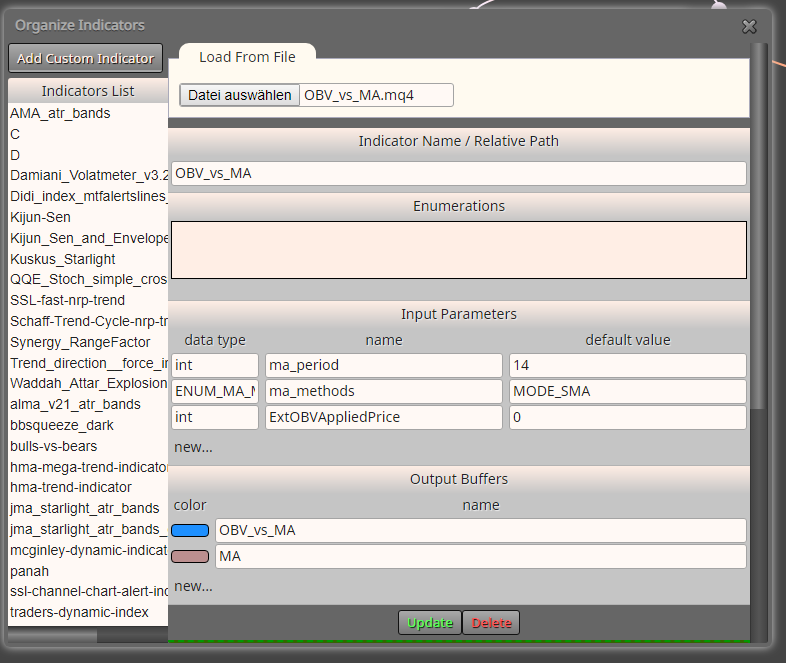
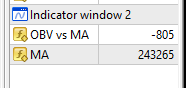
The values of the 2 buffers you can see in the data window of your terminal when moving the mouse on the chart.
-
@trader-philipps sorry, I do not understand your answer, maybe I did not understand the question
-
This is new to me. I never saw that. Could you please tell me where that window is on MT4?
-
@l-andorrà said in NON GRAPHICAL buffers:
This is new to me. I never saw that. Could you please tell me where that window is on MT4?
Press <Ctrl>-D
How can you build strategies without?
-
@trader-philipps said in NON GRAPHICAL buffers:
@gizmosz As you have the source code of the indicator it's easy.
Just create a file "OBV_vs_MA.mq4" in your indicator folder.
Now you ccan import it to fxdreema.@trader-philipps Please, could you kindly explain your response "Just create a "OBV_vs_MA.mq4" file"?
Thanks in advance -
No, sorry. I meant the Data window XD. I took a look on this interesting indicator and I found the problem he's talking about. There is a discrepancy in the data caught by fxDreema. I created this quick EA to see what the buffers shown on 'Custom indicators' window show:
https://fxdreema.com/shared/kELB5yaN
And this is what I got:

Buffers values caught by the graphic buffers are completely different from those shown on the Data Window and the indicator's subwindow. Obviously Gizmosz needs the later ones, not those weird 0 and 2952.
Am I right Gizmosz?
-
@ambrogio said in NON GRAPHICAL buffers:
@trader-philipps said in NON GRAPHICAL buffers:
@gizmosz As you have the source code of the indicator it's easy.
Just create a file "OBV_vs_MA.mq4" in your indicator folder.
Now you ccan import it to fxdreema.@trader-philipps Please, could you kindly explain your response "Just create a "OBV_vs_MA.mq4" file"?
Thanks in advanceHe means you can compile the source code into an mq4 file through the MT4 Metaeditor tool.
-
@l-andorrà
Yes, correct. And it's strange, couse this indicator works normally when it's on live chart, but when it's added to EA it didn't read buffers correctly. And that's the problem. -
I think that @trader-philipps has some problems to solve in Theresienwiese plazt

-
@ambrogio cheers
-
@gizmosz I took a look at it yesterday and it seems that on tester the indicator doesn't work. The values appear to be static. I haven't tried to debug it but it looks like the ma has an issue for some reason.
-
@l-andorrà said in NON GRAPHICAL buffers:
@ambrogio said in NON GRAPHICAL buffers:
@trader-philipps said in NON GRAPHICAL buffers:
@gizmosz As you have the source code of the indicator it's easy.
Just create a file "OBV_vs_MA.mq4" in your indicator folder.
Now you ccan import it to fxdreema.@trader-philipps Please, could you kindly explain your response "Just create a "OBV_vs_MA.mq4" file"?
Thanks in advanceHe means you can compile the source code into an mq4 file through the MT4 Metaeditor tool.
I appreciate your commitment in the forum, (because support in FxDreema does not exist at all), but please do not replace yourself with the answers that others should give, Also because your answer, in this case, does not make sense
-
@ambrogio said in NON GRAPHICAL buffers:
@l-andorrà said in NON GRAPHICAL buffers:
@ambrogio said in NON GRAPHICAL buffers:
@trader-philipps said in NON GRAPHICAL buffers:
@gizmosz As you have the source code of the indicator it's easy.
Just create a file "OBV_vs_MA.mq4" in your indicator folder.
Now you ccan import it to fxdreema.@trader-philipps Please, could you kindly explain your response "Just create a "OBV_vs_MA.mq4" file"?
Thanks in advanceHe means you can compile the source code into an mq4 file through the MT4 Metaeditor tool.
I appreciate your commitment in the forum, (because support in FxDreema does not exist at all), but please do not replace yourself with the answers that others should give, Also because your answer, in this case, does not make sense
Understood.
-
@ambrogio said in NON GRAPHICAL buffers:
@trader-philipps said in NON GRAPHICAL buffers:
@gizmosz As you have the source code of the indicator it's easy.
Just create a file "OBV_vs_MA.mq4" in your indicator folder.
Now you ccan import it to fxdreema.@trader-philipps Please, could you kindly explain your response "Just create a "OBV_vs_MA.mq4" file"?
Thanks in advance@ambrogio It's okay if @l-andorrà answers as long as it's correct.
I meant that you take the source code of from the txt file and put it to a text file with the ending .mq4
That file you could place in the indicator folder and you may open it in MetaEditor.
However, when you have a mq4 file, you can easily import it to fxdreema and it will recognize the available buffers.With your indicator there might be an issue with the enum constant regarding MA method to use. I was not able to work around that even in MetaEditor. It really just seems to not work on tester and calculates only constants to the buffers per candle for whatever reason.
-
@trader-philipps Ah of course, it's the same thing as copying a code directly into the metaeditor, but in this case @Gizmosz had shared the file .ex4, there was some confusion
thank you -
Thanks everyone for replies. I think we solve this problem

-
@ambrogio Nevermind. The dropbox link contained the source code of the indicator.
