4 hours filter
-
I want the ea to run for only 4 hours after being activated by a signal block.
The hours filter does not seem to work.
Any workaround?
-
Do you mean working for 4 hours IMMEDIATELY after being activated? Or just at ANY MOMENT after being activated but before 4 hours have passed since?
-
4 hours IMMEDIATELY after being activated
-
Work in the "on Timer" tab. Make a variable that counts seconds (or minutes), and when the amount for 4 hours is filled up, modify variable stop=1 and use condition "stop == 0" in the regular "on Tick" tab. Alternatively, just terminate at the point.
https://fxdreema.com/shared/MKjwb1vvb
I'm not sure the "Change timer period" works like this, but I hope you get the idea. You can change the timer period from the project settings as well
If you don't need to be very precise, an easier way is to stay in "on Tick", and use "once per bar" block and count them in a similar fashion.
-
Thank you.
-
I don't understand whay are you using the orange dot box on block 7 to update the variable. Why not the white dot one?
(English) I will try to help everyone in these fxDreema forums. But if you want to learn how to use the platform in depth or more quickly, I can help you with my introductory fxDreema course in English at https://www.theandorraninvestor.eu.
(Català) Miraré d’ajudar tothom en aquests fòrums d’fxDreema. Tanmateix, si vols aprendre a fer servir la plataforma amb més profunditat o més de pressa, t’hi puc ajudar amb el meu curs d’introducció a fxDeema en català a https://www.theandorraninvestor.eu/ca.
(Español) Intentaré ayudar a todo el mundo en estos foros de fxDreema. Sin embargo, si quieres aprender a usar la plataforma en profundidad o más deprisa, te puedo ayudar con mi curso de introducción a fxDreema en español en https://www.theandorraninvestor.eu/es.
-
@l-andorrà There is no difference in this case, it's just a matter of choice.
I tend to always use the orange box, because that is often useful when combining with the condition blockNeed small help? Tag me in your post
Need big help? https://www.fiverr.com/big_algo/automate-your-winning-strategy-in-mql4-or-mql5 -
@roar said in 4 hours filter:
@l-andorrà There is no difference in this case, it's just a matter of choice.
I tend to always use the orange box, because that is often useful when combining with the condition blockAnd why is it more useful?
(English) I will try to help everyone in these fxDreema forums. But if you want to learn how to use the platform in depth or more quickly, I can help you with my introductory fxDreema course in English at https://www.theandorraninvestor.eu.
(Català) Miraré d’ajudar tothom en aquests fòrums d’fxDreema. Tanmateix, si vols aprendre a fer servir la plataforma amb més profunditat o més de pressa, t’hi puc ajudar amb el meu curs d’introducció a fxDeema en català a https://www.theandorraninvestor.eu/ca.
(Español) Intentaré ayudar a todo el mundo en estos foros de fxDreema. Sin embargo, si quieres aprender a usar la plataforma en profundidad o más deprisa, te puedo ayudar con mi curso de introducción a fxDreema en español en https://www.theandorraninvestor.eu/es.
-
@l-andorrà I could skip the whole STOP-block in my example, and just modify the variable in the condition-block.
Orange box needs the condition to be TRUE, before it can modify the variable.
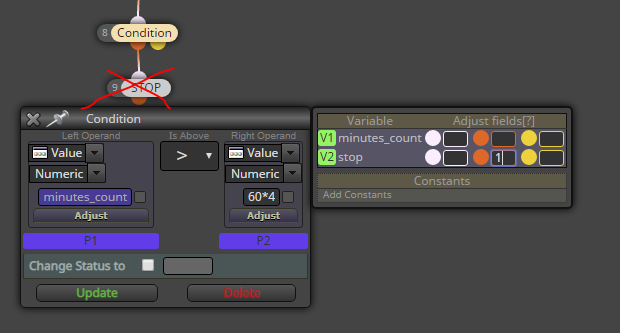
If I used the white box in this case, my variable would be modified before checking the condition, and the system wouldn't work
Need small help? Tag me in your post
Need big help? https://www.fiverr.com/big_algo/automate-your-winning-strategy-in-mql4-or-mql5 -
@roar damn good to know!
-
Sme to me! After more than 3 years using fxDreema and still learning stuff!

-
I know this is an old topic but it fits exactly what I'm looking for. I need to create a variable that is active for a specific amount of time in minutes. I will create a constant to select how many minutes.
I'm testing if I can do that by using 'on Timer' tab, but this is my first experience here and this is the only thread I found dealing with it. This is test project I created:
https://fxdreema.com/shared/CRE95xYbe
I want the variable to be modified exactly 2 minutes after it was last modified. According to the information window of the 'Change timer period' block, it modifies when this tab is activated. However, it still performs as per default every 60 seconds. For some reason I can't see now, the block is simply ignored. Any help?
-
Ok, I see what I really need is a way to insert a Cinstant in theProject Options' 'Timer period'. However, I cannot. Could someone please suggest any way to do it?
-
I'm afraid this is not my field of expertise. You can alway use the 'Delay' block on the 'on tick' tab. There you can inser the constant you say previously transformed into seconds, of course.
-
I already knew that solution, but it doens't work for me. I need to open trades at a very specific periods of time and conditioning that to the arrival of ticks is not an option.
I've been trying several configurations but to no avail. I guess it is a bug. Sadly, seeing the admin is simply disappeared from the forums, I don't see it will be fixed soon, if ever is.

-
I tried your ptroject and you are right. It doesn't work. Apparentñy you found a bug. I recommend you to create a threah on the Bugs forum and explain your case. I know the admin looks at it although he never responds, as you said.
-
That I will do. Thank you for your help.


