Is there anyway to combine all of my stop-loss orders into one big order?
-
Lets say that:
I'm long four lots on the EUR/USD from different price levels and I'm profitable in the trade.
All of my stops are at my average price.
I want to move all of my stops in one quick motion (to lock in profits).How can I have 1 stop-loss order of four lots instead of 4 stop-loss orders of one lot?
-
@dan-2 How do you define that "quick motion"? A button? Fxdreema can't really alter the metatrader interface, just add-on elements.
Finding the proper lot amount is easy done with a loop.
Or, if you want a permanent solution, switch to mt5 netting account.. -
@roar By "quick motion" I mean moving the stop-loss order line on my chart with my mouse and moving it to where I want.
Here's the work around I'm trying to design:
Drawing a trendline at my average price. [ I figured out how to to this ]
Placing all of my stops based on the location of my trendline. [ I figured out how to to this ]
Moving the trendline with my mouse and having all of the stop-loss orders move with it. [ I have NOT figured out this one]Any thoughts?
-
@dan-2 Ah, I see! Let me think a minute
-
This mess of blocks seems working for some reason: https://fxdreema.com/shared/JYbZWfZnd
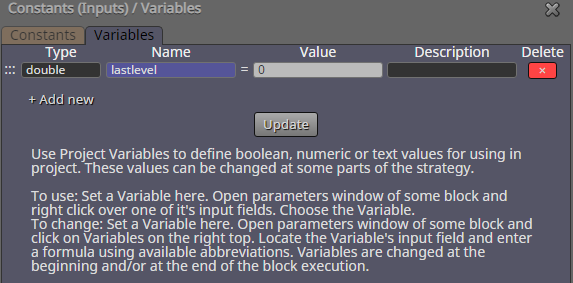
A variable to track the horizontal level changes:
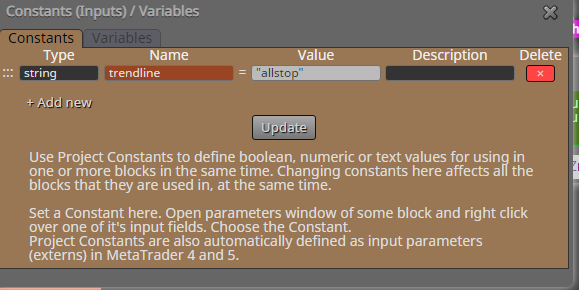
Object name must be in this constant:
Note that this works tick-by-tick, so there might be some seconds delay after moving the line, if market is quiet.
-
@roar Thank you for making this! I appreciate it!
Should I just copy this and add it to the EA I'm making?
Side note: I can't copy more than one block at a time anymore. I'm not sure why. Anytime I highlight two or more blocks and right click I don't get the option to copy... only paste. Thoughts?
-
@dan-2
Yes, copy-paste works. Remember to declare the variables and constants too.
And I don't know what function you use to make that line - make sure it is named as my constant "allstop"Edit: wtf did I think you wrote... well, have you tried just refreshing the page?