Been wondering about this for a while
-
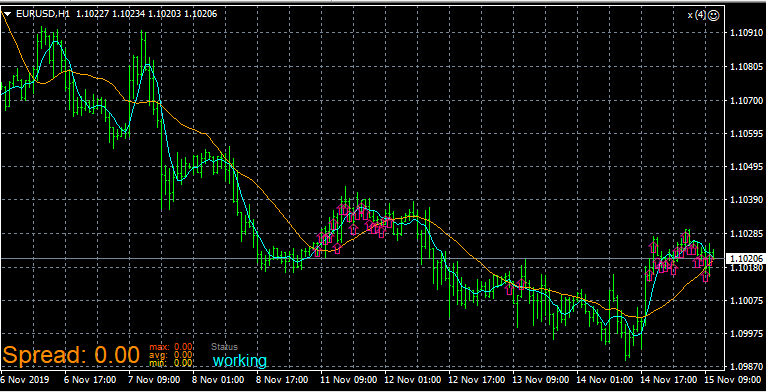
Let say my ea places the arrow on ema cross over, but is it possible to make it place these arrows on every cross over?
I mean with expert advisors, the ea will place these arrows only after the point where the ea is attached, it won't place arrows on crossover happened before that point
Is there a way to make it place these arrows on "n" number of previous bars -
@zackry You can loop through n number of candles with this simple logic:
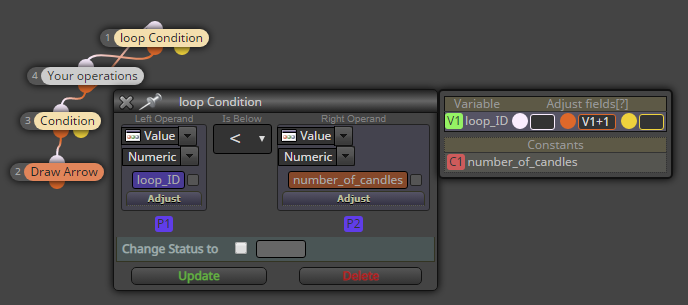
Now you can put the "loop_ID" as the "candle ID" setting in blocks 4 and below -
If i get it, what you need is simply this ? https://fxdreema.com/shared/A1PtFGNsc
With the "1", the number of candles where the arrow is fixed before the cross.
I didn't understood the logic of your exemple roar, can you put the link of the project ? -
@seb-0 here: https://fxdreema.com/shared/tGV3WCMse
Did you notice that zackry wants to check conditions on multiple different candles (if I undestood)? This is what the loop is for. -
@roar
Humm so this ea would :
--->Loop around blocks "1" and "4" continuously
---> Pass to block "3" then "2" 100 times, every loop until the 100th loop
---> then stop
So as there is no "once per bar" block there will be many execution in a bit of time, it will draw arrows on the 100 last bars, in seconds, until 5ma>20ma ?
Im trying to reformulate, it interests me. -
@seb-0 said in Been wondering about this for a while:
it will draw arrows on the 100 last bars, in seconds, until 5ma>20ma ?
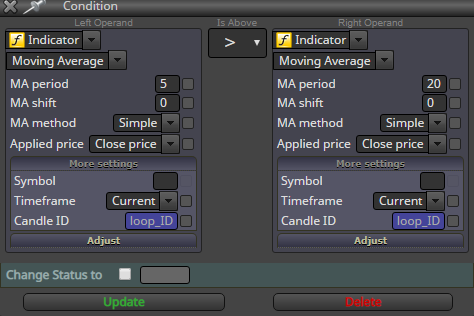
Yes, but notice the candle ID on the 5ma>20 condition changes on each loop iteration -> the arrows will be drawn only to those candles that satisfies the condition.
This is just an example of the core logic, it will need "once per bar" and a reset for the loop id
-
@seb-0 Here's a bit more complete example, lol:
https://fxdreema.com/shared/uXHgzyovb
Need small help? Tag me in your post
Need big help? https://www.fiverr.com/big_algo/automate-your-winning-strategy-in-mql4-or-mql5 -
@roar hey roar thanks for the example, but is that the mt5 builder of fxdreema? if yes can you please share an example in mt4 builder version, i dont use mt5 as of yet so its a bit difficult for me wrap my head around it
-
@zackry It's mt4. My first example has a mistake, though: block id 1 is smaller than block id 3, so block 4 always passes on to block 1, and block 3 never gets activated. Fixed that in the latter example.
Need small help? Tag me in your post
Need big help? https://www.fiverr.com/big_algo/automate-your-winning-strategy-in-mql4-or-mql5 -
never seen these before

is there a block called loop condition? -
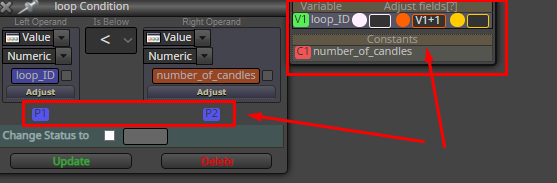
@zackry It's a quicker alternative to "modify variables".
The box on the right: when orange output is activated -> loop_ID becomes loop_ID + 1. So the "V1" is just a shortcut for first variable.P1 and P2 symbolize the values on the left/right side of the condition, no need to use them at all.
I wrote the "loop" in there, it's actually just a standard condition-block
Need small help? Tag me in your post
Need big help? https://www.fiverr.com/big_algo/automate-your-winning-strategy-in-mql4-or-mql5 -
@roar
 I cant believe that I have never clicked on this manage variable section
Now it makes sense, because I was wondering why it was showing mql4/ex4 on the top but this variable panel looked like mt5 version of fxdreema
-
@zackry hah yeah the variable window is pretty well hidden in the blocks lol
Need small help? Tag me in your post
Need big help? https://www.fiverr.com/big_algo/automate-your-winning-strategy-in-mql4-or-mql5 -
@roar thanks bro, gonna ask question after I play around with example you posted, I am a bit slow in the info intake so had to try it a few times to fully understand
-
There is actually a dedicated block for the whole loop system:
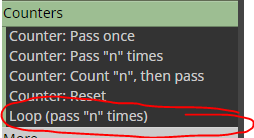
I just like to do it manually, it's a bit more flexible
Need small help? Tag me in your post
Need big help? https://www.fiverr.com/big_algo/automate-your-winning-strategy-in-mql4-or-mql5 -
@roar thanks

-
@roar
Yes got it, pretty smart. Im gona consider it, it may be useful to me later!