Help needed in modifying values in a sequence
-
@rafaels919 With @roar 's solution you can step back and forth to any position. You may also consider another variable for the sequence position and modify this only and keep the losses variable as is if that makes sense.
In the concrete case if you want to step back 2 sequence steps, you would
a) check if losses >2
b) count losses-2In the case you want to step forward you need to ensure that the result is not bigger than the sequence index (roar uses the variable seqLen). And of course always keep in mind that the array is 0 based.
-
For example:
-
We have the "loses" variable changed to "2" by "modify variables" block when RSI crosses 60 (just as in your example)
-
If we are on 5th value - we don't revert back to the 2nd value - instead -> we shift back two values (so we would be on the 3rd value instead of 2nd value) -> so it doesn't REVERT to two when the condition triggers but SHIFTS BACK two values.
To shift back in value, just modify loses = loses - 2.
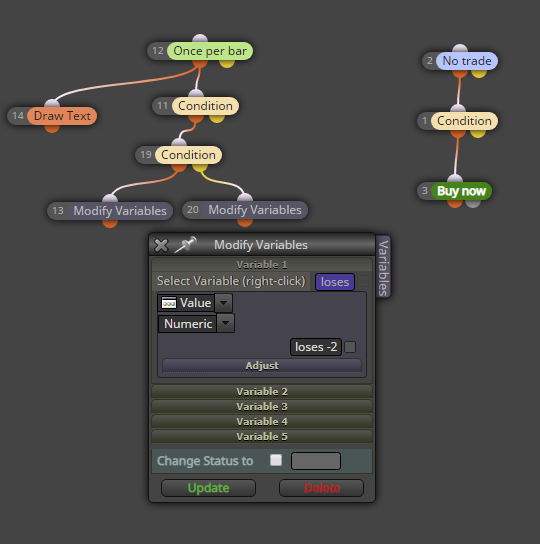
Here's your example:
https://fxdreema.com/shared/CB4cAPh9c -
-
Awesome, it shifts back now. @roar
I might have found another bug though:
The "base volume" bet is being skipped from time to time (0.01):Skipped>:

Not skipped>:

I sent you a PM @roar
Either way, you done a great job figuring this out. I appreciate the help!Thanks to @trader-philipps as well.
-
Is it possible to not use the "yellow" block output?

The second "Modify Variables" block is connected to the yellow output, but some of the other blocks on fxdreema have only a red output. Would be great to have this work with red output only. -
The "base volume" bet is being skipped from time to time (0.01):
Skipped>:
It appears the base lot is skipped when old trade closes and new trade opens at the same time (09:12). Not sure what is causing this..
If you provide details how to reproduce this bug, I'll look into it. (is it USDJPY, what tester settings, which version of the EA?)Is it possible to not use the "yellow" block output?
The color doesn't really change anything. Orange is for TRUE, yellow is for FALSE. In my example, when loses variable is less than 5, it goes to the orange output. When it's more or equal to 5, yellow output is activated. Some blocks miss the yellow output, because their function can't have a "false" output. It doesn't harm your system in any way.
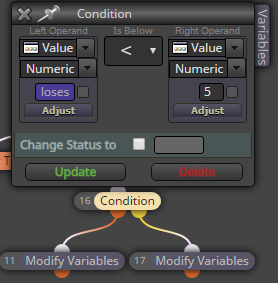
-
@roar If I remove the first "Modify Variable" block and leave only the second one attached, I get a critical error in the tester almost immediately and it stops working:
The configuration:
USDJPY:

EURUSD:

-
I guess that 'loses -2' text is the reason for that failure. I'm not sure, though. I would say this is not the correct way to write that variable there.
-
@rafaels919 said in Help needed in modifying values in a sequence:
@roar If I remove the first "Modify Variable" block and leave only the second one attached, I get a critical error in the tester almost immediately and it stops working:
I suspect the configuration now allows the loses variable to repeatedly lose - 2, so eventually it becomes a negative number. The array can't have negative indexes.
I guess that 'loses -2' text is the reason for that failure. I'm not sure, though. I would say this is not the correct way to write that variable there.
It is not the default way, but actually that works fine

Need small help? Tag me in your post
Need big help? https://www.fiverr.com/big_algo/automate-your-winning-strategy-in-mql4-or-mql5 -
Alright, so I've replaced the indicator and adjusted the condition for the shiftback (so it triggers starting from 2nd loss) and this seems to work now :

-
@rafaels919 said in Help needed in modifying values in a sequence:
Alright, so I've replaced the indicator and adjusted the condition for the shiftback (so it triggers starting from 2nd loss) and this seems to work now
Great, this makes sense - here the loses variable can drop to 0 but not below.
-
@roar said in Help needed in modifying values in a sequence:
I guess that 'loses -2' text is the reason for that failure. I'm not sure, though. I would say this is not the correct way to write that variable there.
It is not the default way, but actually that works fine
Once more I learnt something new!
Thank you.


