Manual Intervention - EA
-
Hi,
I am running an EA and think it is doing fine but i do like to close it or add in SL manually time to time.
Problem
- if i close the trade manually, another trade will open immediately as the condition are still valid. How can i prevent another trade from opening since i just close it?
Thank you
-
You can turn off the block on top of your launching tree. You can also create a time period not to operate after that last closed trade.
-
Hi @l-andorrà ,
I explore a few method but it just didnt work out.
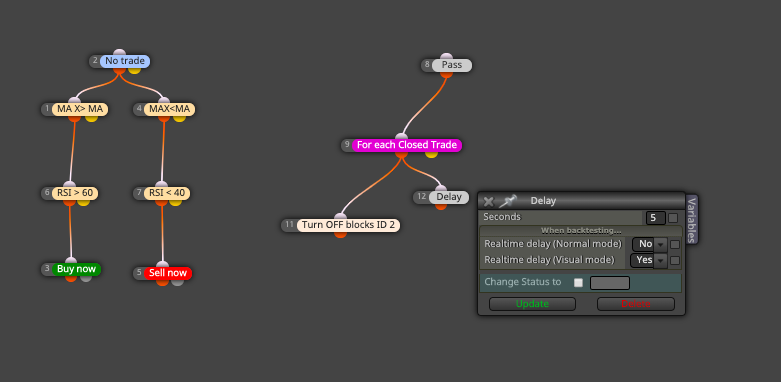
Using my example. Can you guide me on what can i add in the For each trade so that if my trade hit TP/SL or i manually close it, it will not immediately open another trade of the same direction that it TP or SL. But the EA will continue after another 2 bar or 2 hrs.
Appreciate it.
Thanks
-
That 'pass' block is unnecessary unless you are modifying a variable in it. On the other hand, I'm not sure ti use a 'For each closed trade' block. Finally that 'delay' block is not operational for what you want (I guess).
AM I right to say that the launching part is working correctly and the that part it isn't is the one blocking new trades. Right?
-
yes, new trade are still being open. Example.. at 10:05PM SL of Sell are hit. Then at 10.05PM the same sell are being open again. I want to stop this new trade. Atleast delay till the next candle. What should i do?
-
Ok. I see. You can do the following:
- Move Block ID 11 immediatley below blocks 3 and 5. That will stop the launcher tree.
- Then create this separate tree:
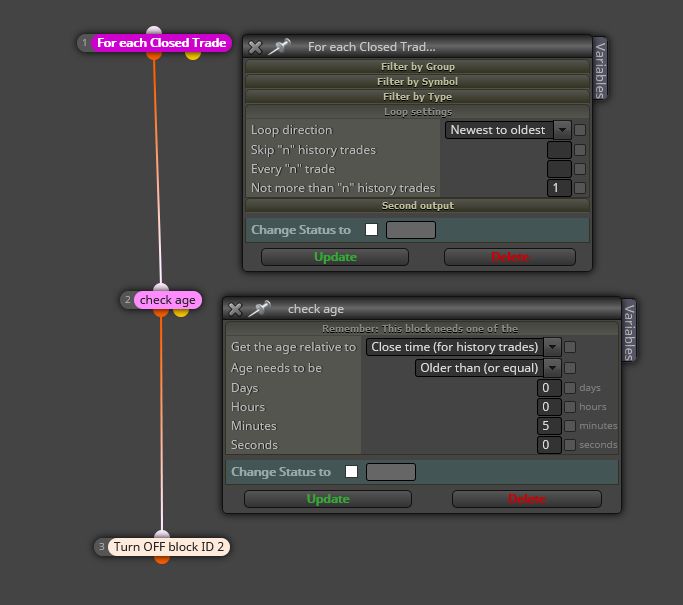
I chose 5 minutes to wait, but you can choose any other time period you need. Please note that a selected a '1' at the bottom of the 'For each closed trade' block. That is the way to find the last closed trade and not any other previous one.
-
Thanks @l-andorrà Somehow it didnt wokr for me. After the trade is closed. No more trade are being opened. I sustpect the block is being turned off and then not ON again. I will continue to explore
-
Obviously, the block needs to be turned On again.
 I assumed you already knew that part. I just modified the second block tree as it should be. Now you need to specify the conditions for the block to be turned on again.


