fxDreema

    • Register
    • Login
    • Search
    • Back to the main page
    • Categories
    • Recent
    • Tags
    • Popular
    • Search
    1. Home
    2. TecnoTrader
    • Profile
    • Following 0
    • Followers 0
    • Topics 4
    • Posts 14
    • Best 2
    • Controversial 0
    • Groups 0

    TecnoTrader

    @TecnoTrader

    3
    Reputation
    1092
    Profile views
    14
    Posts
    0
    Followers
    0
    Following
    Joined Last Online

    TecnoTrader Unfollow Follow

    Best posts made by TecnoTrader

    • RE: NormalizeDouble not working... long flating numbers issue...

      Thank you so much @miro1360 with your help I found a temporary workaround.

      I tested:
      Value, numeric --------> NormalizeDouble(G2RealTimeProfit,2) ----> same issue ❌
      Text (code input) ----> NormalizeDouble(G2RealTimeProfit,2) ----> same issue ❌
      Text (code input) ----> DoubleToString(G2RealTimeProfit,2) -------> working ✅

      That will only convert the number at the moment of display, we still may need to normalize a variable in memory or that to be automatic. I hope we can find the root of this issue. In my opinion is not MQL but how fxDreema handles numeric datatypes.

      Thanks again for your help, any insight is much appreciated

      posted in Bug Reports
      TecnoTrader
      TecnoTrader
    • RE: News Filter

      Hello, I'm using a free indicator that synchronises with forex factory economic calendar, one of the best sites for news in my opinion. The best part is that it draws vertical lines in your chart and has an info panel. Besides you can configure what tipes of news you want to be informed with alerts and everything.
      Based on those vertical lines drawn in your chart you could tell you EA not to trade. Those vertical lines have a name prefix and a specific color that you can configure.

      I hope this helps you and everyone here :simple_smile:

      URL to the site https://www.analyticaltrader.com/news-indicator/
      Indicator: 0_1507669636851_AT-FreeIndicators-Metatrader4.zip

      posted in Questions & Answers
      TecnoTrader
      TecnoTrader

    Latest posts made by TecnoTrader

    • RE: 'toDigits' function does not seem to work anymore.

      That did the trick. Thanks Miro! 🙂

      posted in Questions & Answers
      TecnoTrader
      TecnoTrader
    • 'toDigits' function does not seem to work anymore.

      Hy everyone. 'toDigits' function does not seem to work anymore (it gives error at compiling).
      I posted this here and not in the bugs section because I assume it has been supplanted by another function and if that is the case I would want to know which new function I can use instead of 'toDigits'.

      posted in Questions & Answers
      TecnoTrader
      TecnoTrader
    • RE: NormalizeDouble not working... long flating numbers issue...

      Thank you so much @miro1360 with your help I found a temporary workaround.

      I tested:
      Value, numeric --------> NormalizeDouble(G2RealTimeProfit,2) ----> same issue ❌
      Text (code input) ----> NormalizeDouble(G2RealTimeProfit,2) ----> same issue ❌
      Text (code input) ----> DoubleToString(G2RealTimeProfit,2) -------> working ✅

      That will only convert the number at the moment of display, we still may need to normalize a variable in memory or that to be automatic. I hope we can find the root of this issue. In my opinion is not MQL but how fxDreema handles numeric datatypes.

      Thanks again for your help, any insight is much appreciated

      posted in Bug Reports
      TecnoTrader
      TecnoTrader
    • RE: UPDATE time, write here if you have problems!

      Hello @fxDreema I hope you can help me... since the last update my EAs started to show long weird numbers... I've spent several days trying to solve this but without luck..
      I posted this issue in bug reports.

      @TecnoTrader said in NormalizeDouble not working... long flating numbers issue...:

      Hello everyone, I'm asking for help because of this issue that manifested lately that is getting me crazy.
      Since the last update of fxDreema my EA started to show long numbers in the info panel, like 9.140000000000001

      I searched the forums and tried all the solutions mentioned like using using the function NormalizeDouble() but that only worked with some cases so I could NOT resolve this issue. My variables are in fact of the type double.

      I found several references in the forums about fxDreemas' Admin mentioning something about 'strict mode' and the issues related to printing long numbers, we are talking about post from 2015 so this seems and old issue.

      I created a shared example to show the problem, even with nomalized doubles this long numbers appear.
      Shared project: NormalizeDouble example mt4

      Any help would be much appreciated! 🙏

      0_1507667863548_NormalizeDouble bug1.PNG 0_1507667951339_NormalizeDouble bug2.PNG

      Related forum posts:

      • Draw indicator value, Nov, 2015
      • self updating/refreshing grid, Dec, 2015

      @fxDreema said in self updating/refreshing grid, compare two groups of trades:

      Yes, there was some error. As you probably know, I was experimenting with "strict" mode, but with it some problems appeared. Then I disabled it and these errors appeared. Now I fixed those errors, I guess, and currently I disabled this "strict" mode, mostly because of some issues when printing numbers. Are you sure about the restore? Note that when I restore some project, it's only data about when blocks are located and their settings. The actual code that is generated does not come with the project itself.

      @fxDreema said in self updating/refreshing grid, compare two groups of trades:

      I don't know what to tell you, as I also have troubles with this 🙂 Floating numbers are crazy in C/C++, and MQL4 comes from there. NormalizeDouble() is used to cut digits, but sometimes it doesn't work as expected. For displaying data DoubleToString() is used, the input here is a number and the output is string (text).

      I discovered that in strict mode if I try to get the Equity, which is some floating number, the result can be some number followed by many random numbers. And if I apply NormalizeDouble to the 2nd digit for example, it still does not cut the number to the 2nd number, there is something like 000001 left at the end. Then if I put (double) in front it appears that everything is ok. But the whole thing becomes something like:

      (double)(NormalizeDouble(AccountEquity(), 2))
      

      ... only to cut some floating number to the 2nd digit. And I'm still not sure that the number is actually cut or I am only hiding the truth 🙂

      This is for strict mode. Currently I disabled it, because... because. With strict mode people are complaining more from weird looking numbers coming out of "Comment" 🙂 While in normal mode at least numbers are outputted in the way they should be.

      posted in Questions & Answers
      TecnoTrader
      TecnoTrader
    • RE: News Filter

      Hello, I'm using a free indicator that synchronises with forex factory economic calendar, one of the best sites for news in my opinion. The best part is that it draws vertical lines in your chart and has an info panel. Besides you can configure what tipes of news you want to be informed with alerts and everything.
      Based on those vertical lines drawn in your chart you could tell you EA not to trade. Those vertical lines have a name prefix and a specific color that you can configure.

      I hope this helps you and everyone here :simple_smile:

      URL to the site https://www.analyticaltrader.com/news-indicator/
      Indicator: 0_1507669636851_AT-FreeIndicators-Metatrader4.zip

      posted in Questions & Answers
      TecnoTrader
      TecnoTrader
    • NormalizeDouble not working... long flating numbers issue...

      Hello everyone, I'm asking for help because of this issue that manifested lately that is getting me crazy.
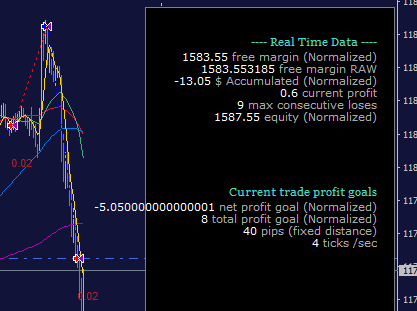
      Since the last update of fxDreema my EA started to show long numbers in the info panel, like 9.140000000000001

      I searched the forums and tried all the solutions mentioned like using using the function NormalizeDouble() but that only worked with some cases so I could NOT resolve this issue. My variables are in fact of the type double.

      I found several references in the forums about fxDreemas' Admin mentioning something about 'strict mode' and the issues related to printing long numbers, we are talking about post from 2015 so this seems and old issue.

      I created a shared example to show the problem, even with nomalized doubles this long numbers appear.
      Shared project: NormalizeDouble example mt4

      Any help would be much appreciated! 🙏
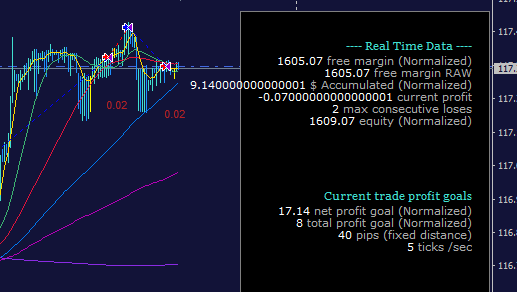
      0_1507667863548_NormalizeDouble bug1.PNG 0_1507667951339_NormalizeDouble bug2.PNG

      Related forum posts:

      • Draw indicator value, Nov, 2015
      • self updating/refreshing grid, Dec, 2015

      @fxDreema said in self updating/refreshing grid, compare two groups of trades:

      Yes, there was some error. As you probably know, I was experimenting with "strict" mode, but with it some problems appeared. Then I disabled it and these errors appeared. Now I fixed those errors, I guess, and currently I disabled this "strict" mode, mostly because of some issues when printing numbers. Are you sure about the restore? Note that when I restore some project, it's only data about when blocks are located and their settings. The actual code that is generated does not come with the project itself.

      @fxDreema said in self updating/refreshing grid, compare two groups of trades:

      I don't know what to tell you, as I also have troubles with this 🙂 Floating numbers are crazy in C/C++, and MQL4 comes from there. NormalizeDouble() is used to cut digits, but sometimes it doesn't work as expected. For displaying data DoubleToString() is used, the input here is a number and the output is string (text).

      I discovered that in strict mode if I try to get the Equity, which is some floating number, the result can be some number followed by many random numbers. And if I apply NormalizeDouble to the 2nd digit for example, it still does not cut the number to the 2nd number, there is something like 000001 left at the end. Then if I put (double) in front it appears that everything is ok. But the whole thing becomes something like:

      (double)(NormalizeDouble(AccountEquity(), 2))
      

      ... only to cut some floating number to the 2nd digit. And I'm still not sure that the number is actually cut or I am only hiding the truth 🙂

      This is for strict mode. Currently I disabled it, because... because. With strict mode people are complaining more from weird looking numbers coming out of "Comment" 🙂 While in normal mode at least numbers are outputted in the way they should be.

      posted in Bug Reports
      TecnoTrader
      TecnoTrader
    • Delete object block not working

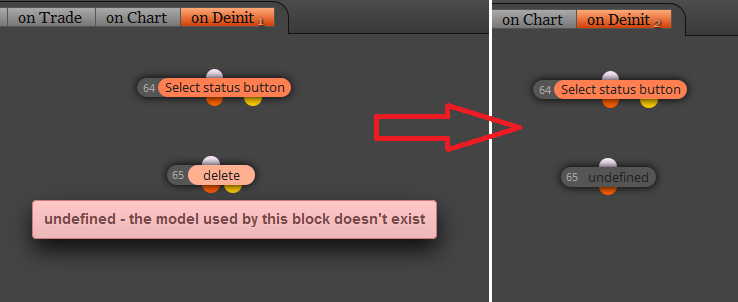
      Hello in my project I created an object (button) and then when I try to use this block to delete it I get this error.. 'undefined'.
      Also when I reload the page the block shows as undefined. The help for this block it's not showing.

      I suppose this error came with the server migration.
      Let me know if this gets fixed.
      Thanks a lot

      0_1480487611979_fxDreema_delete_object_error.png

      posted in Bug Reports
      TecnoTrader
      TecnoTrader
    • Stop Loss or Trailing Stop Based on Parabolic SAR

      At present day I want to add that this is possible with

      -- once every 10 ticks--

      1. Trailing stop (each trade)
      2. Custom level
      3. Indicator
      4. Parabolic stop... PSAR
      5. Candle id 0
      6. Trailing start is pips offset from open price

      I've done it in 5 minutes and works like a charm 👍

      0_1479925670539_Trailing PSAR.PNG

      posted in Questions & Answers
      TecnoTrader
      TecnoTrader
    • RE: Can't load projects after fxDreema server update

      @fxDreema Thank you so much! It's working now.. all projects there 👍

      posted in Bug Reports
      TecnoTrader
      TecnoTrader
    • RE: fxDreema Updating Now

      @fxDreema Thank you so much! Uploading custom indicators is working now 🎉 🎉

      posted in Questions & Answers
      TecnoTrader
      TecnoTrader