I agree this is a great tool with a high degree of flexibility and power. It is also relatively easy for a newbie to get the hang of.
D
Best posts made by drewinbrissie
-
RE: Excellent work by fx dreemaposted in Questions & Answers
-
Filtering conditions on a basketposted in Questions & Answers
Hi all,
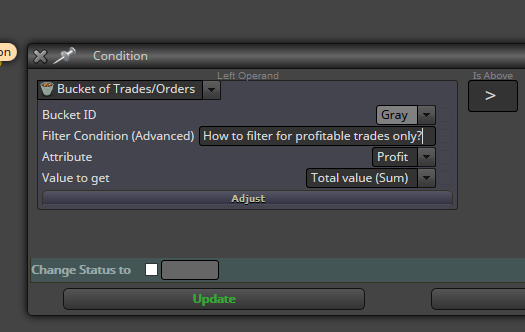
I'm trying to filter a basket of trades based on whether each trade is in profit or not. Can anyone suggest the code to go in the "Filter condition (advanced)" field?
I want to find the combined profit of only the profitable trades in the basket.
Thanks Drew
Latest posts made by drewinbrissie
-
RE: Horizontal line price level not workingposted in Questions & Answers
@l-andorrà Thanks for the reply. I don't want it to re-draw every tick. I've worked out another way using variables and re-setting the TP and SL using "on trade" events - when either a new trade is opened, or a stop is modified. This works well and only when a trade event occurs.
Thanks for your help, much appreciated.
Drew
-
Horizontal line price level not accessibleposted in Bug Reports
Hi all, I'm trying to use the price level of a drawn horizontal line to set take profit and stop loss levels. I want to use lines rather than variable as I want to be able to move the lines as the trades progress and have the TP and SL change with the lines.
The problem is the price levels are not showing as "Price 1" when I select them as a condition. See link below to example. In the comments you can see the price levels show a Null value. I've tried using all the price options including "price 1" but nothing seems to work when backtesting.
https://fxdreema.com/shared/xguYiQUib
Any help to either fix the problem or work around it would be much appreciated.
Thanks Drew
-
RE: Horizontal line price level not workingposted in Questions & Answers
Here's a link with the line price set to "Price 1"
-
Horizontal line price level not workingposted in Questions & Answers
Hi all, I'm trying to use the price level of a horizontal line to set take profit and stop loss levels. I want to use lines rather than calculated level as I want to be able to move the lines as the trades progress and have the TP and SL change with the lines.
The problem is the price levels are not saving correctly. See link below to example. In the comments you can see the price levels are not meaningful. I've tried using all the price options including "price 1" but nothing seems to work when backtesting.
https://fxdreema.com/shared/BgqfXxprc
Any suggestions would be much appreciated.
Thanks Drew
-
RE: ATR value to Pips - Tutorialposted in Tutorials by Users
@jerkha
What about working out ATR as a pip value for indices and other non forex instruments? Any ideas as the pip values can be difficult to calculate as different brokers present the data in different ways. I have found setting the FXDreema options doesn't always work consistently due to broker differences.Any help would be much appreciated.
Thanks Drew
-
RE: How to convert price fraction to pips?posted in Questions & Answers
@ambrogio Thanks, much appreciated
-
RE: How to convert price fraction to pips?posted in Questions & Answers
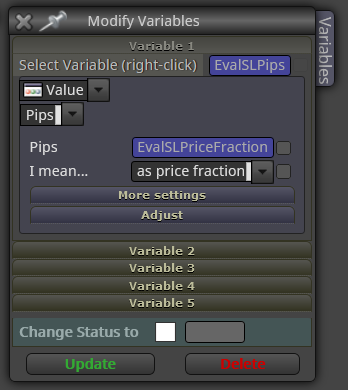
Thanks for the reply @l-andorrà. I'm still not sure how I use these rules to convert a price fraction to pips for use as a SL. Do I use the Modify Variables block like this
-
How to convert price fraction to pips?posted in Questions & Answers
I have a calculated stop loss which is a price fraction (buy open - lowest low of last 5 bars). I want to convert this to pips to use in a move to breakeven block. How do I convert the price fraction to pips in a way that will work across all traded instruments (e.g. fx, index, CFDs)? I can't just multiply by 10,000 because that only works for USD based fx pairs.
Thanks Drew
-
RE: Save lot size of open trade for use laterposted in Bug Reports
I've got it working now as it should
-
Save lot size of open trade for use laterposted in Bug Reports
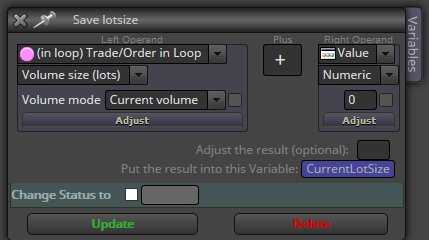
I used to be able to save the lot size of an open trade by using the Formula block and choosing the Loop => Volume as shown below. However since the upgrade a few weeks ago this isn't working. Can anyone suggest a work around or fix?
Thanks Drew