fxDreema

    • Register
    • Login
    • Search
    • Back to the main page
    • Categories
    • Recent
    • Tags
    • Popular
    • Search
    1. Home
    2. drewinbrissie
    3. Posts
    D
    • Profile
    • Following 0
    • Followers 1
    • Topics 11
    • Posts 33
    • Best 1
    • Controversial 1
    • Groups 0

    Posts made by drewinbrissie

    • RE: Horizontal line price level not working

      @l-andorrà Thanks for the reply. I don't want it to re-draw every tick. I've worked out another way using variables and re-setting the TP and SL using "on trade" events - when either a new trade is opened, or a stop is modified. This works well and only when a trade event occurs.

      Thanks for your help, much appreciated.

      Drew

      posted in Questions & Answers
      D
      drewinbrissie
    • Horizontal line price level not accessible

      Hi all, I'm trying to use the price level of a drawn horizontal line to set take profit and stop loss levels. I want to use lines rather than variable as I want to be able to move the lines as the trades progress and have the TP and SL change with the lines.

      The problem is the price levels are not showing as "Price 1" when I select them as a condition. See link below to example. In the comments you can see the price levels show a Null value. I've tried using all the price options including "price 1" but nothing seems to work when backtesting.

      https://fxdreema.com/shared/xguYiQUib

      Any help to either fix the problem or work around it would be much appreciated.

      Thanks Drew
      posted in Bug Reports
      D
      drewinbrissie
    • RE: Horizontal line price level not working

      Here's a link with the line price set to "Price 1"

      https://fxdreema.com/shared/xguYiQUib

      posted in Questions & Answers
      D
      drewinbrissie
    • Horizontal line price level not working

      Hi all, I'm trying to use the price level of a horizontal line to set take profit and stop loss levels. I want to use lines rather than calculated level as I want to be able to move the lines as the trades progress and have the TP and SL change with the lines.

      The problem is the price levels are not saving correctly. See link below to example. In the comments you can see the price levels are not meaningful. I've tried using all the price options including "price 1" but nothing seems to work when backtesting.

      https://fxdreema.com/shared/BgqfXxprc

      Any suggestions would be much appreciated.

      Thanks Drew
      posted in Questions & Answers
      D
      drewinbrissie
    • RE: ATR value to Pips - Tutorial

      @jerkha
      What about working out ATR as a pip value for indices and other non forex instruments? Any ideas as the pip values can be difficult to calculate as different brokers present the data in different ways. I have found setting the FXDreema options doesn't always work consistently due to broker differences.

      Any help would be much appreciated.

      Thanks Drew
      posted in Tutorials by Users
      D
      drewinbrissie
    • RE: How to convert price fraction to pips?

      @ambrogio Thanks, much appreciated

      posted in Questions & Answers
      D
      drewinbrissie
    • RE: How to convert price fraction to pips?

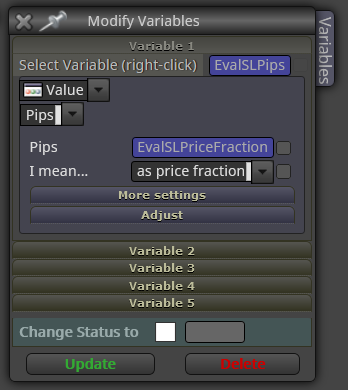
      Thanks for the reply @l-andorrà. I'm still not sure how I use these rules to convert a price fraction to pips for use as a SL. Do I use the Modify Variables block like this
      0_1602893974905_a8ad26e1-d57d-408c-b359-cbd1ff07a7ea-image.png

      posted in Questions & Answers
      D
      drewinbrissie
    • How to convert price fraction to pips?

      I have a calculated stop loss which is a price fraction (buy open - lowest low of last 5 bars). I want to convert this to pips to use in a move to breakeven block. How do I convert the price fraction to pips in a way that will work across all traded instruments (e.g. fx, index, CFDs)? I can't just multiply by 10,000 because that only works for USD based fx pairs.

      Thanks Drew

      posted in Questions & Answers
      D
      drewinbrissie
    • RE: Save lot size of open trade for use later

      I've got it working now as it should

      posted in Bug Reports
      D
      drewinbrissie
    • Save lot size of open trade for use later

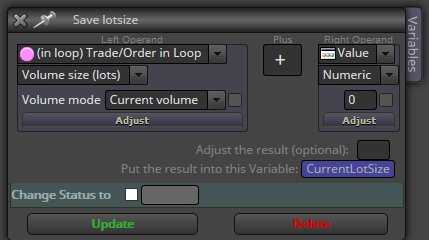
      I used to be able to save the lot size of an open trade by using the Formula block and choosing the Loop => Volume as shown below. However since the upgrade a few weeks ago this isn't working. Can anyone suggest a work around or fix?

      Thanks Drew

      0_1504926846729_upload-f38d4773-e936-4eaa-acf5-cdfedc3c1fa2

      posted in Bug Reports
      D
      drewinbrissie
    • RE: Compiling errosr

      @David197
      I solved the problem by using FXDreema to generate both the Mq4 file and the ex4 files. This way it always works. Both buttons are at the top left of the screen.

      posted in Bug Reports
      D
      drewinbrissie
    • RE: Compiling errosr

      @drewinbrissie

      If I use FXdreema to compile the file by exporting the .ex4 it will run. If I export as .mq4 and let MT4 (opened by Tickstory) compile it, MT4 can not open the file. While this is a workaround it doesn't solve the underlying problems of the .ex4 not compiling in MT4 when MT4 is opened by Tickstory. This hasn't ever been a problem before until this release of FxDreema. Nothing has changed with MT4 or Tickstory.

      posted in Bug Reports
      D
      drewinbrissie
    • RE: Compiling errosr

      @drewinbrissie

      I have found if I open the EA generated from the new FXDreema build using Tickstory I get the errors shown in the previous post. If I don't use tickstory and open the same EA I get no errrors and it runs.

      Something in the latest FxDreema build is causing it not to work when MT4 is opened by Tickstory? When Tickstory open MT4 it makes the data files read-only. It must have some other impact when MT4 compiles the ex4

      Thanks Drew

      posted in Bug Reports
      D
      drewinbrissie
    • RE: Compiling errosr

      @fxDreema

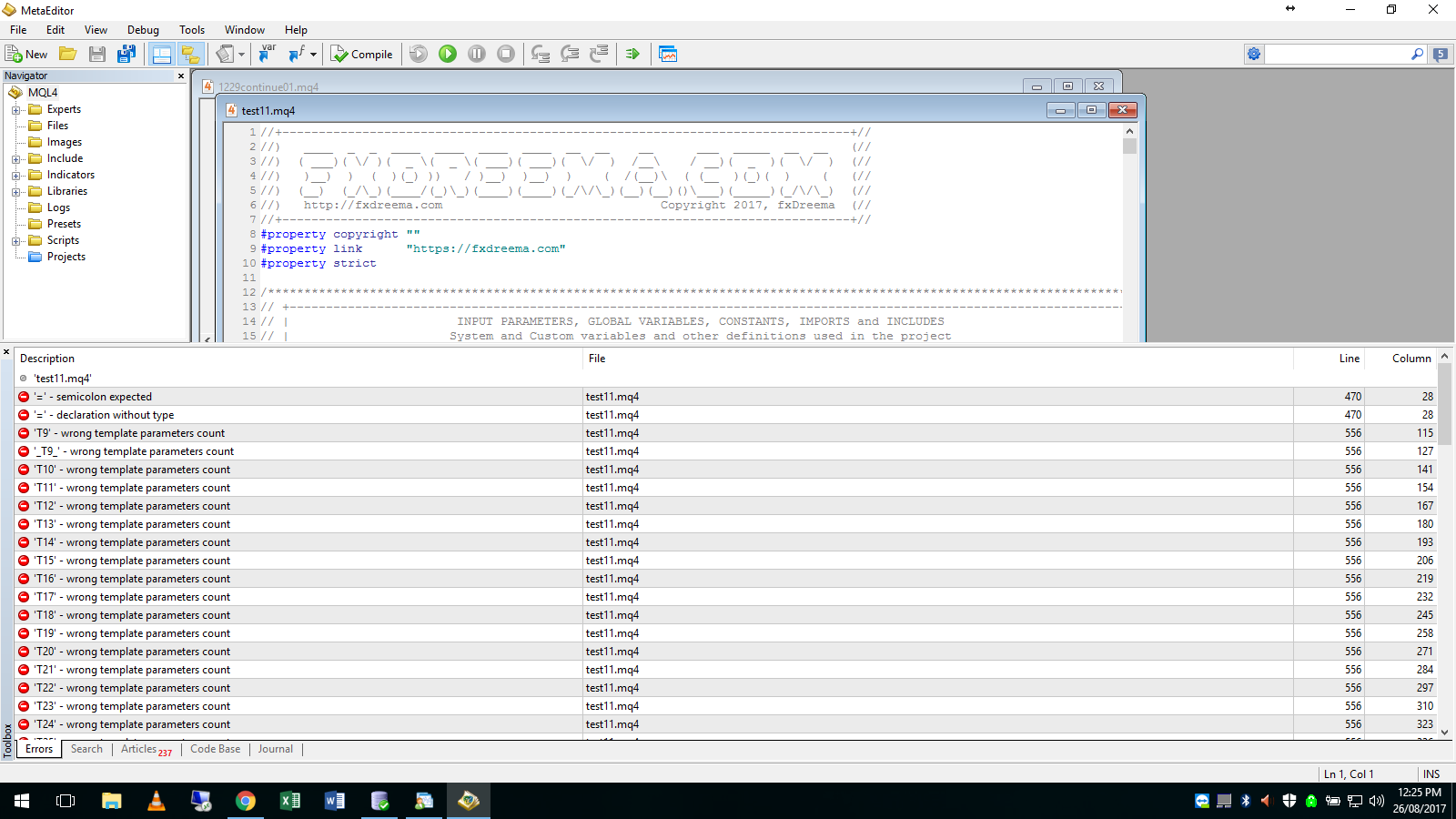
      I still can't get any ea compiled since the last upgrade about a week ago to run at all. I've tried on 3 computers with many versions of mt4 including the lastest and nothing will run. all earlier versions of all eas are fine.

      Here is an example meta editor compile errors... EA only has 2 blocks as attached0_1503714593314_test11.mq4
      0_1503714521495_upload-ce0c9e1c-b269-4c6b-a9c7-d1d992fed0c2

      posted in Bug Reports
      D
      drewinbrissie
    • RE: UPDATE time, write here if you have problems!

      @drewinbrissie

      I'm running an old version of MT4. The updates don't work with it

      posted in Questions & Answers
      D
      drewinbrissie
    • RE: Compiling errosr

      The problem seems to be that I'm running an older version of MT4. To get free tick data I have to run an older version. The upgraded FXdreema code doesn't run on the old MT4 version. If I open it on the latest version its all good.

      Thanks for your help
      Drew

      posted in Bug Reports
      D
      drewinbrissie
    • RE: UPDATE time, write here if you have problems!

      @drewinbrissie

      Here's an example
      This works OK because I generated the MT4 from the project yesterday
      0_1503193902797_170810dca03-3.mq4

      Same project exported to MT4 now (without any changes) has 205 errors in MetaEditor
      0_1503193946828_test2.mq4

      posted in Questions & Answers
      D
      drewinbrissie
    • RE: Compiling errosr

      @miro1360
      This one compiled yesterday works OK
      0_1503193603698_170810dca03-3.mq4

      Same project exported to MT4 today without any changes won't run
      0_1503193617314_test2.mq4

      205 errors when compiled in MetaEditor

      posted in Bug Reports
      D
      drewinbrissie
    • RE: UPDATE time, write here if you have problems!

      @fxDreema
      There appears to be a compile error from this update. Same EA that worked fine yesterday, when saved as a different name today doesn't work

      posted in Questions & Answers
      D
      drewinbrissie
    • Compiling errosr

      It appears FX Dreema is not compiling the code properly when exporting to mt4 to run it in strategy tester.

      Same EA that works fine yesterday will not work when saved as a different file name today.

      Very frustrating as I must stop work.

      posted in Bug Reports
      D
      drewinbrissie
    • 1
    • 2
    • 1 / 2