Thank you for the detailed screenshot.
M
Best posts made by Mohamed80
-
RE: Percentage/Most of conditions occurposted in Questions & Answers
-
RE: Trailing only profit (after offset) regardless of Stop Loss positionposted in General Discussions
@jsauter86
I had a chat message from another user who bombarded me with too many questions. My mistake was when I linked your response to his and thought it is the same person. I should have checked first. I just realised this now.
Latest posts made by Mohamed80
-
RE: Time Filter (For Conditions) not for Trailing Open Positionsposted in Questions & Answers
So the logic I have provided is correct. I just wanted to check it.
Thanks l-andorra -
RE: Time Filter (For Conditions) not for Trailing Open Positionsposted in Questions & Answers
Hi jstap. It has been a while.
Hope everything is going well. -
RE: Time Filter (For Conditions) not for Trailing Open Positionsposted in Questions & Answers
So as long as the (Trailing Block) is above (in order) the Time Filter Block and the condition logic, the trailing should continue. Right?
But in contrary, if I the time filter is above (in order) the trailing, the later will stop.
So the logic I have initially posted is right. You agree?
-
Time Filter (For Conditions) not for Trailing Open Positionsposted in Questions & Answers
Hi,
https://fxdreema.com/shared/ZV7CgVVhe
I want the EA to stop taking new positions after my time filter. But at the same time, it should trail whatever positions are already open.
For simplicity and to focus on this topic, I created a crossover MA condition. My initial logic is to have the (Trailing BlocK) as no 2 after the ( Pass Block) - as I always do with my EAs - and to place the (Time Filter Block) after the (Trailing Block).
I have not yet tested the logic and thought of sharing if anyone has thought of this before or have implemented it.
Thanks,
-
RE: ATR Issueposted in Questions & Answers
https://fxdreema.com/shared/34qXidB3d
That was a solution @jstap has provided before.
-
RE: Moving Stop Loss/Target on chart while EA is active (Solved)posted in Questions & Answers
Thanks a lot. It worked..
-
RE: Sells not activating while buys areposted in Bug Reports
Another thing to consider and add it to my above post.
The EA may not look for the nearest fractal up or down but will look for the specified period. In your head, the fractal has not appeared yet but there is a fractal 10 bars ago. The EA will not look at the fractals 10 bars ago but will look for the most recent one.
What is the most recent one? It is every 5 candles we need the third candle to have a higher high or lower low. This is confirmed two candles late.My explanation will be wrong if the EA does look back in history (more than 5 bars) ago to look for the most recent fractal. I don't think that it is the case though.
-
RE: Sells not activating while buys areposted in Bug Reports
Have you tested it live on more than one pair?
Now, you of course know the fractal repaints in MT4. So maybe when the condition you set for a crossover of the Alligator, the fractal has not appeared. By the same token, when the fractal does appear, the crossover did not happen.
The other way around it is: Change the crossover to Above/Below. And set a condition that the Price when Below/Above the alligator is not far more than X Distance in pips.
This way you won't miss the chance if the crossover of Price with Alligator happened and the fractal has appeared.
In practice, you may be having a crossover and then after 30 seconds, the fractal appears. The EA will not execute the trade as per the conditions you have set.Try it as I am suggesting and replace Crossover with Above/Below and a maximum distance in Pips. You can have the distance as low as 5 pips and give the chance for the two conditions to be met as early as possible.
-
RE: Moving Stop Loss/Target on chart while EA is active (Solved)posted in Questions & Answers
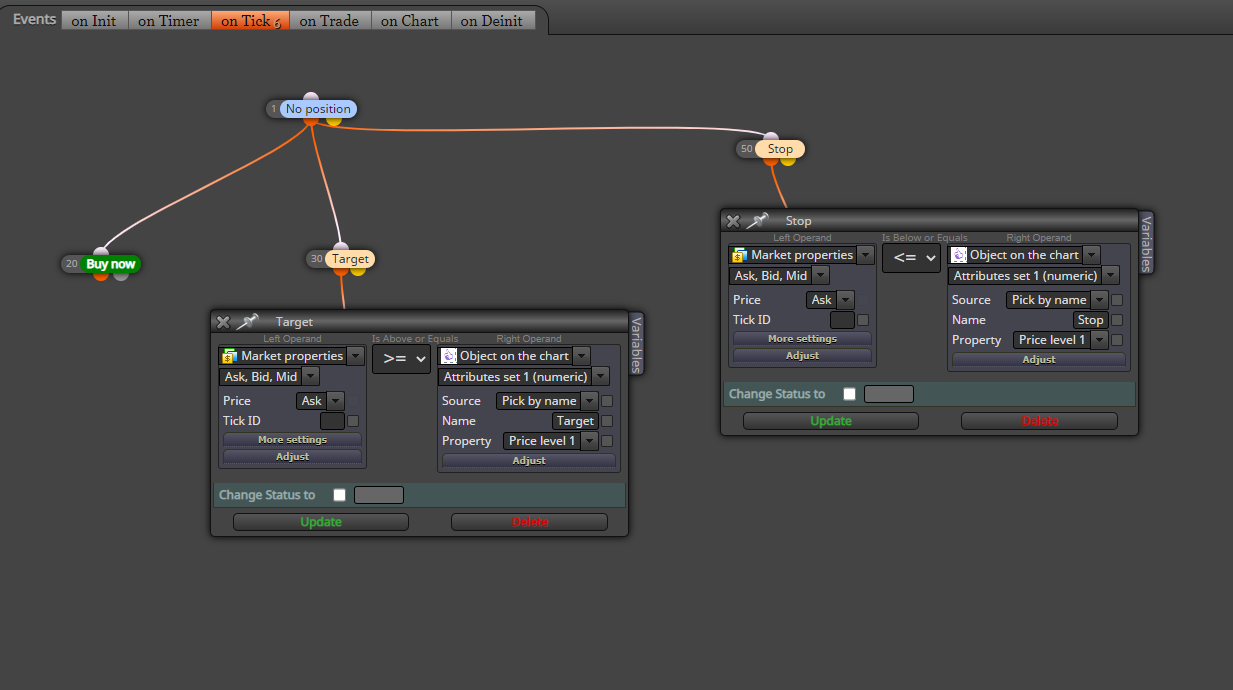
Trade will close when the price is >= Horizontal Line price level named "Target" or will close when the price is <= Horizontal Line level named "Stop".
https://fxdreema.com/shared/xQorUbdmb
What I need to do is to drag/move these lines on the chart while the EA is running.
-
RE: Moving Stop Loss/Target on chart while EA is active (Solved)posted in Questions & Answers
Hi @max-c
The thing is that I have horizontal lines on the chart representing SL, TP. Do not see the how the EA in your example would react to dragging these lines up and down.