So the logic I have provided is correct. I just wanted to check it.
Thanks l-andorra
M
Posts made by Mohamed80
-
RE: Time Filter (For Conditions) not for Trailing Open Positionsposted in Questions & Answers
-
RE: Time Filter (For Conditions) not for Trailing Open Positionsposted in Questions & Answers
Hi jstap. It has been a while.
Hope everything is going well. -
RE: Time Filter (For Conditions) not for Trailing Open Positionsposted in Questions & Answers
So as long as the (Trailing Block) is above (in order) the Time Filter Block and the condition logic, the trailing should continue. Right?
But in contrary, if I the time filter is above (in order) the trailing, the later will stop.
So the logic I have initially posted is right. You agree?
-
Time Filter (For Conditions) not for Trailing Open Positionsposted in Questions & Answers
Hi,
https://fxdreema.com/shared/ZV7CgVVhe
I want the EA to stop taking new positions after my time filter. But at the same time, it should trail whatever positions are already open.
For simplicity and to focus on this topic, I created a crossover MA condition. My initial logic is to have the (Trailing BlocK) as no 2 after the ( Pass Block) - as I always do with my EAs - and to place the (Time Filter Block) after the (Trailing Block).
I have not yet tested the logic and thought of sharing if anyone has thought of this before or have implemented it.
Thanks,
-
RE: ATR Issueposted in Questions & Answers
https://fxdreema.com/shared/34qXidB3d
That was a solution @jstap has provided before.
-
RE: Moving Stop Loss/Target on chart while EA is active (Solved)posted in Questions & Answers
Thanks a lot. It worked..
-
RE: Sells not activating while buys areposted in Bug Reports
Another thing to consider and add it to my above post.
The EA may not look for the nearest fractal up or down but will look for the specified period. In your head, the fractal has not appeared yet but there is a fractal 10 bars ago. The EA will not look at the fractals 10 bars ago but will look for the most recent one.
What is the most recent one? It is every 5 candles we need the third candle to have a higher high or lower low. This is confirmed two candles late.My explanation will be wrong if the EA does look back in history (more than 5 bars) ago to look for the most recent fractal. I don't think that it is the case though.
-
RE: Sells not activating while buys areposted in Bug Reports
Have you tested it live on more than one pair?
Now, you of course know the fractal repaints in MT4. So maybe when the condition you set for a crossover of the Alligator, the fractal has not appeared. By the same token, when the fractal does appear, the crossover did not happen.
The other way around it is: Change the crossover to Above/Below. And set a condition that the Price when Below/Above the alligator is not far more than X Distance in pips.
This way you won't miss the chance if the crossover of Price with Alligator happened and the fractal has appeared.
In practice, you may be having a crossover and then after 30 seconds, the fractal appears. The EA will not execute the trade as per the conditions you have set.Try it as I am suggesting and replace Crossover with Above/Below and a maximum distance in Pips. You can have the distance as low as 5 pips and give the chance for the two conditions to be met as early as possible.
-
RE: Moving Stop Loss/Target on chart while EA is active (Solved)posted in Questions & Answers
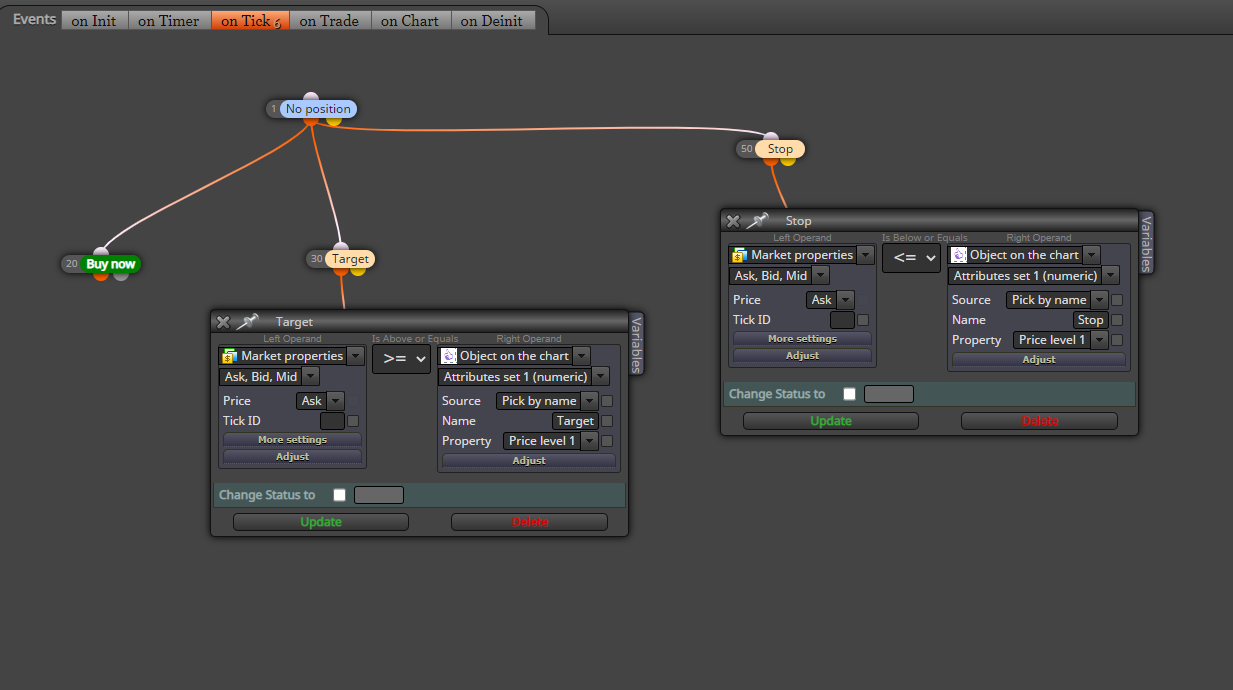
Trade will close when the price is >= Horizontal Line price level named "Target" or will close when the price is <= Horizontal Line level named "Stop".
https://fxdreema.com/shared/xQorUbdmb
What I need to do is to drag/move these lines on the chart while the EA is running.
-
RE: Moving Stop Loss/Target on chart while EA is active (Solved)posted in Questions & Answers
Hi @max-c
The thing is that I have horizontal lines on the chart representing SL, TP. Do not see the how the EA in your example would react to dragging these lines up and down.
-
Moving Stop Loss/Target on chart while EA is active (Solved)posted in Questions & Answers
Does anyone know how to modify stop losses and target profits from the chart while the EA is running?
I have an EA that places stop loss based on a horizontal line that is named "Stop" and the same thing for target profit.
What I need to do is to drag these horizontal lines to change the stop loss/target profit.
What I know so far is once the EA is applied to the chart then that's it; there is no way to modify it later on.
I believe it will be a long process and not a straightforward one and may involve loops; perhaps? I just can not figure where to start from.
Can someone put me on the first few steps to achieve this?
Thanks,
@jstap @l-andorrà and others of course, how would the structural concept should look like?
-
RE: Sells not activating while buys areposted in Bug Reports
Interesting. Did not know that.
Do you mean that Block 1 in any EA either as a Pass Block or No Positions/Trades Block, we should have two tree structures starting from top to bottom? -
RE: Sells not activating while buys areposted in Bug Reports
I experienced the same thing in the past and I found the reason is in (Fractals) and their repainting nature. You see, the original fractals should only print when confirmed and not like in MT4 repainting.
I substituted fractals with the highest high and lowest low in the past period of X candles.
Have a look
https://fxdreema.com/shared/0ojq7lnJAlso when I changed the Candle ID to 1, I got more trades in the tester compared to when Candle ID is 0.
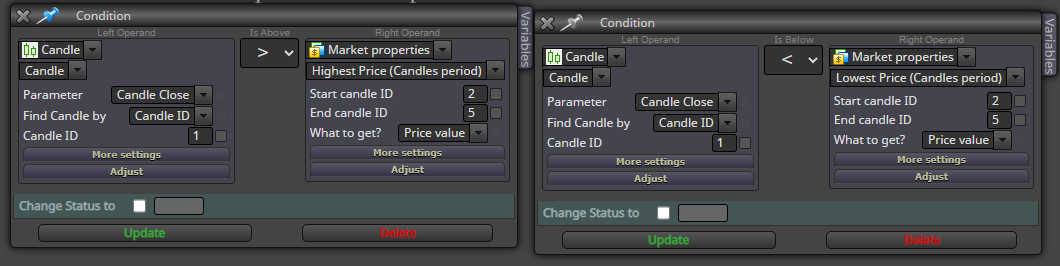
I myself had a very similar EA like yours and it took me a while to figure out the problem. However, what I do not understand is why we have to set the Candle ID to 1 if we need to see more trades in the tester.
Anyway, try in live mode and change the Candle ID to 0 and see how it goes live.Another point, I changed the tree numbering as you will find out. The way you numbered the blocks is common practice here and I do not understand the reason for it.
-
RE: how can i program my EA to open a specified number of positionsposted in General Discussions
'Check Trades Count' Block
https://fxdreema.com/shared/zgB04Smab
You can specify the number and also the number of trades for either buys or sells or combined
https://fxdreema.com/shared/zgB04Smab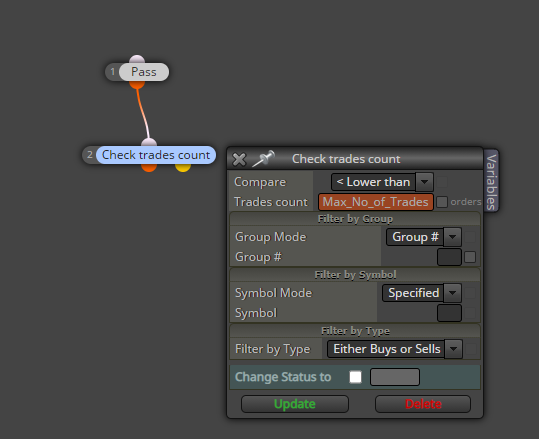
I do not know the difference between this block and the other one Tipsywisdom has shared. I have not used the latter before.
-
MQL4/5 Coders needed for very simple formulas in Custom Code Blockposted in General Discussions
Hello,
I am now actively using the Custom Code Block since @jstap has introduced me to the concept.
I was able to reduce the number of blocks to a great extent for trading multiple pairs based on Currency Strength.
For example:
In order to get values of close, High, Low, I type:EURUSD_Change_D1=(iClose("EURUSD",PERIOD_D1,0)-iLow("EURUSD",PERIOD_D1,0))/(iHigh("EURUSD",PERIOD_D1,0)-iLow("EURUSD",PERIOD_D1,0))*100;
EURGBP_Change_D1=(iClose("EURGBP",PERIOD_D1,0)-iLow("EURGBP",PERIOD_D1,0))/(iHigh("EURGBP",PERIOD_D1,0)-iLow("EURGBP",PERIOD_D1,0))*100;
EURJPY_Change_D1=(iClose("EURJPY",PERIOD_D1,0)-iLow("EURJPY",PERIOD_D1,0))/(iHigh("EURJPY",PERIOD_D1,0)-iLow("EURJPY",PERIOD_D1,0))*100;This helped me a lot in reducing the number of blocks. The same functions/formulas worked in MQL4 and MQL5
Now I have three questions please:
First: What should I type in the Custom Block to reduce the number of trading orders? for MT4 and MT5
I want to execute Buy and Sell orders inside the blcok for MT4 and I used this successfully:{OrderSend(Symbol(),OP_BUY,0.1,Ask,2,Bid - SL10Point, Bid + TP10Point);}
return;However, the order gets executed more than once and I have no clue how to limit the number of trades per individual Pair (and per Buys and per Sells).
I tried the (Check Trades Count Block) and placed it just above the Custom MQL4 Code Block but this did not help.
In case anyone asks why not use theBuy, Sell Blocks. The reason is that there is little in common. The "Set for Current Markets" Block will not help.Second: The Symbol() only works for the current chart. But I instead want to for ex, Buy EURCAD and EURJPY. So I need to type Symbol (EURCAD) and Symbol (EURJPY). This however did not work.
Third: I was not able to successfully use the same formulas to get indicators values. For example, I tried iMACD and iRSI with the right parameters.
EURUSD_iOsMA=iOsMA("EURUSD",PERIOD_D1,12,26,9,0,0);
What is the right function/formula for each MT4 and MT5?
Just put me on the first steps ...
Thanks,
-
Backtesting issues in MT5 (EAs work Live but not in Backtest)posted in General Discussions
Hello,
I have a couple of EAs that are trading live but are not yielding any results in the backtesting.
1- I have this simple multi-pair EA that trades three cryptocurrencies against USD. If each pair's strength goes above 70 %, it buys and shorts when goes below 30 %.
In the backtesting mode, It is not taking any trades although I traded it live.2- I then thought to change to one single pair in the conditions and then I backtested. Still, backtesting is not working.
I am sure these EAs are working in Live Mode in MT5 but not sure why are they are not working in the Backtesting.
Thanks,
-
RE: Buy a EUR pair when Conditions are met from three Pairsposted in General Discussions
Take your time...
By the way, with regard to my first point/question, the pain for me was in changing/editing the two condition blocks for each pair.
However, I overcame this problem by using a code to get a value of a variable if it is equal to 1(for longs) or -1 (for shorts). Then the two condition blocks will always remain intact. The editing will be in the Main Custom MQL4 Code Block which will make life easier of course.
With regard to your answer to number 2, I want to know how to refer to a variable within the Symbol (). The latter will fetch the one on Chart. But if I type Symbol ("EURUSD"), it will give an error. There might be some difference between MT4 and MT5.
Thanks,
-
RE: Buy a EUR pair when Conditions are met from three Pairsposted in General Discussions
PM me with the discord group.
Generally, what would be your approach? What blocks or codes do you suggest for all the Buy/Sell Order Blocks?
-
RE: Buy a EUR pair when Conditions are met from three Pairsposted in General Discussions
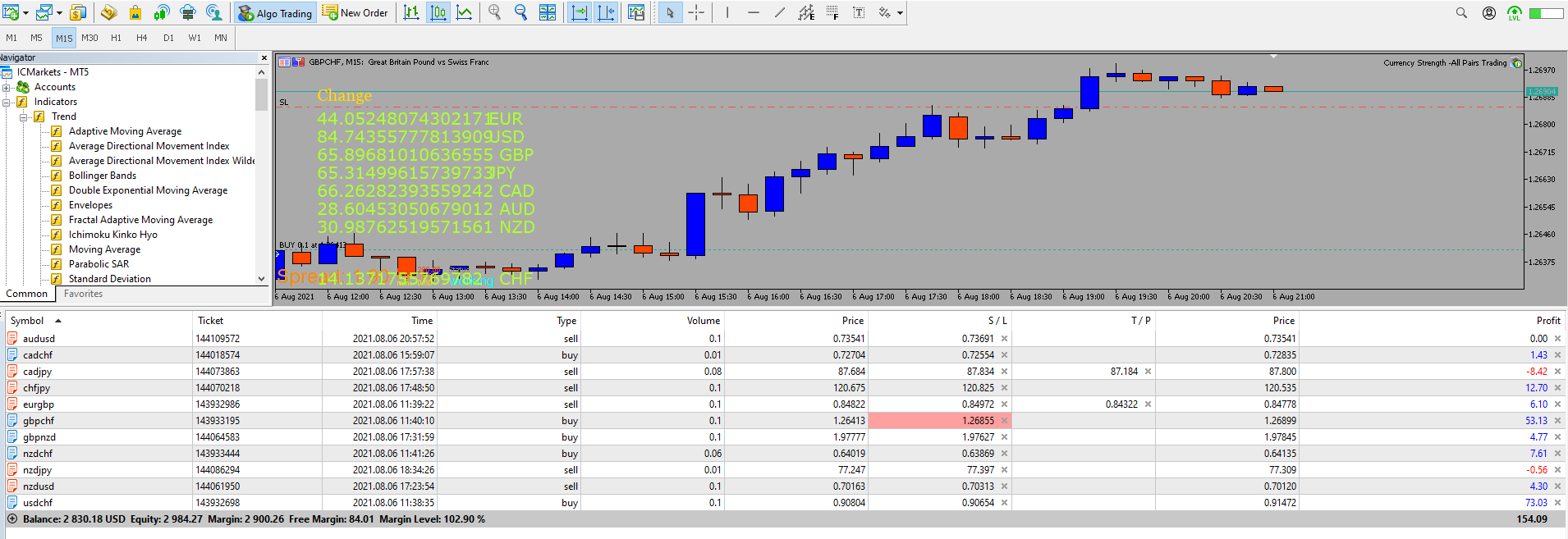
I wanted to see how the EA will behave if I trade all signals at once without me choosing which pair. tested on a demo account during the overlap hours of London and Newyork sessions.
I made the calculations for percentage change in the Custom Code Block. I found it in MQL4 reference and used for example:
EURUSD_Change=(iClose("EURUSD",PERIOD_D1,0)-iLow("EURUSD",PERIOD_D1,0))/(iHigh("EURUSD",PERIOD_D1,0)-iLow("EURUSD",PERIOD_D1,0))*100;Observation: I used the "Comment Block" to plot the values and to check the updating frequency.
I found that when calculations are embedded in the Custom Block Code, they update quicker than when using a custom indicator(that calculates the same formulas) in the EA. I tried both.
I will try later on to find the same formulas to get few indicators readings like RSI, etc..
I had to put a Sell and Buy Block for each of the 28 pairs and have two Conditions blocks for each one of them for Buys and Sells. For ex: for EURUSD: (EUR >= Bullish Threshold, USD<= Bearish Threshold)
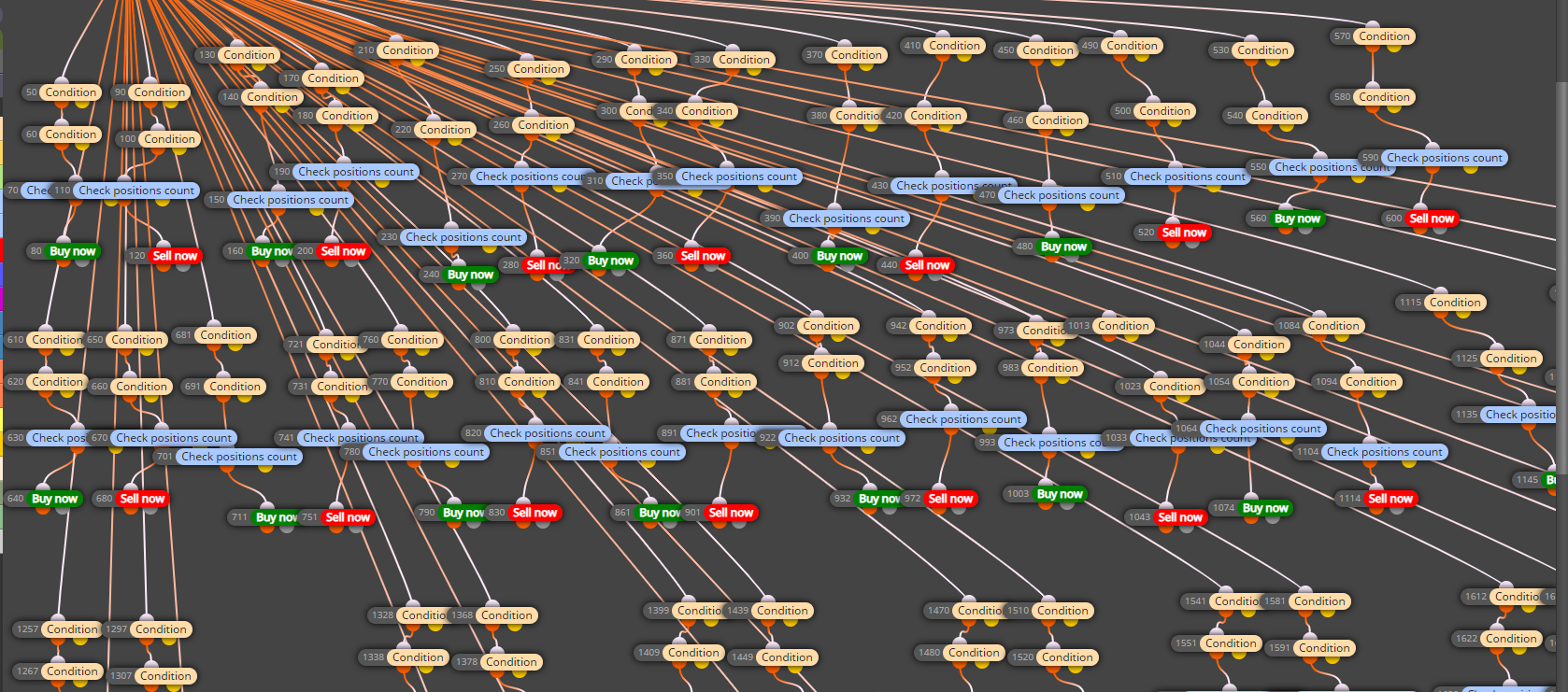
I want to maximize all that I can do inside the Custom Code Block so I will include few points I want to address whenever you have some time:
1- The two condition blocks are for each Buy (For ex: EUR>= 80, USD<=20) and Sell (For ex: USD <=20, EUR>=80). They are placed just above a Buy/Sell Order Block for each pair.
Can I type the conditions inside the Custom Code Block or inside the Condition (coding) Block? Instead of having 2*28 Conditions Block?
Something like:
If((EUR_Strength >= 80) && (USD_Strength <=20 )) {Then Activate the buy Order Block for EURUSD or type a Buy Order if Possible.}2- A General question: I tried inserting a string variable/constant between the brackets of Symbol () but it did not work. For ex: Symbol ("EURUSD") or Symbol (EURUSD). Is there a proper way to do it?
The reason for this question is that I may have certain numbers of Pairs that I want to trade only based on my Technical analysis and do not want to manually delete the pairs I do not need.
So I will have the 28 pairs as string constants and I want to choose which to trade.3- In Excel, as you know, we can use the Filter Function for those values that are bigger than or smaller than a threshold. Then I can concat the respective Currencies and get the Pairs I need to trade.
Is there something similar to the Filter function one can use in the Custom Block? I can then use the substr. I only found MAthmax and MathMin but they won't help.
Anyway, it might be a bit complicated in the custom bloc as it is already lengthy in Excel.I am not really fussy about it.
I can use an Excel template to give me the list of all possible combinations and embed it in the Custom Code Block.4- Any idea how to backtest? The backtesting did not yield any results although it was working Live and in MT5.
Thanks,