Hello wralyn,
May I suggest that one small change could possibly help with drawdown and long-term open positions at the same time. You could try adding another parameter to your protocol which would be a minimum pips (such as 10 pips) as a separation between the EMA 100 and the EMA 500. Seems to work like a charm.
D
Latest posts made by dscoles
-
RE: after closing profitable trades, Wait for remaining trades to profit before closing?posted in Questions & Answers
-
RE: after closing profitable trades, Wait for remaining trades to profit before closing?posted in Questions & Answers
Running your little EA is a heady experience! Something so SIMPLE works extremely well. Very nice algorithm. Thank you for sharing.
-
RE: Desktop Version updates please.posted in General Discussions
FYI. I downloaded the current version as of today. The desktop screenshot is from today. The version I downloaded is the same size as the installer from 2016. The one from today starts up incredibly slowly, and the "loading..." step is also very slow. I reinstalled the copy that I downloaded in 2017 and it takes about 1/5 of the time to load the application and is also quite a bit faster in the "loading..." step.
Sounds like I am complaining. Actually, this application is Very, VERY impressive. I maybe use 1/100th of the features. And the tool allows me to build very sophisticated EAs. Thank you1
-
Desktop Version updates please.posted in General Discussions
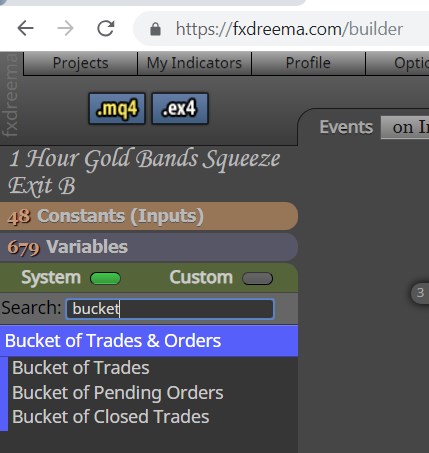
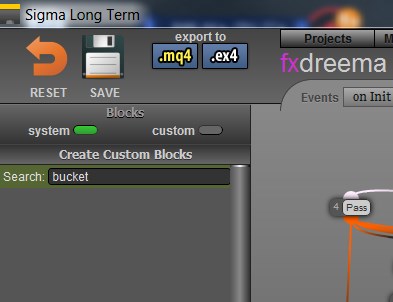
Regarding the desktop version, I use it nearly every day. I'm not sure which online version it represents, but one of the features that I cannot find in the desktop version is "bucket of trades". I need this feature to close out trades when the current set of open trades reaches a specific amount of money. Thank you.
See the attached screen shots.
-
3 month subscription not registeredposted in Questions & Answers
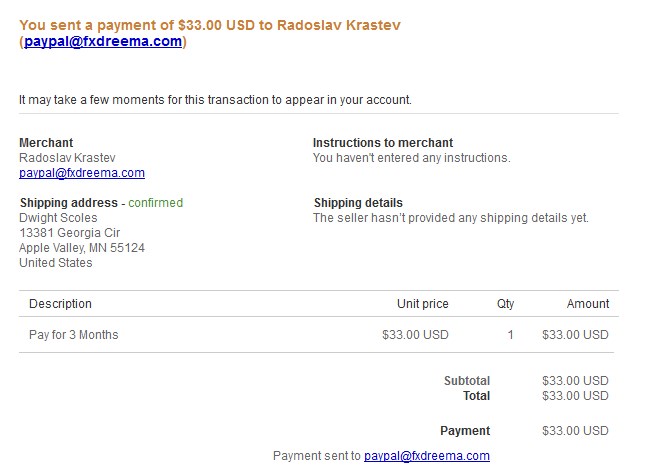
I extended my subscription for 3 months on November 17th. The PURCHASE tab shows an entry but no details. I have a little time left but wanted to bring this to your attention.
Thanks,Dwight
-
RE: fxDreema Updating Nowposted in Questions & Answers
My desktop version opened a pure white window. I downloaded version 100 again. It also showed a pure white window for a couple of minutes before asking for my credentials. I am logged in now. It shows I have 137 days left. That is nice for me but not for you as I should be about out of my subscription.
Dwight
BTW, you were wondering why we love the desktop version... I make rather large EAs... 300 or more blocks typically. They display small and manageable on the desktop version. Everything is much larger on the web version.
-
RE: commented out all of the variablesposted in Questions & Answers
I am having trouble starting up the desktop version of my EA. So I thought I would move it to the on-line version.
There are 130 variables in the list that opens by clicking the Variables tab at the left of the on-line screen. When I click the MQ4 button all of the variables are missing, with only the comments left just like you see below. As a work-around I am pasting in the variable declarations from an older version of my EA. But, I am wondering what to do about the generation forgetting about my variables.
Thank you,
Dwight
// Variables (Global Variables)
// WaitOneCandle
// CloseTheTrade
// ClosePrice
// timer_seq
// CurrName
// TrendLineUp
// TrendLineDown
// TMP_STR
// NezCtr2
// NezCtr3
// TradePrice
// Candle_MA_Val
// TMA_CenterLine
// TMA_Last_Center
// Bands_TopLine
// Bands_BottomLine
// FL23_ADX_SM
// FL23_Last_SM
// FL23_ADX_Val
// FL23_ADX_Last
// tmp4
// tmp3
// CandleOpen
// CandleClose
// Candle_High
// Candle_Low
// BullCandle
// TrendAbove_MidTMA
// MedMA_Above_MidTMA
// LWMA_Val
// COG_Prep_Buy
// Red_Dot
// Blue_Dot
// BuyNow
// SellNow
// Band_Top
// Band_Bottom
// WasAboveBands
// WasBelowBands
// COG_Prep_Sell
// HMA_SM_Val
// HMA_SM_Last
// CandleSize
// TMA_Extreme_Top
// TMA_Top_Line
// TMA_Bottom_Line
// TMA_Extreme_Bottom
// CloseOnRedDot
// CloseOnBlueDot
// ATR_Val
// LastRedDot
// LastBlueDot
// tmp1
// tmp2
// CloseBuyAt
// CloseSellAt
// CdLow5
// CdlLow4
// CdlLow3
// CdlLow2
// CdlLow1
// CdlHigh5
// CdlHigh4
// CdlHigh3
// CdlHigh2
// CdlHigh1
// TMA_HighGold
// TMA_LowGold
// FL23_ADX_WasUp
// FL23_ADX_WasDn
// ImmediateSell
// ImmediateBuy
// TradeGains
// TradeLosses
// ClosedSell
// ClosedBuy
// TradeProfit
// Sine_MA_High_UP
// Sine_MA_High_DN
// Sine_MA_High_Val
// Sine_MA_Low_UP
// Sine_MA_Low_DN
// Sine_MA_Low_Val
// COG_Val
// COG_Last_Val
// COG_SM_Val
// COG_SM_Last_Val
// MACD_Last_Val
// MACD_Val
// HMA_UP_Val
// HMA_DN_Val
// HMA_Val
// TMA_Green_High
// TMA_Green_Low
// PTL_Line_Val
// BullCandleCount
// BearCandleCount
// COG_LNG_Last_Val
// COG_LNG_Val
// TMA_Trend
// COG_Trend
// HMA_Cross_Val
// CurrCandleVal
// Curr_HMA_Val
// CurrCdlLineVal
// Last_Cdl_Val
// TradeCandleCount
// CdlUP_CrossCtr
// CdlDN_CrossCtr
// TradeType
// PredictorCenterVal
// PredictorCenterLast
// PredictorRedExtreme
// PRedictorRedHigh
// PredictorGreenExtreme
// PredictorGreenHigh
// NezTopLine
// NezBottomLine
// NezCenterLast
// NezCenterLine
// HighMidNez
// LowMidNez
// NEZ_Trend
// CandleWasGT_Orange
// CandleWasLT_Green
// LastTradeDir
// TriTMA_Val
// TriTMA_Last
// LowNEZLast
// LSMA_Val -
RE: MyIndicators limitposted in Questions & Answers
I too have had this experience with the on-line version, but not consistently. I believe what made it work was adding a new indicator first thing without clicking on an existing one. But I cannot be certain that is what did the trick.
-
RE: Building up huge numbers of windows from custom indicatorsposted in Questions & Answers
The issue is resolved for the right reason now! Thank you.
I created a blank string variable and used it for the first and fourth parameter. Only one sub-window is created now.
Very good call!
Dwight
