Hello wralyn,
May I suggest that one small change could possibly help with drawdown and long-term open positions at the same time. You could try adding another parameter to your protocol which would be a minimum pips (such as 10 pips) as a separation between the EMA 100 and the EMA 500. Seems to work like a charm.
D
Posts made by dscoles
-
RE: after closing profitable trades, Wait for remaining trades to profit before closing?posted in Questions & Answers
-
RE: after closing profitable trades, Wait for remaining trades to profit before closing?posted in Questions & Answers
Running your little EA is a heady experience! Something so SIMPLE works extremely well. Very nice algorithm. Thank you for sharing.
-
RE: Desktop Version updates please.posted in General Discussions
FYI. I downloaded the current version as of today. The desktop screenshot is from today. The version I downloaded is the same size as the installer from 2016. The one from today starts up incredibly slowly, and the "loading..." step is also very slow. I reinstalled the copy that I downloaded in 2017 and it takes about 1/5 of the time to load the application and is also quite a bit faster in the "loading..." step.
Sounds like I am complaining. Actually, this application is Very, VERY impressive. I maybe use 1/100th of the features. And the tool allows me to build very sophisticated EAs. Thank you1
-
Desktop Version updates please.posted in General Discussions
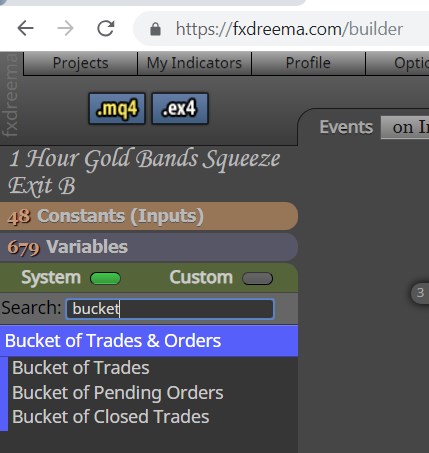
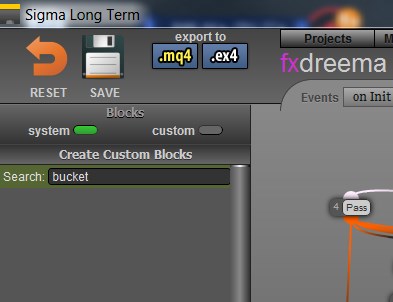
Regarding the desktop version, I use it nearly every day. I'm not sure which online version it represents, but one of the features that I cannot find in the desktop version is "bucket of trades". I need this feature to close out trades when the current set of open trades reaches a specific amount of money. Thank you.
See the attached screen shots.
-
3 month subscription not registeredposted in Questions & Answers
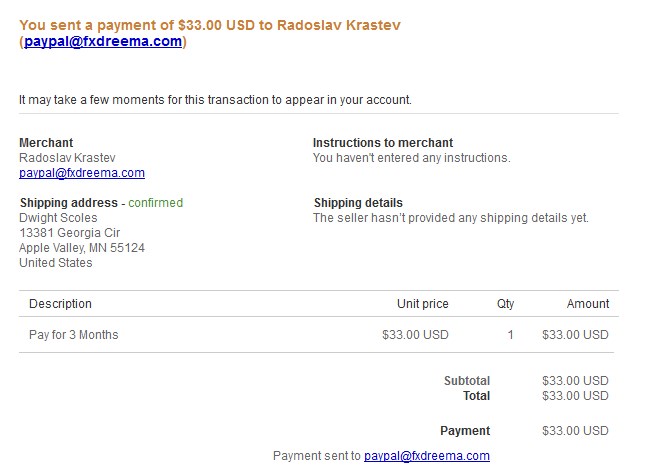
I extended my subscription for 3 months on November 17th. The PURCHASE tab shows an entry but no details. I have a little time left but wanted to bring this to your attention.
Thanks,Dwight
-
RE: fxDreema Updating Nowposted in Questions & Answers
My desktop version opened a pure white window. I downloaded version 100 again. It also showed a pure white window for a couple of minutes before asking for my credentials. I am logged in now. It shows I have 137 days left. That is nice for me but not for you as I should be about out of my subscription.
Dwight
BTW, you were wondering why we love the desktop version... I make rather large EAs... 300 or more blocks typically. They display small and manageable on the desktop version. Everything is much larger on the web version.
-
RE: commented out all of the variablesposted in Questions & Answers
I am having trouble starting up the desktop version of my EA. So I thought I would move it to the on-line version.
There are 130 variables in the list that opens by clicking the Variables tab at the left of the on-line screen. When I click the MQ4 button all of the variables are missing, with only the comments left just like you see below. As a work-around I am pasting in the variable declarations from an older version of my EA. But, I am wondering what to do about the generation forgetting about my variables.
Thank you,
Dwight
// Variables (Global Variables)
// WaitOneCandle
// CloseTheTrade
// ClosePrice
// timer_seq
// CurrName
// TrendLineUp
// TrendLineDown
// TMP_STR
// NezCtr2
// NezCtr3
// TradePrice
// Candle_MA_Val
// TMA_CenterLine
// TMA_Last_Center
// Bands_TopLine
// Bands_BottomLine
// FL23_ADX_SM
// FL23_Last_SM
// FL23_ADX_Val
// FL23_ADX_Last
// tmp4
// tmp3
// CandleOpen
// CandleClose
// Candle_High
// Candle_Low
// BullCandle
// TrendAbove_MidTMA
// MedMA_Above_MidTMA
// LWMA_Val
// COG_Prep_Buy
// Red_Dot
// Blue_Dot
// BuyNow
// SellNow
// Band_Top
// Band_Bottom
// WasAboveBands
// WasBelowBands
// COG_Prep_Sell
// HMA_SM_Val
// HMA_SM_Last
// CandleSize
// TMA_Extreme_Top
// TMA_Top_Line
// TMA_Bottom_Line
// TMA_Extreme_Bottom
// CloseOnRedDot
// CloseOnBlueDot
// ATR_Val
// LastRedDot
// LastBlueDot
// tmp1
// tmp2
// CloseBuyAt
// CloseSellAt
// CdLow5
// CdlLow4
// CdlLow3
// CdlLow2
// CdlLow1
// CdlHigh5
// CdlHigh4
// CdlHigh3
// CdlHigh2
// CdlHigh1
// TMA_HighGold
// TMA_LowGold
// FL23_ADX_WasUp
// FL23_ADX_WasDn
// ImmediateSell
// ImmediateBuy
// TradeGains
// TradeLosses
// ClosedSell
// ClosedBuy
// TradeProfit
// Sine_MA_High_UP
// Sine_MA_High_DN
// Sine_MA_High_Val
// Sine_MA_Low_UP
// Sine_MA_Low_DN
// Sine_MA_Low_Val
// COG_Val
// COG_Last_Val
// COG_SM_Val
// COG_SM_Last_Val
// MACD_Last_Val
// MACD_Val
// HMA_UP_Val
// HMA_DN_Val
// HMA_Val
// TMA_Green_High
// TMA_Green_Low
// PTL_Line_Val
// BullCandleCount
// BearCandleCount
// COG_LNG_Last_Val
// COG_LNG_Val
// TMA_Trend
// COG_Trend
// HMA_Cross_Val
// CurrCandleVal
// Curr_HMA_Val
// CurrCdlLineVal
// Last_Cdl_Val
// TradeCandleCount
// CdlUP_CrossCtr
// CdlDN_CrossCtr
// TradeType
// PredictorCenterVal
// PredictorCenterLast
// PredictorRedExtreme
// PRedictorRedHigh
// PredictorGreenExtreme
// PredictorGreenHigh
// NezTopLine
// NezBottomLine
// NezCenterLast
// NezCenterLine
// HighMidNez
// LowMidNez
// NEZ_Trend
// CandleWasGT_Orange
// CandleWasLT_Green
// LastTradeDir
// TriTMA_Val
// TriTMA_Last
// LowNEZLast
// LSMA_Val -
RE: MyIndicators limitposted in Questions & Answers
I too have had this experience with the on-line version, but not consistently. I believe what made it work was adding a new indicator first thing without clicking on an existing one. But I cannot be certain that is what did the trick.
-
RE: Building up huge numbers of windows from custom indicatorsposted in Questions & Answers
The issue is resolved for the right reason now! Thank you.
I created a blank string variable and used it for the first and fourth parameter. Only one sub-window is created now.
Very good call!
Dwight
-
RE: Building up huge numbers of windows from custom indicatorsposted in Questions & Answers
Solution Found!
OK... So now I am a bit confused, humored and surprised.
By pure happenstance and serendipity I stumbled into an answer to the mass-generation of sub-windows, one for each candle processed by the EA.
I had been naming the template I use "Dots MACD" and for whatever reason I was naming my EA "DotsMACD". When I made a new version of the EA, calling it "Dots MACD" (extra space in the middle like the template) I was surprised to see that the template was immediately loaded at the time the EA began running. It must search for a template with the same name as the EA. Which is cool.

My experience up until now is that I have to pause the EA to manually load my template before continuing to run the session. So, now I get a "two-fer"! Now I can just start up the EA and let it rip!
The best part is that no matter how long I run the EA now, when it stops running, the only windows displayed in the trading screen are those associated with the template. The hundreds of extra sub-windows are no longer being generated for my EX4-Only indicators. Sweet!

Dwight
-
RE: Building up huge numbers of windows from custom indicatorsposted in Questions & Answers
Hello,
I have three custom indicators without source code that I am capturing data from their buffers. However, the EA seems to create a new window for each time that I call each indicator to set variables within 'Modify Variable' blocks.
When I stop the EA even after running for just a minute in the Metatrader 4 Strategy Testor, I can have a hundred windows generated under the indicators list for the window.
I have tried using 'Select Object By Name" with the name of the indicator (e.g., FL11) and connecting that to Delete Objects with 'name starting with' value of FL11. I have also tried using ONLY the 'Delete Objects' with the 'Name Stars With' value set (e.g., FL11). These blocks are run after the blocks which use these indicators for every candlestick. I have included as many of these groupings as there are calls of each indicator. In other words, during the 'for each candle' set, I call FL11 four times. After setting my variables, I run the 'delete' blocks four times (to no avail).
Is there a way for me to get rid of these instances of the indicators on the chart? Otherwise there could possibly be hundreds of thousands of them when running the EA for a week at a time.
BTW, I have never seen this before. I have also never used these particular indicators before. But I have used custom indicators without source code quite often without seeing this outcome.
I am running Build 99 23 August 2015
Thanks,
Dwight
-
RE: Cannot add custom indicatorsposted in Bug Reports It is working fine now... I did this multiple times before giving up and asking for help... even closed the session and came back in.
Well, I can make my updates now.
Nice web site. Looks like you have been busy!
-
RE: Cannot add custom indicatorsposted in Bug Reports
Using the web version of fxdreema, I am attempting to add custom indicators. I have 4 existing indicators. When I click on Add Custom Indicator and then "Update" for the new indiator, it simply overwrites whatever indicator was highlighted (and I lose THAT indicator).
I have not used the web version in quite some time as I have been developing locally. However, I was attempting to add indicators so that I can import my current EA into the web version location. Without my new custom indicators it will not be possible for me to generate the MQ4 code.
Please help.
Thanks,
Dwight
-
RE: Wishlist Item for new versionposted in Questions & Answers
Thank you for the little "bonus". It is indeed appreciated!
I would guess that the reason they don't complain is that they are so blown away by your product that they do not consider the little irritants to be substantial. And, really, they are insubstantial.
The job you have done is amazing. I have created a few minor tools in the past, and cannot even begin to imagine the thousands of hours you had to put in for this project to work in the flawless way it does. Judging from some of your comments, FXDREEMA is a labor of love and it is not about the money. Thank you for giving us all a "leg up" on our projects.
Wishing you much success,
Dwight
-
RE: Wishlist Item for new versionposted in Questions & Answers
I would love to be able to search for block numbers. We can click on "delete" on a variable to see which blocks contain that variable. But finding it can require a lot of searching. I realize from your comments that most developers are not generating EAs containing 300 or 400 blocks. But my tweaking of close parameters, in particular, generates hundreds of blocks of code and a way to search would be a great time saver for me.
Thanks,
Dwight
-
RE: Modification denied because order too close to market (145)posted in Questions & Answers
Great point!
I agree that you need protection in case of a system failure (computer stops, network drops, etc.) so I open each trade with a fixed stop-loss in place.
-
RE: Modification denied because order too close to market (145)posted in Questions & Answers
I also ran into this error but would not be able to reproduce it at this point. My solution implemented now is to track the highest BID (for buys) and the lowest ASK (for sells) in variables filled in per tick. I then check for when the current bid/ask (depending) is more than nn pips away from the high-bid/low-ask current price after a turn. Again, this is on a per-tick basis. It takes a few blocks of logic but it works no matter how close the price is to the preferred stop-loss or take-profit position.
Also, there is no additional repeated action needed in the logic. In other words, I do not have to have the program keep moving the stop-loss/take-profit points through requests to the broker.
Plus, I would prefer to hide my exit points from the broker in any case.
-
RE: Still troubled by timeposted in Questions & Answers
Thanks... I was a bit dense as the easy answer was to create a "live trade" zone from 6:00 until 17:00. Works great.
-
RE: Still troubled by timeposted in Questions & Answers
I want to have a "dead zone" for trading, which mostly works. You can see an abbreviated version called TestTime in my projects.
The issue that I have appears around the single second at midnight (24:00:00 to 00:00:00).
The trigger (trade-on = 0) happens correctly at 17:00. It stays off until exactly midnight, at which time it turns on for just a second, and then turns off again until 6:00.
I have attempted to save the time right at midnight and use a condition block to force skipping the logic for 100 seconds. I could not get that to work.
How can I set up my blocks so that midnight does not trigger setting trade-on to "1" (true)?
Thanks,
Dwight
