On Builder window, top right, there's a "History", click on it, just undo one step, they should all re-appear...
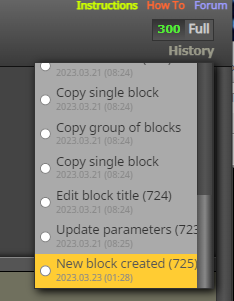
On Builder window, top right, there's a "History", click on it, just undo one step, they should all re-appear...
Hi everyone,
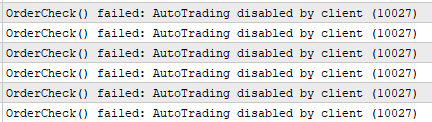
I've not gotten such messages before from the EAs created using fxdreema... but it happened, for the first time.
Background: I'm using MQL5's VPS, so I ran the EA locally, migrated it onto the VPS, then it starts giving these messages. Been using MQL's VPS without any problems so far.
Does anyone know usually what "function" cause this? Thanks!
@jstap Thanks again... I'll double check my codes again...
@jstap It only closes the trades that the EA opened and the manual ones. But it's not closing the other trades that other EAs opened.
Thanks again!
Dear all,
Thanks for your time looking at this. I want to achieve the following, hope someone can help me with it.
Scenario:
I have an account that is running multiple EAs on it.
Now, what I want to achieve: when a certain profit is hit on the account, any one of the EA can trigger to close all positions currently on the account (yes the other EAs coded by me). I am using different Magic Numbers for the other EAs.
I have tried using this method but, it doesn't close the positions by the other EAs.
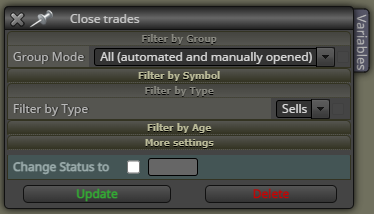
I guess, this is achievable with a code snippet instead?
Any leads/advice is much appreciated.
Thanks for your time again!
Hi again, see I have different EAs running on the same account each with a magic number of its own. How would you go about it so that any one of the EAs can/would close all positions (ignoring magic number) on that account when take profit is met? Thanks!
Hi everyone, can I do this?
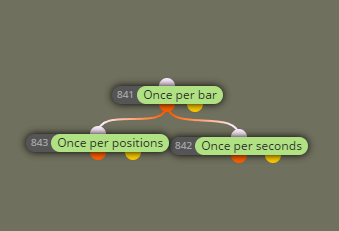
Question: Would this also mean whatever I put under 842, will keep looping in that x second interval limited by the constraint of 841? If the Traded TF (841-Bar) is 15 mins, so 842 keeps looping inside that 841's 15 mins?
Thanks 
@William-1 William, if I may, and mind you I'm no expert, your shared project has a couple of missing elements...
I might be wrong...
@William-1 I believe from the image above, it's the "cross" problem, the cross didn't happen on the candle (not on the vertical lines) ... the cross width perhaps is 2, not 1.
You could also set the "Expiration time period" as 5 minutes under "Specified time" for those pending orders.