@skauch hi, I think you could use the "expiration time period" section of that same block. Set to "custom" and choose to delete it when the current candle closes

@skauch hi, I think you could use the "expiration time period" section of that same block. Set to "custom" and choose to delete it when the current candle closes
@l-andorrà In principle, the idea that comes to mind is to select all the objects through the object type and the beginning of their name and then put a custom code that tells them to go to the bottom of the graph.
That function is what I need. Modify object properties and send to the background
Hi, I'm making a panel with information about trades and when the lines are drawn on the chart, they are placed on top of my panel.
Is there a way to select those lines and send them to the bottom of the chart every so often?
Thank you very much for your help
@jazzybhai y además lo puedes bloquear con el bloque "Turn OFF blocks"
@wyfchrsis hola, podrías crear una simulación, por ejemplo, las primeras 8 trades no los abre realmente, sino que dibujas una línea horizontal en el gráfico y vas contando las líneas. A partir de la octava línea sí que abre trades de verdad
Espero que te ayude
@l-andorrà It's true, my idea is to put it on time, I will have forgotten to change it
I've been learning matrices all weekend with a video of me and it's going super well, so I've started to change that part of the project. I'll pass it on to you when I have something ready
@miro1360 hi, i'm following the video, excellent tutorial, thank you very much.
I would like to ask if there is something similar but to handle the open trades of the currency of the chart we are working on.

That is, we assume that we work with several currencies at the same time and in the graph we want only the open trades of that currency to appear so that we can easily see specific information about that currency and not about everything in general
Thank you very much for everything, you are a great help
@l-andorrà is there any way to change the value 2147483647 to 0?
@l-andorrà es más, yo creo que es muy bueno que aparezca porque así podemos controlar que se cumplan las funciones. Yo lo utilizo para activar o desactivar cierres globales por lo que es muy muy importante controlar que funcione correctamente
Hello friends, I am making an information panel to view all the operations that I have open. My EA works with 20 currencies simultaneously and several trades each.
So far, what I have done is create a "Bucket of Trades" block for Buy and another for Sell for each of the currencies, that is, I have 20 Buckets.
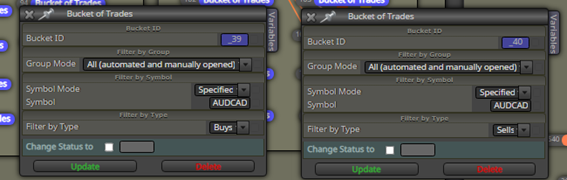

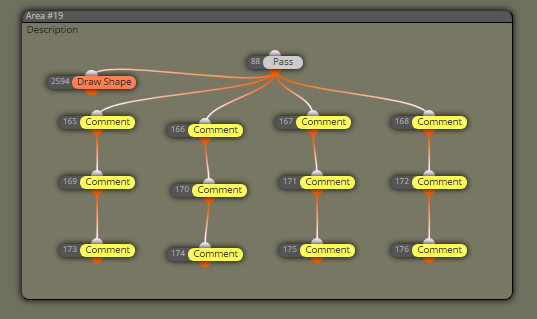
The information of the Buckets I put them in comments:
The information in the graph looks like this:
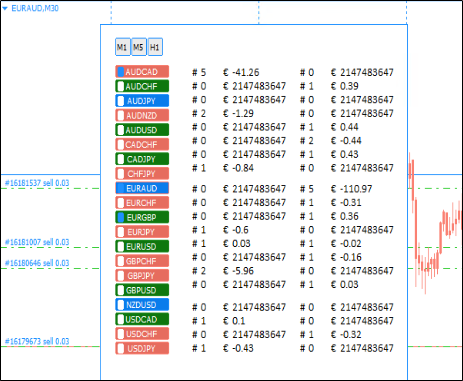
It's a bit messy but it works except for the downside of the number "2147483647" which appears instead of the "zero" value of profit when there are no trades.
The case is to ask yourself if any of you know of an easier way to use the Backets
I don't know if a single backet can be made but that it works according to the CURRENCY that we can choose
Thank you all very much, this community is great !!
Creo que Esos mensajes los muestras cuando se activa o desactiva un bloque a través de los bloques “turn ON blocks” o “turn OFF block”
@oking hola, quizás puedes probar a utilizar el bloque "modify stops"
@khalids222 no estoy seguro, pero creo que en tick id debes poner el valor 0
@xyon126 en lugar de abrir propiedades para modificar parámetros podrías utilizar "draw edit field" en el gráfico y ahí introduces los cambios que necesites
@l-andorrà magnifica información, jejjjejejej
por cierto, sabes hay que poner encima un comando "pass" para que comience a funcionar??
o no es necesario??
de todos modos me pongo a probarlo ahora mismo
@l-andorrà prueba así, ahora me ha dejado

@l-andorrà llevo desde ayer dándole vueltas, en un EA lo tengo puesto como te indiqué, lo estoy intentando hacer en otro para compartirlo contigo y ......
NO FUNCIONA!!!!
hjjjjjjjjjjjj
sigo probando porque de verdad que lo tengo hecho tal y como te digo