fxDreema

    • Register
    • Login
    • Search
    • Back to the main page
    • Categories
    • Recent
    • Tags
    • Popular
    • Search
    1. Home
    2. albyxx
    3. Posts
    A
    • Profile
    • Following 1
    • Followers 2
    • Topics 6
    • Posts 34
    • Best 3
    • Controversial 0
    • Groups 0

    Posts made by albyxx

    • RE: Position Closed block MT5 not working

      @fxDreema thanks for the fix.

      Just a small item that maybe you could tidy up.
      The problem can be seen in the code screenshot below declaring orderTicket as an 'int' at line 23,205.
      This generates a "possible loss of data due to type conversion from 'long' to 'int'" compiler warning.
      As can be seen in the same screenshot below in line 23,213 it is declared as a 'ulong' and that does not generate a warning.
      If my understanding of the MQL5 documentation is correct it should be at least declared as a 'long'.

      Thanks in advance and cheers!!
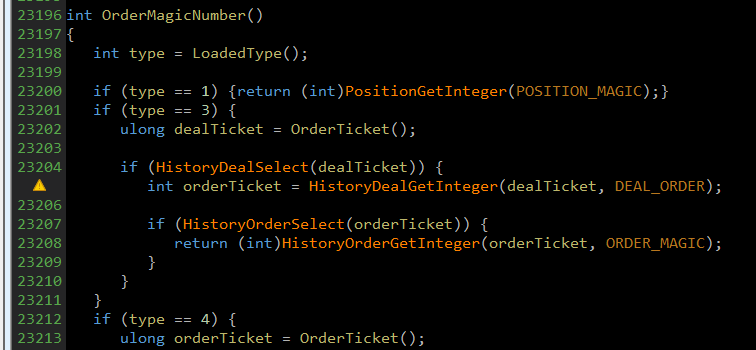
      image.png

      posted in Bug Reports
      A
      albyxx
    • Implementation Of A Custom Function Using fxDreema Studio MQL5

      Hi folks,

      I have tried to implement some code into the fxDreema Studio MQL5 "New" custom functions facility at the bottom right of the studio editor.
      The code is very simple as follows:

      double OnTester()
      {
      return NormalizeDouble(v::V_Custom_Metric, 2);
      }

      I assume that once it is created in the Studio it becomes a part all new projects?
      The Studio editor saves the code but when I search for it in the .mq5 output file of a new project it does not exist.

      If I add the code with a text editor manually into the "Functions" section of an fxDreema produced .mq5 file it executes as expected.
      If I try to import that project back into the fxDreema builder it strips out that code.

      Am I missing something here on how to instruct a new project to load that custom functions code or is it a bug?

      Looking forward to some help.

      posted in Bug Reports
      A
      albyxx
    • RE: Position closed block doesn't work

      It's not fixed.
      All I want to do is close all pending orders when a position hits TP for the current symbol.
      I made a work around in "on Tick" that is a bit messy but it functions.

      I have some MT5 issues that are still unresolved for more than a year.
      Support from fxDreema is almost non-existent these days.
      Very frustrating having to make work arounds when blocks don't function as they are supposed to.

      posted in Bug Reports
      A
      albyxx
    • RE: Position closed block doesn't work

      I have the same problem.
      @l-andorrร  Did you get any feedback on this or find a work around?

      posted in Bug Reports
      A
      albyxx
    • RE: MT5 Draw Arrowed Line, Delete Objects and Screenshot Resolution Problems

      @FXDREEMA

      Still looking forward some help.

      /Allan

      posted in Bug Reports
      A
      albyxx
    • RE: MT5 Draw Arrowed Line, Delete Objects and Screenshot Resolution Problems

      Hi there.

      Any chance to get an answer on these issues?

      Regards,
      /Allan.

      posted in Bug Reports
      A
      albyxx
    • MT5 Draw Arrowed Line, Delete Objects and Screenshot Resolution Problems

      Hi Dreema,

      I have 3 problems with blocks run from a script in MT5:

      1. Draw Line - Arrowed Line. Does not work
      2. Delete Objects. Does not work
      3. Chart Screenshot. Height resolution does not work.

      Maybe I'm not doing something correctly with these blocks???

      I have uploaded my examples below.

      0_1553194253758_Problem Examples.mq5

      Looking forward to your help.

      Regards,
      /Allan.

      posted in Bug Reports
      A
      albyxx
    • RE: Feature Requests - Scale Fixing and Screen Shot

      No need to apologize.
      I don't need them but maybe others will in the future???
      The new features are greatly appreciated so thanks!!!!

      posted in General Discussions
      A
      albyxx
    • RE: Feature Requests - Scale Fixing and Screen Shot

      Thanks Dreema for the screen shot block.
      Perfect!!

      I load a variable with the market properties server time and use that variable as the file name.
      Note that the server time is addressed as Epoch or Unix time.

      Any luck with the chart scale fix on/off selection for the "Modify Chart Properties" block?

      posted in General Discussions
      A
      albyxx
    • RE: Feature Requests - Scale Fixing and Screen Shot

      That would be great indeed!! ๐Ÿ™‚

      posted in General Discussions
      A
      albyxx
    • RE: Feature Requests - Scale Fixing and Screen Shot

      Hi Dreema,

      Maybe I have missed the following 2 functions and they already exist but if not then is there any chance of adding them?

      1. Scale Fix
        Scale fix enable/disable can be toggled through MT4 chart properties F8 under the Common tab.
        In the "Modify Chart Properties" block add a selection to enable/disable "Scale fix" (not "Scale fix One to One").
        I use this function quite often and it is up to 5 mouse clicks to enable and then another 4 to disable again which is a pain in the butt.
        It would be nice to be able to build a toggle button to do this.
        I had an attempt at building something with some custom MQL4 but was not successful.

      2. Screen shot
        Add an output block to automate saving an active chart screen shot.
        It can be manually done using the following sequence:
        File -> Save Picture As -> Active chart (as is) -> Folder -> File Name
        It would be great to always use the same folder such as the existing "Files" folder.
        Also auto generate a file name with the following context: symbol-timeframe-server timestamp.png

      What do you think?

      Cheers,
      Allan.

      posted in General Discussions
      A
      albyxx
    • RE: Bug? Draw Line Block using time component for the price

      Looks like you've nailed it Dreema.

      Thanks!!! ๐Ÿ™‚

      By the way, by creating this builder and giving the ability for non-programmers to build EA's is absolutely wonderful.
      Well done indeed!! ๐Ÿ˜„

      posted in Bug Reports
      A
      albyxx
    • RE: Bug? Draw Line Block using time component for the price

      Hi Dreema,

      Thanks for the reply.
      I made a new test EA and as far as I can tell it is still reading local time, not server time.

      https://fxdreema.com/shared/kT3LjTRUb

      The old blocks are on the left and the new blocks are on the right.
      This time the bug can be reproduced by changing the PC time, not the date.

      Cheers,
      Allan.

      posted in Bug Reports
      A
      albyxx
    • RE: Bug? Draw Line Block using time component for the price

      Hi Dreema,

      I believe there is a bug in the Draw Line block when drawing a trend line.
      It may occur for other line types but I have not tested them.

      The problem is produced when using Market Properties -> Highest Price or Lowest Price (Time Period) -> Server Time for the price components.
      The block is returning Local Time instead of Server Time when Server Time is requested.
      The below link can be used to produce the "bug"
      https://fxdreema.com/shared/XRrbApaYd

      To produce the problem simply change your PC date and the line is redrawn to reflect the local PC time instead of server time.

      Could you please have a look at this.

      Thanks,
      Allan.

      posted in Bug Reports
      A
      albyxx
    • 1
    • 2
    • 2 / 2